Have any questions? +1 646.844.5712 (US)

  • Facebook
  • LinkedIn
  • Twitter
HiTech ServiceHiTech Service
  • Home
  • About
  • Services
    • Software Development
    • Customer Support
    • Quality Assurance
    • Managed Services
    • Compliance Audit
    • GDPR Compliance
    • Competency Center
    • Emergency IT Support
    • Software as medical device
    • Local AI Agent Development
  • Projects
  • GDPR
  • Articles
  • Case Studies
  • Contact
Menu
  • Home
  • About
  • Services
    • Software Development
    • Customer Support
    • Quality Assurance
    • Managed Services
    • Compliance Audit
    • GDPR Compliance
    • Competency Center
    • Emergency IT Support
    • Software as medical device
    • Local AI Agent Development
  • Projects
  • GDPR
  • Articles
  • Case Studies
  • Contact
windows 10

How to upgrade Windows 10 from 32 bit up to 64 bit

Windows 10 users have raised lots of different issues with the system for the past year. Nevertheless, more and more users are switching to Windows 10. At the beginning of the summer already a quarter of all computers (Windows, MacOS and UNIX-like systems) were running Windows 10 as it’s operating system.


A free upgrade period that has ended recently guaranteed Microsoft such high volume of updated machines. Any user could upgrade their Windows 7 or Windows 8 computer to Windows 10 for free as soon as they are upgrading within same (or equivalent) product edition (Home, Pro, Enterprise, Education). If a user wanted to update and change Windows edition, it would require payment.

Another thing that that Microsoft allows you to do for free is to switch from 32-bit to 64-bit system.

Why switch to 64-bit?

If you have questioned why you should do that, some time ago we have discussed a difference about 32 and 64 bit operating systems. If you still have not checked it you can click here. Key benefits are that your system can operate with more RAM ( the 32-bit system is not able to recognize more than 3.5GB) and launch 64-bit versions of an application that increases their performance.

Getting started

Unfortunately, you will not be able to switch from 32-bit to 64-bit system with an update from older Windows version to Windows 10. It requires additional workflow, but if take some time and proceeding with an upgrade you will surely get performance benefits.


The first thing you need to do is to check if your hardware supports 64-bit system. Access Start menu and search for System Information. Run tools and check System Type property under System Summary section.

Upgrade windows 10 from 32 bit to 64 bit 02 — How to upgrade Windows 10 from 32 bit up to 64 bit

If System Type is indicated as x64-based PC, you can upgrade to 64-bit Windows 10.

For older PCs, you can double check if 64-bit hardware drivers are available.

Backup

Make sure you’ve done a full backup of your system. Go to Start and Launch Control panel. Search for File History. Within File History screen click on System Image Backup. You can save it on the internal or external drive and allow you roll back if anything goes wrong with the further activity.

Also, check if all documents are stored on system drive or simply back them up on cloud or external drive.

Windows 10 clean installation

When you are ready, proceed with clean installation of Windows 10. To do that you will require a USB flash drive with the capacity at least 4 Gb.

Follow the steps described in How to install Windows 10 from the flash drive to create a bootable installation drive.

Make sure to choose 64-bit (64x) architecture on the screen shown in the screenshot.
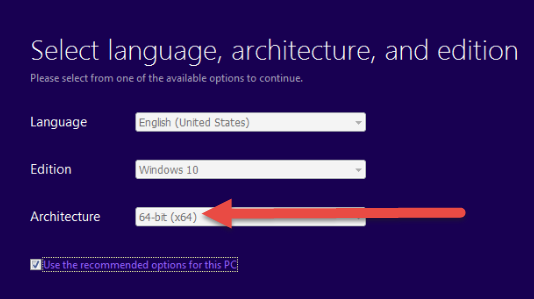
Upgrade windows 10 from 32 bit to 64 bit 03 — How to upgrade Windows 10 from 32 bit up to 64 bit

After installation drive is ready, reboot PC with the flash drive plugged in.

Follow the with installation procedure.

When 64-bit Windows 10 installs make sure that you checked for the Windows updates. It is crucial that all drivers have latest versions installed. To do that do to Settings -> Update & Security -> Windows Update.

If you have faced any issues or need any assistance with the process, contact our support representative via chat.

Also, read more Windows-related articles here.


  • On August 16, 2016
  • 0 Comment

Leave Reply Cancel reply

Your email address will not be published. Required fields are marked *

Recent Posts
  • How AI and Automation Are Changing IT Service Delivery
  • Managed IT Services vs. In-House IT: What Should You Choose?
  • When the Model Is the Vendor: What Happens to Compliance When You Don’t Own the Weights
  • The Edge Device Is the Perimeter: Why the Box You Bought to Keep Them Out Is How They Get In
  • The Password Memo Was Honest. The Checklist Wasn’t.
Categories
  • ai (10)
  • android (18)
  • apple (36)
  • chart (18)
  • cloud (1)
  • fix (42)
  • games (11)
  • google (31)
  • hardware (73)
  • healthcare (3)
  • how to (231)
  • internet (92)
  • ios (23)
  • macos (3)
  • microsoft (82)
  • mobile (36)
  • news (74)
  • optimization (17)
  • osx (4)
  • outsourcing (9)
  • qa (3)
  • regulation (8)
  • review (120)
  • security (41)
  • software (160)
  • windows (150)
Archives
  • September 2026
  • August 2026
  • July 2026
  • June 2026
  • May 2026
  • August 2025
  • March 2025
  • February 2025
  • April 2023
  • March 2023
  • February 2023
  • January 2023
  • March 2022
  • January 2022
  • December 2021
  • November 2021
  • October 2021
  • September 2021
  • August 2021
  • July 2021
  • June 2021
  • May 2021
  • April 2021
  • March 2021
  • February 2021
  • January 2021
  • December 2020
  • November 2020
  • October 2020
  • September 2020
  • August 2020
  • July 2020
  • June 2020
  • May 2020
  • April 2020
  • March 2020
  • February 2020
  • January 2020
  • December 2019
  • November 2019
  • October 2019
  • September 2019
  • August 2019
  • April 2019
  • March 2019
  • February 2019
  • January 2019
  • December 2018
  • November 2018
  • October 2018
  • September 2018
  • June 2018
  • May 2018
  • April 2018
  • February 2018
  • January 2018
  • December 2017
  • November 2017
  • October 2017
  • June 2017
  • May 2017
  • April 2017
  • March 2017
  • February 2017
  • January 2017
  • December 2016
  • November 2016
  • October 2016
  • September 2016
  • August 2016
  • July 2016
  • June 2016
  • May 2016
  • April 2016
  • March 2016
  • February 2016
  • January 2016
  • December 2015
  • November 2015
  • October 2015
  • September 2015
  • July 2015
  • January 2015
Archives
  • September 2026
  • August 2026
  • July 2026
  • June 2026
  • May 2026
  • August 2025
  • March 2025
  • February 2025
  • April 2023
  • March 2023
  • February 2023
  • January 2023
  • March 2022
  • January 2022
  • December 2021
  • November 2021
  • October 2021
  • September 2021
  • August 2021
  • July 2021
  • June 2021
  • May 2021
  • April 2021
  • March 2021
  • February 2021
  • January 2021
  • December 2020
  • November 2020
  • October 2020
  • September 2020
  • August 2020
  • July 2020
  • June 2020
  • May 2020
  • April 2020
  • March 2020
  • February 2020
  • January 2020
  • December 2019
  • November 2019
  • October 2019
  • September 2019
  • August 2019
  • April 2019
  • March 2019
  • February 2019
  • January 2019
  • December 2018
  • November 2018
  • October 2018
  • September 2018
  • June 2018
  • May 2018
  • April 2018
  • February 2018
  • January 2018
  • December 2017
  • November 2017
  • October 2017
  • June 2017
  • May 2017
  • April 2017
  • March 2017
  • February 2017
  • January 2017
  • December 2016
  • November 2016
  • October 2016
  • September 2016
  • August 2016
  • July 2016
  • June 2016
  • May 2016
  • April 2016
  • March 2016
  • February 2016
  • January 2016
  • December 2015
  • November 2015
  • October 2015
  • September 2015
  • July 2015
  • January 2015

Wireless technologies, how it works

Previous thumb

Windows 10: Anniversary update – What’s new? (Part 2)

Next thumb
Scroll

Services

  • Software Development
  • Quality Assurance
  • Customer Support
  • Managed Services
  • 24/7 Emergency IT Support
  • Competency Center
  • Local AI Agent Development
  • Software as a Medical Device

Compliance

  • Compliance Audit
  • GDPR Compliance
  • What is GDPR
  • ISO 9001:2015 Certification

Company

  • About Us
  • All Services
  • Projects
  • Case Studies
  • Articles
  • Contact
About HiTech Service

With 10 year experience of working together, we have reached tangible synergetic effect in performance and productivity, which results in highest quality services and satisfied clients.

Privacy Policy   Cookie Policy


  • Facebook
  • X
  • LinkedIn
CONTACT INFO
  • 900 Foulk Rd, Suite 201, Wilmington, DE, USA, 19803
  • Kudryavs’kyi descent 5b, Kyiv, Ukraine, 04053
  • +1 646.844.5712 (US)
ISO 9001:2015 certificate issued to HiTech Service LLC by Veritas
RIPE Atlas logo, the network measurement community HiTech Service takes part in
BrainBasket Foundation logo, IT education initiative HiTech Service supports
HiTech Service LLC membership badge of the Hi-Tech Office Ukraine association Dun & Bradstreet verified business badge for HiTech Service LLC
YouTeam partner badge for HiTech Service LLC
Hitech Service LLC

Copyright 2026