Have any questions? +1 646.844.5712 (US)

  • Facebook
  • LinkedIn
  • Twitter
HiTech ServiceHiTech Service
  • Home
  • About
  • Services
    • Software Development
    • Customer Support
    • Quality Assurance
    • Managed Services
    • Compliance Audit
    • GDPR Compliance
    • Competency Center
    • Emergency IT Support
    • Software as medical device
    • Local AI Agent Development
  • Projects
  • GDPR
  • Articles
  • Case Studies
  • Contact
Menu
  • Home
  • About
  • Services
    • Software Development
    • Customer Support
    • Quality Assurance
    • Managed Services
    • Compliance Audit
    • GDPR Compliance
    • Competency Center
    • Emergency IT Support
    • Software as medical device
    • Local AI Agent Development
  • Projects
  • GDPR
  • Articles
  • Case Studies
  • Contact
S.M.A.R.T – check if your hard drive is dying

S.M.A.R.T – check if your hard drive is dying

Would you be happy if your hard drive decided to suddenly collapse? Having realized how much stuff I have there, I would rather die instead of it. Thus, be S.M.A.R.T and do take care of your hard drive not to lose your precious data.


What is S.M.A.R.T?

If your hard drive is facing performance issues, it is the right time to check its working condition. Unfortunately, Windows does not contain any built-in instrument that may inform you about the disk state. However, you may use Command Prompt, Windows PowerShell, or Performance Monitor to run S.M.A.R.T – Self-Monitoring, Analysis, and Reporting Technology. This is the technology that helps to monitor the current state of your hard drive and warns you if you need to prepare a substitution.


How to diagnose a potential malfunction of the hard drive using the command prompt?

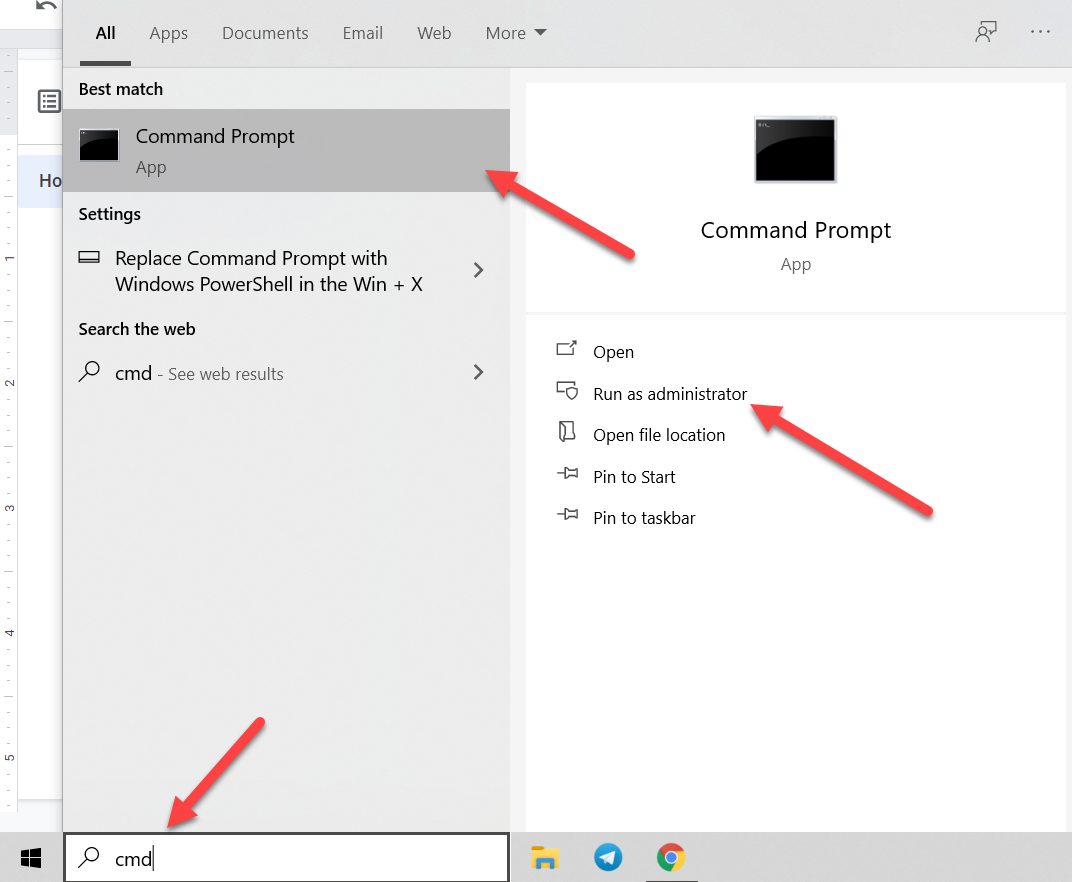
  • Run the command prompt as administrator. You can open the search, enter ‘cmd’, and, using the context menu, open the tool with administrator privileges.
S.M.A.R.T – check if your hard drive is dying — illustration 1

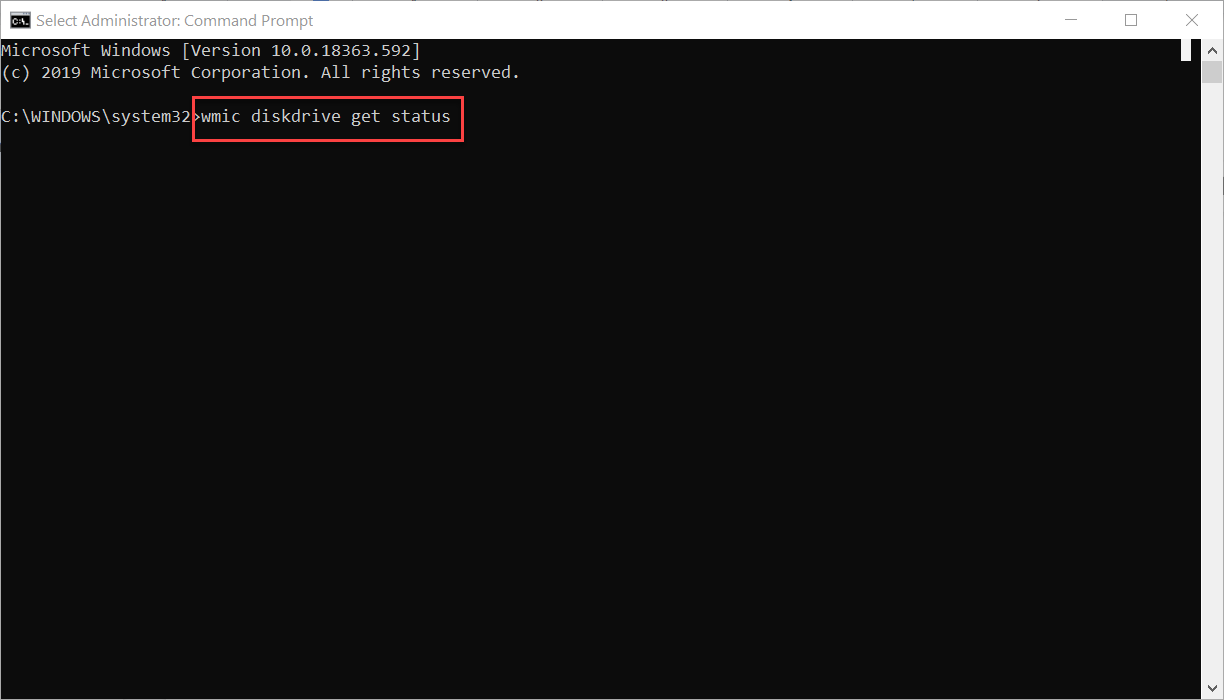
  • In the opened window, enter the following command – wmic diskdrive get status – so the system can determine if the hard disk is experiencing specific performance issues. Press ‘Enter’ to execute the action.
S.M.A.R.T – check if your hard drive is dying — illustration 2

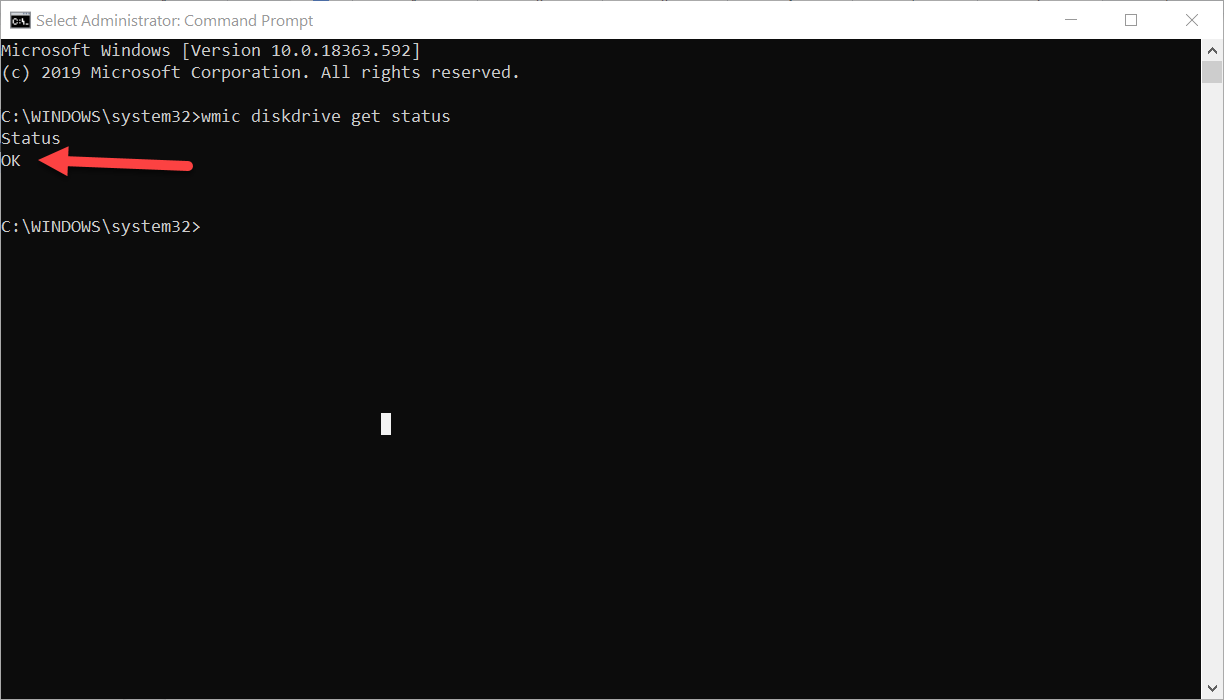
  • If everything is fine, you will receive the ‘OK’ answer. Note that you may receive several OKs depending on the number of logical disks you have. As you can see, I have one 🙂
S.M.A.R.T – check if your hard drive is dying — illustration 3

If you have only OKs, then you may stay calm. However, if your hard drive has a problem, and results return you «bad», «unknown» or «caution» messages, then you will need to investigate further. How to do it? Let’s proceed.


Determination of the possible drive failure

  • Again, run the command prompt as administrator. Open the search, enter ‘cmd’ and, using the context menu, open the tool with administrator privileges.
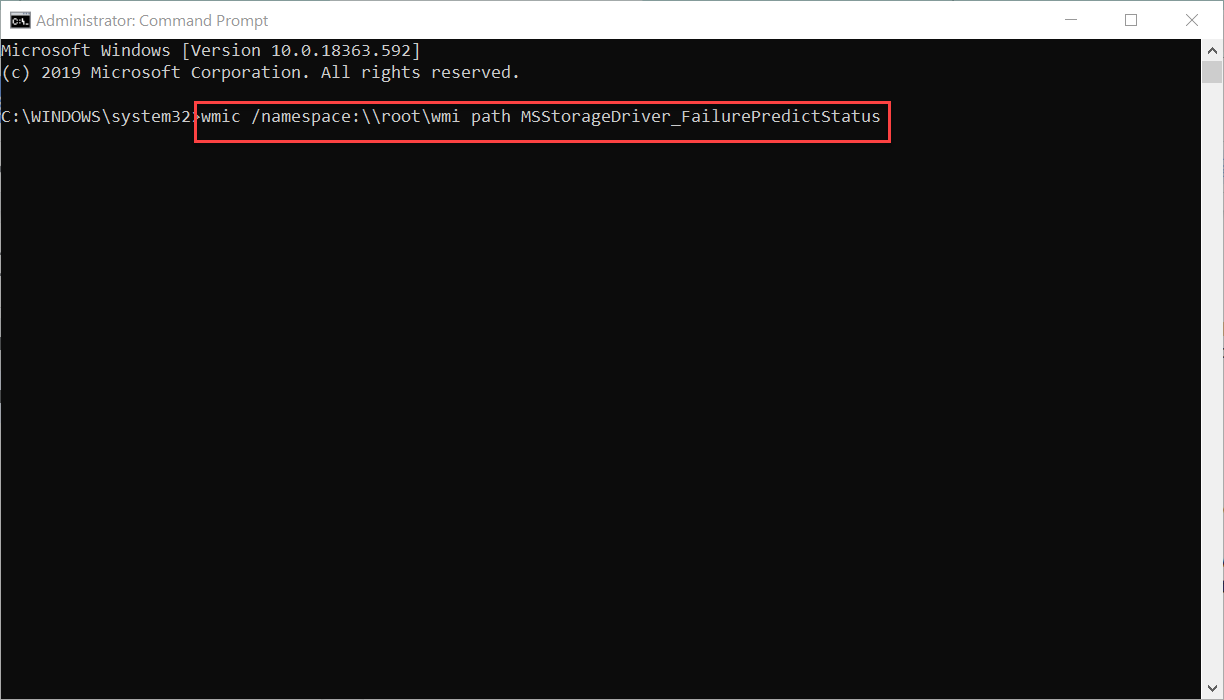
  • In the opened window, enter the following command – wmic /namespace:\\root\wmi path MSStorageDriver_FailurePredictStatus – that will prompt the system to prepare the corresponding reports to determine the hard drive state:
S.M.A.R.T – check if your hard drive is dying — illustration 4

  • When the process is finished, a summary result will be displayed. Check the value in the PredictFailure column. If the final status returns “FALSE”, it means that the hard disk works correctly with no problems.

However, if the status of the command shows the “TRUE” value, then users need to pay special attention to the disk since S.M.A.R.T technology predicts a close failure of the hard drive. The Reason column can also display a numerical coefficient greater than zero. In this case, users may need to contact the device brand support to decrypt the code, as the number may take different values, depending on the manufacturer.


Conclusion

Since Windows cannot inform you about the possible disk failure, it would be a wise decision to use Self-Monitoring, Analysis, and Reporting Technology. It would not save your hard drive, but it may prevent you from losing precious data stored there. Also, knowing the possible problem, you may replace your drive in advance and improve the performance of your device. Take care!


  • On February 4, 2020
  • 0 Comment

Leave Reply Cancel reply

Your email address will not be published. Required fields are marked *

Recent Posts
  • How AI and Automation Are Changing IT Service Delivery
  • Managed IT Services vs. In-House IT: What Should You Choose?
  • When the Model Is the Vendor: What Happens to Compliance When You Don’t Own the Weights
  • The Edge Device Is the Perimeter: Why the Box You Bought to Keep Them Out Is How They Get In
  • The Password Memo Was Honest. The Checklist Wasn’t.
Categories
  • ai (10)
  • android (18)
  • apple (36)
  • chart (18)
  • cloud (1)
  • fix (42)
  • games (11)
  • google (31)
  • hardware (73)
  • healthcare (3)
  • how to (231)
  • internet (92)
  • ios (23)
  • macos (3)
  • microsoft (82)
  • mobile (36)
  • news (74)
  • optimization (17)
  • osx (4)
  • outsourcing (9)
  • qa (3)
  • regulation (8)
  • review (120)
  • security (41)
  • software (160)
  • windows (150)
Archives
  • September 2026
  • August 2026
  • July 2026
  • June 2026
  • May 2026
  • August 2025
  • March 2025
  • February 2025
  • April 2023
  • March 2023
  • February 2023
  • January 2023
  • March 2022
  • January 2022
  • December 2021
  • November 2021
  • October 2021
  • September 2021
  • August 2021
  • July 2021
  • June 2021
  • May 2021
  • April 2021
  • March 2021
  • February 2021
  • January 2021
  • December 2020
  • November 2020
  • October 2020
  • September 2020
  • August 2020
  • July 2020
  • June 2020
  • May 2020
  • April 2020
  • March 2020
  • February 2020
  • January 2020
  • December 2019
  • November 2019
  • October 2019
  • September 2019
  • August 2019
  • April 2019
  • March 2019
  • February 2019
  • January 2019
  • December 2018
  • November 2018
  • October 2018
  • September 2018
  • June 2018
  • May 2018
  • April 2018
  • February 2018
  • January 2018
  • December 2017
  • November 2017
  • October 2017
  • June 2017
  • May 2017
  • April 2017
  • March 2017
  • February 2017
  • January 2017
  • December 2016
  • November 2016
  • October 2016
  • September 2016
  • August 2016
  • July 2016
  • June 2016
  • May 2016
  • April 2016
  • March 2016
  • February 2016
  • January 2016
  • December 2015
  • November 2015
  • October 2015
  • September 2015
  • July 2015
  • January 2015
Archives
  • September 2026
  • August 2026
  • July 2026
  • June 2026
  • May 2026
  • August 2025
  • March 2025
  • February 2025
  • April 2023
  • March 2023
  • February 2023
  • January 2023
  • March 2022
  • January 2022
  • December 2021
  • November 2021
  • October 2021
  • September 2021
  • August 2021
  • July 2021
  • June 2021
  • May 2021
  • April 2021
  • March 2021
  • February 2021
  • January 2021
  • December 2020
  • November 2020
  • October 2020
  • September 2020
  • August 2020
  • July 2020
  • June 2020
  • May 2020
  • April 2020
  • March 2020
  • February 2020
  • January 2020
  • December 2019
  • November 2019
  • October 2019
  • September 2019
  • August 2019
  • April 2019
  • March 2019
  • February 2019
  • January 2019
  • December 2018
  • November 2018
  • October 2018
  • September 2018
  • June 2018
  • May 2018
  • April 2018
  • February 2018
  • January 2018
  • December 2017
  • November 2017
  • October 2017
  • June 2017
  • May 2017
  • April 2017
  • March 2017
  • February 2017
  • January 2017
  • December 2016
  • November 2016
  • October 2016
  • September 2016
  • August 2016
  • July 2016
  • June 2016
  • May 2016
  • April 2016
  • March 2016
  • February 2016
  • January 2016
  • December 2015
  • November 2015
  • October 2015
  • September 2015
  • July 2015
  • January 2015

Meet the new Microsoft Edge

Previous thumb

Google Chrome 80: it may be dangerous for your site

Next thumb
Scroll

Services

  • Software Development
  • Quality Assurance
  • Customer Support
  • Managed Services
  • 24/7 Emergency IT Support
  • Competency Center
  • Local AI Agent Development
  • Software as a Medical Device

Compliance

  • Compliance Audit
  • GDPR Compliance
  • What is GDPR
  • ISO 9001:2015 Certification

Company

  • About Us
  • All Services
  • Projects
  • Case Studies
  • Articles
  • Contact
About HiTech Service

With 10 year experience of working together, we have reached tangible synergetic effect in performance and productivity, which results in highest quality services and satisfied clients.

Privacy Policy   Cookie Policy


  • Facebook
  • X
  • LinkedIn
CONTACT INFO
  • 900 Foulk Rd, Suite 201, Wilmington, DE, USA, 19803
  • Kudryavs’kyi descent 5b, Kyiv, Ukraine, 04053
  • +1 646.844.5712 (US)
ISO 9001:2015 certificate issued to HiTech Service LLC by Veritas
RIPE Atlas logo, the network measurement community HiTech Service takes part in
BrainBasket Foundation logo, IT education initiative HiTech Service supports
HiTech Service LLC membership badge of the Hi-Tech Office Ukraine association Dun & Bradstreet verified business badge for HiTech Service LLC
YouTeam partner badge for HiTech Service LLC
Hitech Service LLC

Copyright 2026