Today it is already a common case that a PC may have more than one external connection – to the Internet via cable, to VPN, to WiFi, to a modem, to different services like Hamachi etc. They can be used one by one or simultaneously in various combinations. It is important to set priority of these connections, so that your programs and/or games use them in the order that ensures their correct performance and connectivity. We decided to show you how to organize all this.
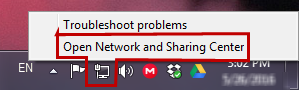
So first thing, open your Network and Sharing center. Just right click on the icon with your connections on the taskbar and choose this option.
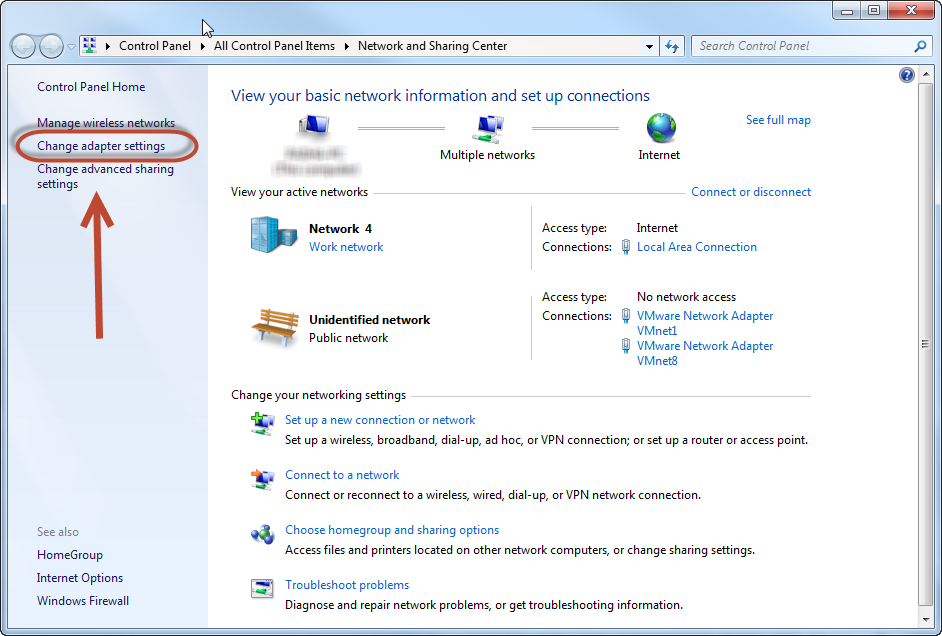
After the Network and Sharing center windows is open, click on the link saying “Change adapter settings” located on the left panel.
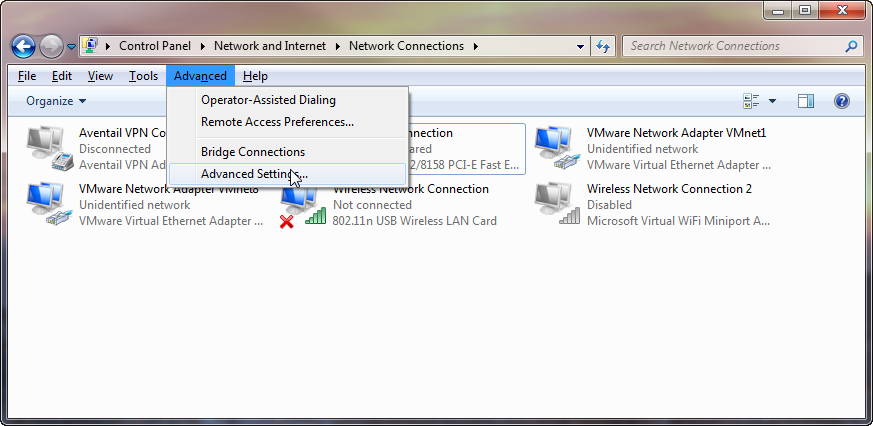
There, click Alt on the keyboard once, so that the menu on the top slides down to your sight, and then choose Advanced => Advanced Settings… from there.
In the Window that will appear you will see the list of your connections on the top. Use the arrow buttons on the left to move these connections to the top or to the bottom to prioritize them. First on top is the first in priority to be used by you programs and services.
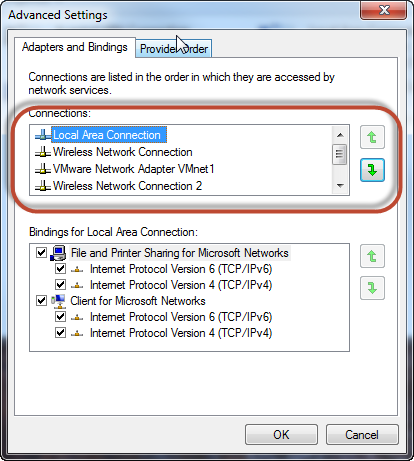
In my case a program will first use my cable connection, and only then switch to WiFi if something went wrong, and then downwards if WiFi is not available. By doing this, I am sure that I will have the fastest available connection available at all times.