After upgrading to Windows 10 you might find that your computer acting quite different from the previous OS version due to some settings that you have never touched or even knew about.
For example, Windows 10 screen going darker during the dark scenes in the movies or games, it even seems that it almost turns off the screen. This problem is mostly relevant for laptop users, but even on the desktop you might face it as well. So If you have the problem with brightness or the picture seems to be dim stop searching for the driver update and take a look at Windows power plans.
The setting we are talking about is called adaptive brightness.
So how to turn off the adaptive brightness?
First, click on Windows button and enter Power Options and hit enter.
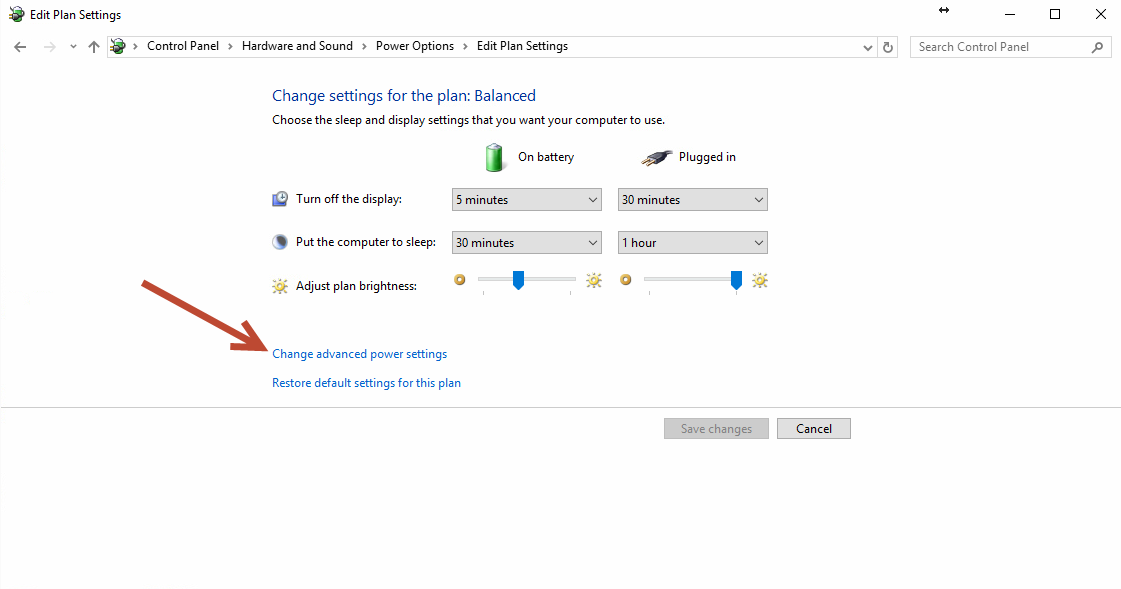
Check what power plan you are currently using and click on the Change plan settings link on the right.
Now, click on Change advanced power settings link in the bottom.
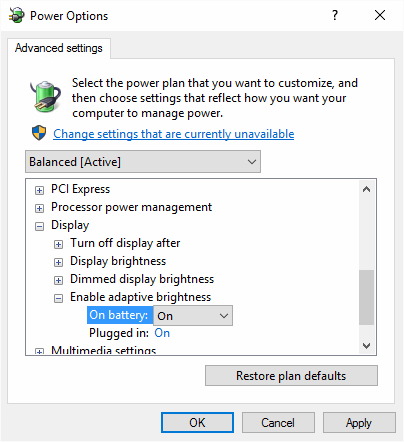
All you need to do now is to find and expand Display options and find Adaptive brightness settings and turn them off.

By the way, the same menu you can set the default brightness of your display while the laptop is on battery or plugged to the wall.
We hope that knowing this option will improve your Windows 10 experience.