Have any questions? +1 646.844.5712 (US)

  • Facebook
  • LinkedIn
  • Twitter
HiTech ServiceHiTech Service
  • Home
  • About
  • Services
    • Software Development
    • Customer Support
    • Quality Assurance
    • Managed Services
    • Compliance Audit
    • GDPR Compliance
    • Competency Center
    • Emergency IT Support
    • Software as medical device
    • Local AI Agent Development
  • Projects
  • GDPR
  • Articles
  • Case Studies
  • Contact
Menu
  • Home
  • About
  • Services
    • Software Development
    • Customer Support
    • Quality Assurance
    • Managed Services
    • Compliance Audit
    • GDPR Compliance
    • Competency Center
    • Emergency IT Support
    • Software as medical device
    • Local AI Agent Development
  • Projects
  • GDPR
  • Articles
  • Case Studies
  • Contact
Internet Browser – Default page issues

Internet Browser – Default page issues

Internet browsing usually is much fun, but sometimes it may bring unexpected results. One the popular issues is that your default page in browser gets set to some website (online store, news portal, some strange search engine or even something adult).

This can be easily considered as a virus, but antiviruses never pay attention to those. The reason for this is that the “software” that changed settings of your browsers have official website, that describes their product or service. They even post instructions how to deactivate their software on your computer, but they are always wrong.


Depending on how complicated affecting software is, depends on how the issue can be resolved. But we offer to go through all the steps to make sure that your system was completely cleaned up.

So you usually start with just checking your browser configurations. If you have multiple browsers installed on your computer (Internet Explorer, Chrome, Firefox, etc.), you will need to check them all. Look for default page setting first of all. Look for an option to clean your browser’s temporary files.

Some browsers have the option to reset all settings to default. Though it may require you to re-login to all social networks and mailboxes, it is still worth of doing.

Internet Explorer for example has a separate menu in Internet Option screen for this. In case you have Chrome installed, you will need to go:

C:\Users\\AppData\Local\Google\Chrome\User Data\Default\Cache

Select all files delete them. These are just cached files that were saved during the browsing, but the cause of the issues can be one of them. Deleting your Windows temporary file can also be helpful/

Restart your browser to see if the issue was resolved. If yes we would still recommend rebooting your computer as in some cases issue appears again after the reboot. This applies to any case when you see that issue seems to be resolved.

Check you browser icon properties. Right click on the browser icon on your desktop or in the start menu and choose properties. In shortcut tab, check values in TARGET and START IN. These values should not contain anything except the direct link to the browser executable file. Anything extra needs to be deleted.

Another step to get rid of the annoying default page in your web browser is to look through your installed software. Go to Control Panel and Program and Features. Filter all installed software by Installed on. Look through software that was installed lately, you may find something that was installed automatically (with another software or by clicking something on the website). Delete what you consider to be wrong.


In some cases issue controlled by the process that is running on the background. To check this start you Task Manager and go the processes. Looks for the suspicious processes (strange name and np description). If located one, right-click on the process and hit option ‘Open file location“. It will open a folder with highlighted executable file. “ Kill” the process by hitting delete on your keyboard and then delete executable file.

Use your windows search. Just look up an address of the annoying homepage, the search should return all files that contain that address. Do not delete them all together as this may crash the application. Try editing those files if they are related to applications that you use.
Browsers default page 1 — Internet Browser – Default page issues

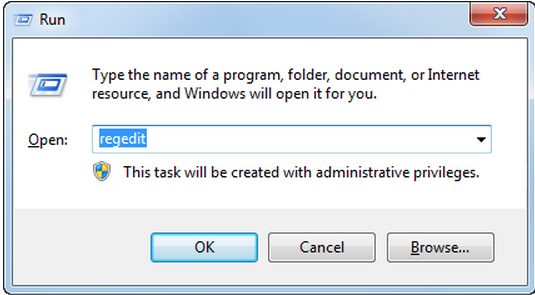
Last option will be to work with the registry. To run registry use Win+R and type in “regedit”. This will open registry editor. Be aware that you should be extremely careful working the registry as even small change here may crash your system.

First of all go to the:

HKEY_LOCAL_MACHINE \ Software \ Microsoft \ Windows \ CurrentVersion \ Run

Browsers default page 2 — Internet Browser – Default page issues

This path will contains registry files. Look them through and see if any contain link to the page that your are looking for.

Hit Ctrl+F to search in rest of the registry.

Going through these steps will most likely help to resolve the issue, though be really careful performing most of the actions as it may affect your system. If you do not feel confident about these steps, have someone do it for you.

You just skipped those ”smart” screenshots and bunch of scary text while reading the article.


  • On September 22, 2015
  • 0 Comment

Leave Reply Cancel reply

Your email address will not be published. Required fields are marked *

Recent Posts
  • Managed IT Services vs. In-House IT: What Should You Choose?
  • When the Model Is the Vendor: What Happens to Compliance When You Don’t Own the Weights
  • The Edge Device Is the Perimeter: Why the Box You Bought to Keep Them Out Is How They Get In
  • The Password Memo Was Honest. The Checklist Wasn’t.
  • As Is: How Software Became the Only Product You Could Legally Sell Broken
Categories
  • ai (9)
  • android (18)
  • apple (36)
  • chart (18)
  • cloud (1)
  • fix (42)
  • games (11)
  • google (31)
  • hardware (73)
  • healthcare (3)
  • how to (231)
  • internet (92)
  • ios (23)
  • macos (3)
  • microsoft (82)
  • mobile (36)
  • news (74)
  • optimization (17)
  • osx (4)
  • outsourcing (9)
  • qa (3)
  • regulation (8)
  • review (120)
  • security (41)
  • software (160)
  • windows (150)
Archives
  • September 2026
  • August 2026
  • July 2026
  • June 2026
  • May 2026
  • August 2025
  • March 2025
  • February 2025
  • April 2023
  • March 2023
  • February 2023
  • January 2023
  • March 2022
  • January 2022
  • December 2021
  • November 2021
  • October 2021
  • September 2021
  • August 2021
  • July 2021
  • June 2021
  • May 2021
  • April 2021
  • March 2021
  • February 2021
  • January 2021
  • December 2020
  • November 2020
  • October 2020
  • September 2020
  • August 2020
  • July 2020
  • June 2020
  • May 2020
  • April 2020
  • March 2020
  • February 2020
  • January 2020
  • December 2019
  • November 2019
  • October 2019
  • September 2019
  • August 2019
  • April 2019
  • March 2019
  • February 2019
  • January 2019
  • December 2018
  • November 2018
  • October 2018
  • September 2018
  • June 2018
  • May 2018
  • April 2018
  • February 2018
  • January 2018
  • December 2017
  • November 2017
  • October 2017
  • June 2017
  • May 2017
  • April 2017
  • March 2017
  • February 2017
  • January 2017
  • December 2016
  • November 2016
  • October 2016
  • September 2016
  • August 2016
  • July 2016
  • June 2016
  • May 2016
  • April 2016
  • March 2016
  • February 2016
  • January 2016
  • December 2015
  • November 2015
  • October 2015
  • September 2015
  • July 2015
  • January 2015
Archives
  • September 2026
  • August 2026
  • July 2026
  • June 2026
  • May 2026
  • August 2025
  • March 2025
  • February 2025
  • April 2023
  • March 2023
  • February 2023
  • January 2023
  • March 2022
  • January 2022
  • December 2021
  • November 2021
  • October 2021
  • September 2021
  • August 2021
  • July 2021
  • June 2021
  • May 2021
  • April 2021
  • March 2021
  • February 2021
  • January 2021
  • December 2020
  • November 2020
  • October 2020
  • September 2020
  • August 2020
  • July 2020
  • June 2020
  • May 2020
  • April 2020
  • March 2020
  • February 2020
  • January 2020
  • December 2019
  • November 2019
  • October 2019
  • September 2019
  • August 2019
  • April 2019
  • March 2019
  • February 2019
  • January 2019
  • December 2018
  • November 2018
  • October 2018
  • September 2018
  • June 2018
  • May 2018
  • April 2018
  • February 2018
  • January 2018
  • December 2017
  • November 2017
  • October 2017
  • June 2017
  • May 2017
  • April 2017
  • March 2017
  • February 2017
  • January 2017
  • December 2016
  • November 2016
  • October 2016
  • September 2016
  • August 2016
  • July 2016
  • June 2016
  • May 2016
  • April 2016
  • March 2016
  • February 2016
  • January 2016
  • December 2015
  • November 2015
  • October 2015
  • September 2015
  • July 2015
  • January 2015

Windows 10: Turning off Windows Defender in Windows 10

Previous thumb

Windows 7: How to convert values to a different format?

Next thumb
Scroll

Services

  • Software Development
  • Quality Assurance
  • Customer Support
  • Managed Services
  • 24/7 Emergency IT Support
  • Competency Center
  • Local AI Agent Development
  • Software as a Medical Device

Compliance

  • Compliance Audit
  • GDPR Compliance
  • What is GDPR
  • ISO 9001:2015 Certification

Company

  • About Us
  • All Services
  • Projects
  • Case Studies
  • Articles
  • Contact
About HiTech Service

With 10 year experience of working together, we have reached tangible synergetic effect in performance and productivity, which results in highest quality services and satisfied clients.

Privacy Policy   Cookie Policy


  • Facebook
  • X
  • LinkedIn
CONTACT INFO
  • 900 Foulk Rd, Suite 201, Wilmington, DE, USA, 19803
  • Kudryavs’kyi descent 5b, Kyiv, Ukraine, 04053
  • +1 646.844.5712 (US)
ISO 9001:2015 certificate issued to HiTech Service LLC by Veritas
RIPE Atlas logo, the network measurement community HiTech Service takes part in
BrainBasket Foundation logo, IT education initiative HiTech Service supports
HiTech Service LLC membership badge of the Hi-Tech Office Ukraine association Dun & Bradstreet verified business badge for HiTech Service LLC
YouTeam partner badge for HiTech Service LLC
Hitech Service LLC

Copyright 2026