
Have any questions? +1 646.844.5712 (US)

  • Facebook
  • LinkedIn
  • Twitter
HiTech ServiceHiTech Service
  • Home
  • About
  • Services
    • Software Development
    • Customer Support
    • Quality Assurance
    • Managed Services
    • Compliance Audit
    • GDPR Compliance
    • Competency Center
    • Emergency IT Support
    • Software as medical device
    • Local AI Agent Development
  • Projects
  • GDPR
  • Articles
  • Case Studies
  • Contact
Menu
  • Home
  • About
  • Services
    • Software Development
    • Customer Support
    • Quality Assurance
    • Managed Services
    • Compliance Audit
    • GDPR Compliance
    • Competency Center
    • Emergency IT Support
    • Software as medical device
    • Local AI Agent Development
  • Projects
  • GDPR
  • Articles
  • Case Studies
  • Contact
Ghost Recon Wildlands: High CPU usage and low FPS

Ghost Recon Wildlands: High CPU usage and low FPS

Being a gamer for years, I always look forward to new Ubisoft games, and no doubts, Tom Clancy’sfranchise if one my favorite ones. Rainbow Six, Splinter Cell, H.A.W.X, EndWar and, of course, Ghost Recon – each game series is unique and draws attention of thousands of gamers.

Next month we are expecting the release of the new Ghost Recon game – Wildlands. The release is planned on March 7th, 2017 but 1 month before Ubisoft gave gamers a chance to glance at the game and participate in closed beta. In case you missed the closed beta we can share our own experience and sum ups.

General information.

Ghost Recon Wildlands is an open world shooter with slight RPG elements – you have a soldier, basic loadout and during the game you can find or gain experience points that you can later spend on new equipment and skills. For example, a parachute or thermal vision aren’t available from the beginning, but can be bought for those skill points. The same thing is with the weapon – you can find new weapon and its parts while browsing the map. Despite the game is available in both – single and co-op mode, playing together with friends gives the best experience. While one of you is a driver and upgrades the corresponding set of skills, other players can open different skill trees to balance the game. The co-op allows up to 4 players in a team and in case you don’t have friends playing the game with you, Ghost Recon Wildlands has a matchmaking system that will try to find players matching you level, skills and type of action you prefer.

While playing The Division released last year, I didn’t find a reason for myself to play a co-op in main missions, but the Wildlands is definitely more fun when your friends are backing you up. Drive cars, fly planes and helicopters, use drones, attack enemies from different directions – the game offers multiple options to advance through the story and being a team member in here is a part of the fun.

Ghost Recon Wildlands performance.

What I really was surprised with is game optimization. It’s definitely very poor and this is my main concern about this game and the main reason why I have not yet pre-ordered it. Let’s take a look at the Ghost Recon Wildlands official system requirements :

Minimum requirements

Operating System: Windows 7 SP1, Windows 8.1, Windows 10 (64-bit versions only)
Processor: Intel Core i5-2400S @ 2.5 GHz / AMD FX 4350 @ 4 GHz
RAM: 4 GB
Video card: Nvidia GeForce GTX 660 (2GB) / AMD R7 260X (2GB) or better
Hard Drive: 25 GB available storage
Sound: DirectX Compatible Sound Card with latest drivers
Peripherals: Windows compatible keyboard and mouse / Microsoft Xbox One or Xbox 360 Controller / DualShock 4 Controller
Multiplayer: 256 kbps or faster broadband connection

Recommended requirements

Operating System: Windows 7 SP1, Windows 8.1, Windows 10 (64-bit versions only)
Processor: Intel Core i5-3770 @ 3.5 GHz / AMD FX 8350 @ 4 GHz
RAM: 8 GB
Video card: Nvidia GeForce GTX 970 (4GB with Shader Model 5.0) or better / AMD Radeon R9 Fury (4GB with Shader Model 5.0) or better
Hard Drive: 25 GB available storage
Sound: DirectX Compatible Sound Card with latest drivers
Peripherals: Windows compatible keyboard and mouse / Microsoft Xbox One Controller / DualShock 4 Controller
Multiplayer: 256 kbps or faster broadband connection

High CPU usage in Ghost Recon: Wildlands.

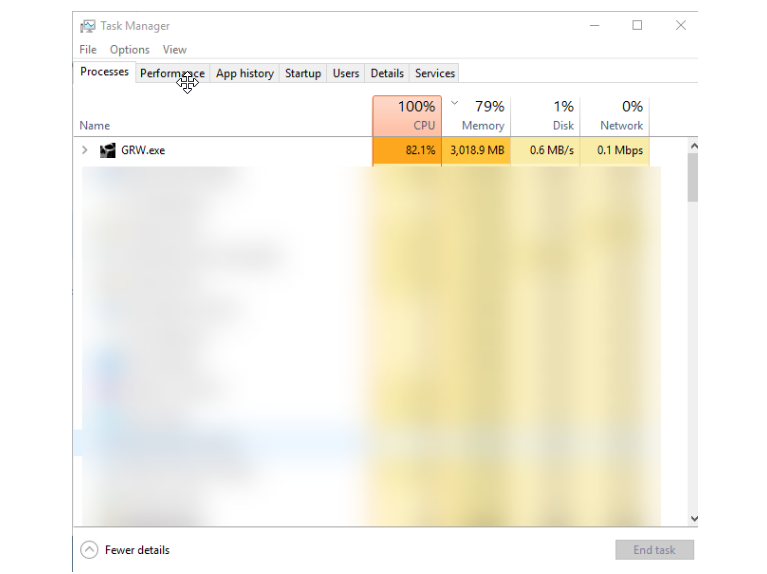
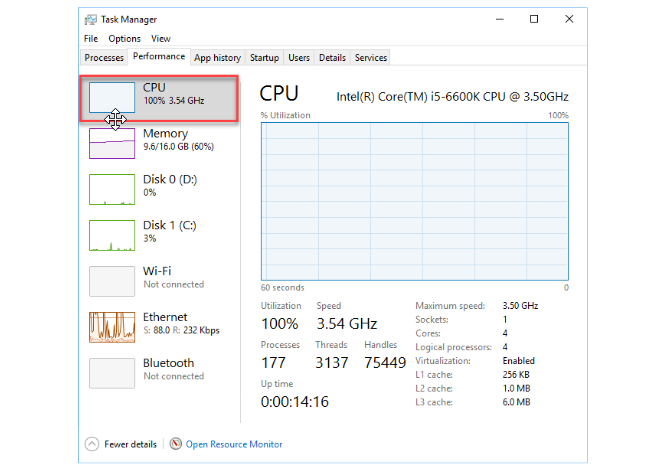
We tested the game on 2 computers (one of them is well known to our readers as the gaming config choice) and none of the computers was able to maintain 60FPS during the game. Both computers faced the problem with CPU being loaded up to 100%
Ghost recon 2 — Ghost Recon Wildlands: High CPU usage and low FPS

The picture is the same for old Core i5-3470 and the new Core i5-6600K – the processor is loaded heavily.
Ghost recon 3 — Ghost Recon Wildlands: High CPU usage and low FPS

As for low FPS in Wildlands, this is the first game that urged me to use low settings on GTX660 even on 720p. Actually, this is the first game that I switched from to 1080p to 720p. Moreover, even on 720p my FPS was usually around 35.

Recently Ubisoft had another beta, where we had a chance to play “For Honor” for a weekend and I should say my FPS was 60 on Mid-High settings. The latest Resident Evil 7 with system requirements way higher than my GTX660 PC has on board also showed pretty good results, not lower than 50 FPS on Mid-High.

If you think it’s time for me to buy a better PC, we tested the game on GTX1070 where the picture is similar, on 1080p with “Very High” settings FPS was around 46. The game was freezing from time to time and we saw no reason for it, except for poor optimization. CPU is 100%.

The graphics is good, especially if to compare with 720p. Take a look at the same place from second player’s viewpoint.

In addition to the optimization issues beta participants reported multiple glitches in the game that you can also find on YouTube.

To Sum Up.

Despite the mentioned problems the game totally caught us – it’s interesting, you have a space to play how you want to – be stealth or aggressive, evolve the character and technical means, do whatever you want in the open world. Now it’s up to Ubisoft to release the optimization patch and new drivers by NVidia. Hope they come up with game improvements by the time open beta starts. Once we hear “we have a solution for low FPS in Ghost Recon” we will know for sure if we buy one or more copies of the game, since not every one of us has GTX1070 on board, and 720p is not an option for a gamer. Hope Ubi will come up

By the way, our Support team knows a lot about optimization. Of course we cannot help Ubisoft with game optimization, but we can help you prepare your computer for heavy gaming. Contact us 24/7 to optimize your PC or with any other IT related issues.


  • On February 6, 2017
  • 0 Comment

Leave Reply Cancel reply

Your email address will not be published. Required fields are marked *

Recent Posts
  • As Is: How Software Became the Only Product You Could Legally Sell Broken
  • The Production Incident Class Your Postmortem Template Doesn’t Have
  • Why Load Test Numbers Lie
  • When Config Became Executable: The Twenty-Year Pattern Behind Supply Chain Attacks
  • How Software Became a Medical Device
Categories
  • ai (8)
  • android (18)
  • apple (36)
  • chart (18)
  • cloud (1)
  • fix (42)
  • games (11)
  • google (31)
  • hardware (73)
  • healthcare (3)
  • how to (231)
  • internet (92)
  • ios (23)
  • macos (3)
  • microsoft (82)
  • mobile (36)
  • news (74)
  • optimization (17)
  • osx (4)
  • outsourcing (8)
  • qa (3)
  • regulation (7)
  • review (120)
  • security (39)
  • software (160)
  • windows (150)
Archives
  • August 2026
  • July 2026
  • June 2026
  • May 2026
  • August 2025
  • March 2025
  • February 2025
  • April 2023
  • March 2023
  • February 2023
  • January 2023
  • March 2022
  • January 2022
  • December 2021
  • November 2021
  • October 2021
  • September 2021
  • August 2021
  • July 2021
  • June 2021
  • May 2021
  • April 2021
  • March 2021
  • February 2021
  • January 2021
  • December 2020
  • November 2020
  • October 2020
  • September 2020
  • August 2020
  • July 2020
  • June 2020
  • May 2020
  • April 2020
  • March 2020
  • February 2020
  • January 2020
  • December 2019
  • November 2019
  • October 2019
  • September 2019
  • August 2019
  • April 2019
  • March 2019
  • February 2019
  • January 2019
  • December 2018
  • November 2018
  • October 2018
  • September 2018
  • June 2018
  • May 2018
  • April 2018
  • February 2018
  • January 2018
  • December 2017
  • November 2017
  • October 2017
  • June 2017
  • May 2017
  • April 2017
  • March 2017
  • February 2017
  • January 2017
  • December 2016
  • November 2016
  • October 2016
  • September 2016
  • August 2016
  • July 2016
  • June 2016
  • May 2016
  • April 2016
  • March 2016
  • February 2016
  • January 2016
  • December 2015
  • November 2015
  • October 2015
  • September 2015
  • July 2015
  • January 2015
Archives
  • August 2026
  • July 2026
  • June 2026
  • May 2026
  • August 2025
  • March 2025
  • February 2025
  • April 2023
  • March 2023
  • February 2023
  • January 2023
  • March 2022
  • January 2022
  • December 2021
  • November 2021
  • October 2021
  • September 2021
  • August 2021
  • July 2021
  • June 2021
  • May 2021
  • April 2021
  • March 2021
  • February 2021
  • January 2021
  • December 2020
  • November 2020
  • October 2020
  • September 2020
  • August 2020
  • July 2020
  • June 2020
  • May 2020
  • April 2020
  • March 2020
  • February 2020
  • January 2020
  • December 2019
  • November 2019
  • October 2019
  • September 2019
  • August 2019
  • April 2019
  • March 2019
  • February 2019
  • January 2019
  • December 2018
  • November 2018
  • October 2018
  • September 2018
  • June 2018
  • May 2018
  • April 2018
  • February 2018
  • January 2018
  • December 2017
  • November 2017
  • October 2017
  • June 2017
  • May 2017
  • April 2017
  • March 2017
  • February 2017
  • January 2017
  • December 2016
  • November 2016
  • October 2016
  • September 2016
  • August 2016
  • July 2016
  • June 2016
  • May 2016
  • April 2016
  • March 2016
  • February 2016
  • January 2016
  • December 2015
  • November 2015
  • October 2015
  • September 2015
  • July 2015
  • January 2015

Are you sure your account was not stolen?

Previous thumb

SSD vanished from the list of drives? How to diagnose

Next thumb
Scroll

Services

  • Software Development
  • Quality Assurance
  • Customer Support
  • Managed Services
  • 24/7 Emergency IT Support
  • Competency Center
  • Local AI Agent Development
  • Software as a Medical Device

Compliance

  • Compliance Audit
  • GDPR Compliance
  • What is GDPR
  • ISO 9001:2015 Certification

Company

  • About Us
  • All Services
  • Projects
  • Case Studies
  • Articles
  • Contact
About HiTech Service

With 10 year experience of working together, we have reached tangible synergetic effect in performance and productivity, which results in highest quality services and satisfied clients.

Privacy Policy   Cookie Policy


  • Facebook
  • X
  • LinkedIn
CONTACT INFO
  • 900 Foulk Rd, Suite 201, Wilmington, DE, USA, 19803
  • Kudryavs’kyi descent 5b, Kyiv, Ukraine, 04053
  • +1 646.844.5712 (US)
ISO 9001:2015 certificate issued to HiTech Service LLC by Veritas
RIPE Atlas logo, the network measurement community HiTech Service takes part in
BrainBasket Foundation logo, IT education initiative HiTech Service supports
HiTech Service LLC membership badge of the Hi-Tech Office Ukraine association Dun & Bradstreet verified business badge for HiTech Service LLC
YouTeam partner badge for HiTech Service LLC
Hitech Service LLC

Copyright 2026