Have any questions? +1 646.844.5712 (US)

  • Facebook
  • LinkedIn
  • Twitter
HiTech ServiceHiTech Service
  • Home
  • About
  • Services
    • Software Development
    • Customer Support
    • Quality Assurance
    • Managed Services
    • Compliance Audit
    • GDPR Compliance
    • Competency Center
    • Emergency IT Support
    • Software as medical device
    • Local AI Agent Development
  • Projects
  • GDPR
  • Articles
  • Case Studies
  • Contact
Menu
  • Home
  • About
  • Services
    • Software Development
    • Customer Support
    • Quality Assurance
    • Managed Services
    • Compliance Audit
    • GDPR Compliance
    • Competency Center
    • Emergency IT Support
    • Software as medical device
    • Local AI Agent Development
  • Projects
  • GDPR
  • Articles
  • Case Studies
  • Contact
Windows 10: You don’t currently have permission to access folder

Windows 10: You don’t currently have permission to access folder

Preamble (you can skip it and pass to the solution below)

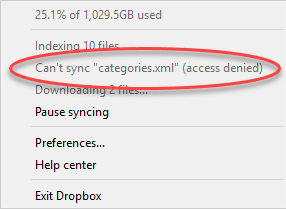
After upgrading my Windows 7 to Windows 10, I started to install necessary programs that I use daily. Luckily this process doesn’t take long due to beloved service of bulk program installation we told you about in one of our previous articles https://hitech-us.hitech.dev/articles/entry/158/Necessary-software-for-a-Windows-PC-in-one-click . One of the programs I use on all my devices is the Dropbox cloud service and due to this program, I found an interesting problem accessing my files and folders from the previous version of Windows. I noticed that after a few days of syncing my local files with the cloud, I still had some thousands of files to be synced. So I went to check what was going on and found the following message in the log.


Windows 10: You don’t currently have permission to access folder — illustration 1

Dropbox can’t sync the file access denied.

I went to the folder where the problem file was located and found another interesting thing about it – I didn’t have permissions to do anything with the files in the folder even though I had an administrative account (the only account on this PC). My first guess was the Read Only setting in the folder options and I was right. Partially. I did have Read Only checked, and every time I tried to change it, Read only was reverting back in Windows 10.

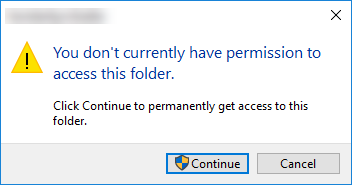
But there was more. When I tried to access the folder I received the following message: You don’t currently have permission to access this folder.
Windows 10: You don’t currently have permission to access folder — illustration 2

I was unable to rename, delete and even access files and folders until I confirm every step, and even with confirming that I am an admin, part of the files and folders “refused to cooperate.”

Browsing the Internet, trying to find the solution, I found multiple funny comments “I had the same problem and reinstalling Windows helped me.” Well, this is definitely not the piece of advice I would follow.

As it turned out, the problem was much easier to resolve.

Resolution

The problem was in the inherited access permissions from the legacy user that no longer existed in my Windows 10. Still, all the access rights appeared to belong to that account. Even more, I used to have a Documents folder from another user created years ago and it was accessible after I had my Windows 7 was reinstalled, but Windows 10 reverted even those permissions. To resolve the problem, I simply had to reassign the folder owner.

The first step is to right click on the folder and choose Properties.
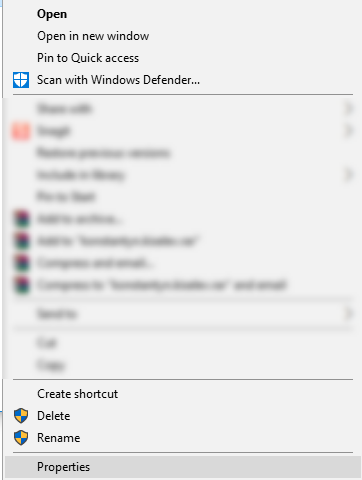
Windows 10: You don’t currently have permission to access folder — illustration 3

In Properties, navigate to Security tab.
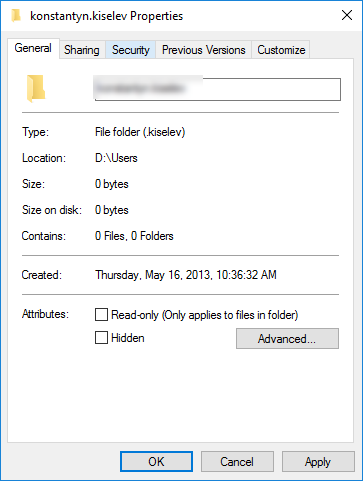


Windows 10: You don’t currently have permission to access folder — illustration 4

Under Security click on Advanced button. Pay attention to message inside the tab – You must have Read permissions to view the properties of this object.
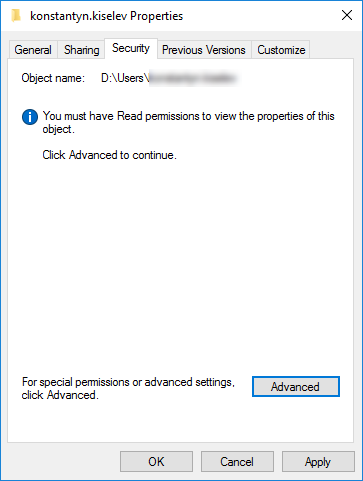
Windows 10: You don’t currently have permission to access folder — illustration 5

Once you hit Advanced the Owner setting will show you who is the owner of the folder, and in my case the owner even wasn’t there.
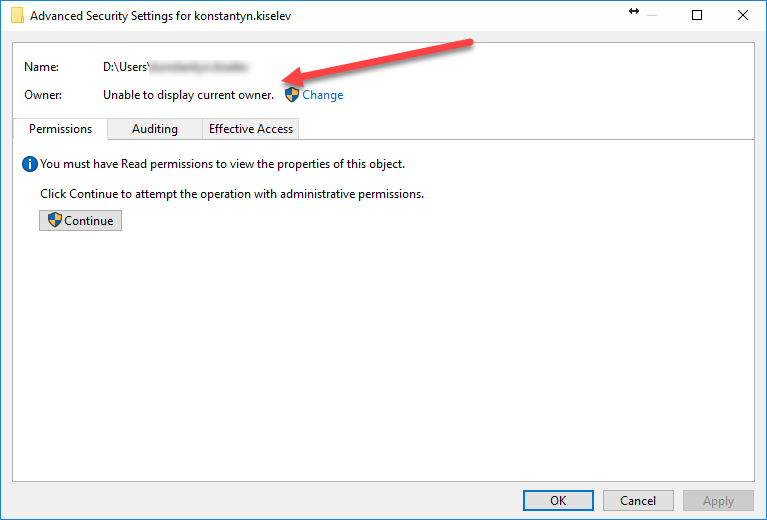
Windows 10: You don’t currently have permission to access folder — illustration 6

Click on Change button.

Windows 10: You don’t currently have permission to access folder — illustration 7

In this Window click on Advanced again. (Down the rabbit hole, isn’t it?).
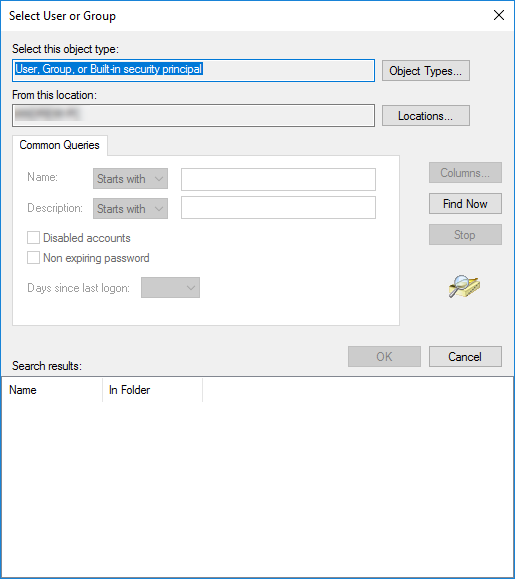
Windows 10: You don’t currently have permission to access folder — illustration 8

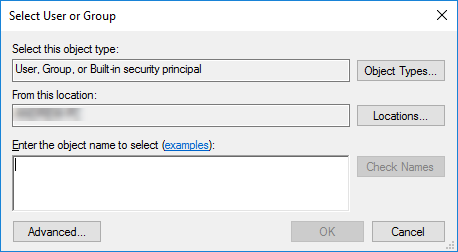
Finally click Find Now button to see the list of available users in the system.
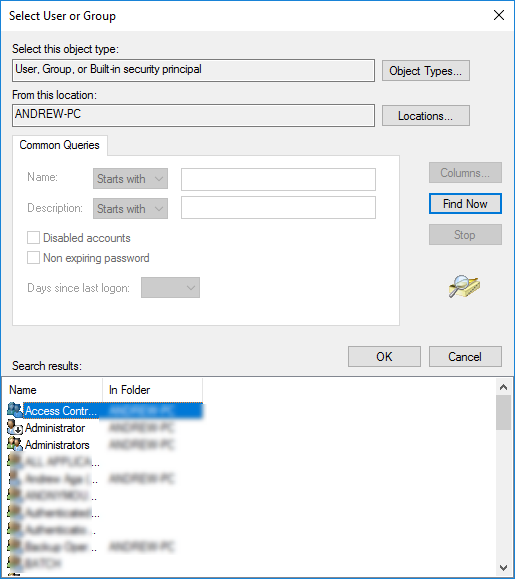
Windows 10: You don’t currently have permission to access folder — illustration 9

You will be surprised how many built-in system users exist in the system, ignore them and choose your Windows 10 user in the list and hit Ok.

You will be back in the previous window with your user selected.
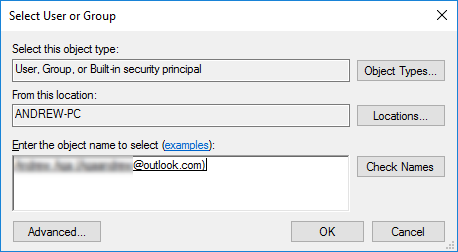
Windows 10: You don’t currently have permission to access folder — illustration 10

Hit Ok again.

Windows 10: You don’t currently have permission to access folder — illustration 11

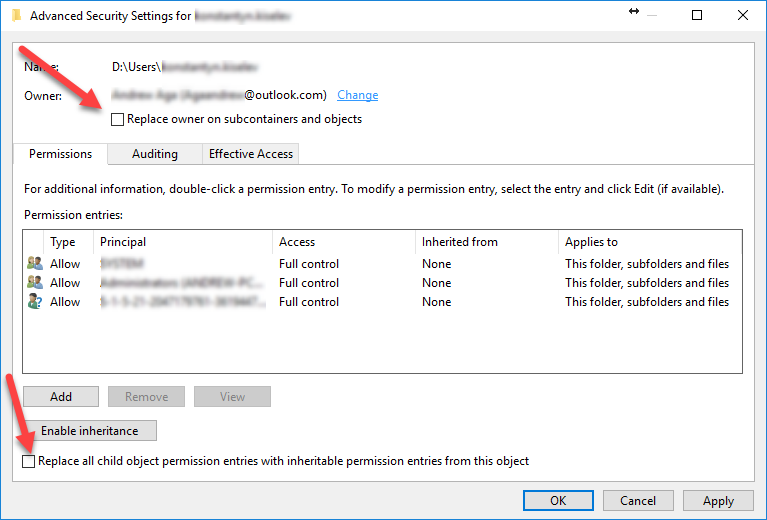
The last two steps would be to check “Replace owner on subcontainers and objects” and “Replace all child object permission entries with inheritable permission entries from the object”.

That’s it, hit Ok button and you have full control over the folder and its content.

Enjoy.


  • On October 6, 2016
  • 0 Comment

Leave Reply Cancel reply

Your email address will not be published. Required fields are marked *

Recent Posts
  • Why Load Test Numbers Lie
  • When Config Became Executable: The Twenty-Year Pattern Behind Supply Chain Attacks
  • How Software Became a Medical Device
  • Compliant With What? A Working Map of GDPR, HIPAA, SOC 2 and ISO 27001
  • Local AI vs Cloud AI: The Break-Even Is About Utilization, Not Tokens
Categories
  • ai (7)
  • android (18)
  • apple (36)
  • chart (18)
  • cloud (1)
  • fix (42)
  • games (11)
  • google (31)
  • hardware (73)
  • healthcare (3)
  • how to (231)
  • internet (92)
  • ios (23)
  • macos (3)
  • microsoft (82)
  • mobile (36)
  • news (74)
  • optimization (17)
  • osx (4)
  • outsourcing (8)
  • qa (3)
  • regulation (7)
  • review (120)
  • security (37)
  • software (159)
  • windows (150)
Archives
  • August 2026
  • July 2026
  • June 2026
  • May 2026
  • August 2025
  • March 2025
  • February 2025
  • April 2023
  • March 2023
  • February 2023
  • January 2023
  • March 2022
  • January 2022
  • December 2021
  • November 2021
  • October 2021
  • September 2021
  • August 2021
  • July 2021
  • June 2021
  • May 2021
  • April 2021
  • March 2021
  • February 2021
  • January 2021
  • December 2020
  • November 2020
  • October 2020
  • September 2020
  • August 2020
  • July 2020
  • June 2020
  • May 2020
  • April 2020
  • March 2020
  • February 2020
  • January 2020
  • December 2019
  • November 2019
  • October 2019
  • September 2019
  • August 2019
  • April 2019
  • March 2019
  • February 2019
  • January 2019
  • December 2018
  • November 2018
  • October 2018
  • September 2018
  • June 2018
  • May 2018
  • April 2018
  • February 2018
  • January 2018
  • December 2017
  • November 2017
  • October 2017
  • June 2017
  • May 2017
  • April 2017
  • March 2017
  • February 2017
  • January 2017
  • December 2016
  • November 2016
  • October 2016
  • September 2016
  • August 2016
  • July 2016
  • June 2016
  • May 2016
  • April 2016
  • March 2016
  • February 2016
  • January 2016
  • December 2015
  • November 2015
  • October 2015
  • September 2015
  • July 2015
  • January 2015
Archives
  • August 2026
  • July 2026
  • June 2026
  • May 2026
  • August 2025
  • March 2025
  • February 2025
  • April 2023
  • March 2023
  • February 2023
  • January 2023
  • March 2022
  • January 2022
  • December 2021
  • November 2021
  • October 2021
  • September 2021
  • August 2021
  • July 2021
  • June 2021
  • May 2021
  • April 2021
  • March 2021
  • February 2021
  • January 2021
  • December 2020
  • November 2020
  • October 2020
  • September 2020
  • August 2020
  • July 2020
  • June 2020
  • May 2020
  • April 2020
  • March 2020
  • February 2020
  • January 2020
  • December 2019
  • November 2019
  • October 2019
  • September 2019
  • August 2019
  • April 2019
  • March 2019
  • February 2019
  • January 2019
  • December 2018
  • November 2018
  • October 2018
  • September 2018
  • June 2018
  • May 2018
  • April 2018
  • February 2018
  • January 2018
  • December 2017
  • November 2017
  • October 2017
  • June 2017
  • May 2017
  • April 2017
  • March 2017
  • February 2017
  • January 2017
  • December 2016
  • November 2016
  • October 2016
  • September 2016
  • August 2016
  • July 2016
  • June 2016
  • May 2016
  • April 2016
  • March 2016
  • February 2016
  • January 2016
  • December 2015
  • November 2015
  • October 2015
  • September 2015
  • July 2015
  • January 2015

Computer wakes up by itself? Fixed!

Previous thumb

Folder loads too slow? Fixed!

Next thumb
Scroll

Services

  • Software Development
  • Quality Assurance
  • Customer Support
  • Managed Services
  • 24/7 Emergency IT Support
  • Competency Center
  • Local AI Agent Development
  • Software as a Medical Device

Compliance

  • Compliance Audit
  • GDPR Compliance
  • What is GDPR
  • ISO 9001:2015 Certification

Company

  • About Us
  • All Services
  • Projects
  • Case Studies
  • Articles
  • Contact
About HiTech Service

With 10 year experience of working together, we have reached tangible synergetic effect in performance and productivity, which results in highest quality services and satisfied clients.

Privacy Policy   Cookie Policy


  • Facebook
  • X
  • LinkedIn
CONTACT INFO
  • 900 Foulk Rd, Suite 201, Wilmington, DE, USA, 19803
  • Kudryavs’kyi descent 5b, Kyiv, Ukraine, 04053
  • +1 646.844.5712 (US)
ISO 9001:2015 certificate issued to HiTech Service LLC by Veritas
RIPE Atlas logo, the network measurement community HiTech Service takes part in
BrainBasket Foundation logo, IT education initiative HiTech Service supports
HiTech Service LLC membership badge of the Hi-Tech Office Ukraine association Dun & Bradstreet verified business badge for HiTech Service LLC
YouTeam partner badge for HiTech Service LLC
Hitech Service LLC

Copyright 2026