
Have any questions? +1 646.844.5712 (US)

  • Facebook
  • LinkedIn
  • Twitter
HiTech ServiceHiTech Service
  • Home
  • About
  • Services
    • Software Development
    • Customer Support
    • Quality Assurance
    • Managed Services
    • Compliance Audit
    • GDPR Compliance
    • Competency Center
    • Emergency IT Support
    • Software as medical device
    • Local AI Agent Development
  • Projects
  • GDPR
  • Articles
  • Case Studies
  • Contact
Menu
  • Home
  • About
  • Services
    • Software Development
    • Customer Support
    • Quality Assurance
    • Managed Services
    • Compliance Audit
    • GDPR Compliance
    • Competency Center
    • Emergency IT Support
    • Software as medical device
    • Local AI Agent Development
  • Projects
  • GDPR
  • Articles
  • Case Studies
  • Contact
USB Device Not Recognized? How to Fix?

USB Device Not Recognized? How to Fix?

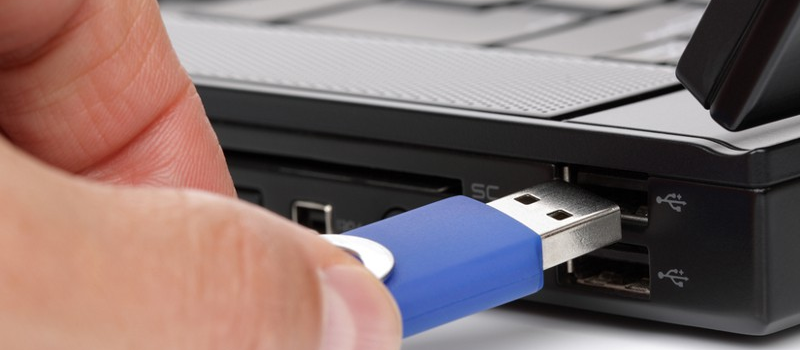
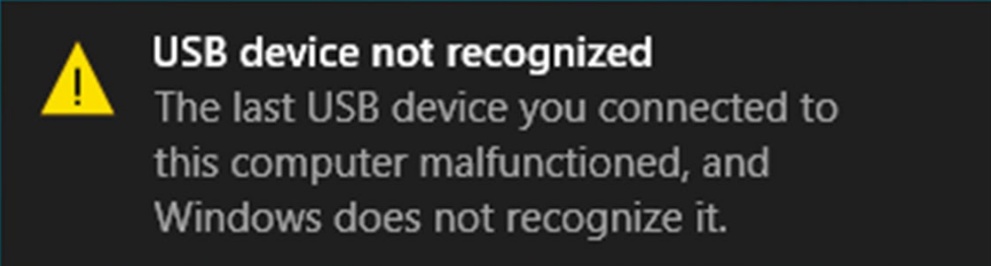
It may happen that when you connect an external USB device to your computer, Windows surprises you with message saying “USB Device Not Recognized” instead of launching the dialogue window. The error message also may appear out of a sudden while the device is already plugged in to your computer and from now on it becomes absolutely useless, since Windows just does not recognizes it, even if it did work fine before. No matter what USB device is showing the problem – mouse, keyboard, USB flash drive – the root cause of “USB Device Not Recognized” message is most likely a hardware issue.


Usb device not recognized 02 — USB Device Not Recognized? How to Fix?

Problem with Device

First thing you need to do is to make sure that the problem is with the device. The easiest test is to connect the device to any other computer and see what happens. If there is no other computer within your reach, try to plug the device to another usb port of the same computer. If you end up with the same message on another computer, this means that your device needs a repair or replacement. If the error shows up from time to time only, this means that you should consider checking the USB contacts and wires if any. This often happens to worn out keyboard and mouse cables. The cord is bending back and forth all the time that results in its malfunction.

Problem with USB-ports

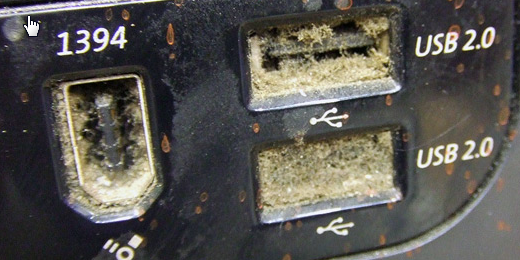
Another possible root cause is the USB port or motherboard USB controller issue. First check if there is no dust or other obstacles in the USB port.
Usb device not recognized 03 — USB Device Not Recognized? How to Fix?

Also, check Device Manager for red marks in the list of USB controllers. If there are any, this means that you would most likely need to repair or replace the damaged USB controller. Or you can always connect your device to another USB port and enjoy.

Using Low Quality USB-Hubs

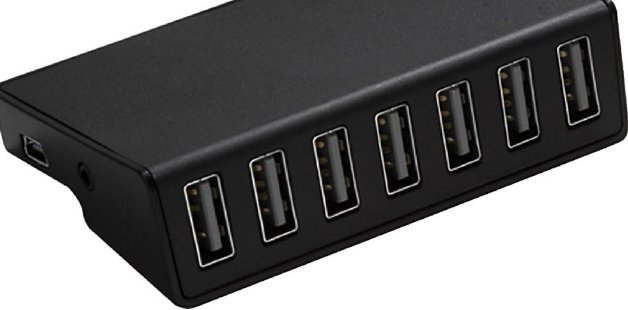
USB-hub is a very convenient invention, but we recommend to use only high quality devices of this kind, preferably with additional power supply. Yes, they may cost a bit more, but you will be sure that there will be no hardware or software conflicts and the device will work for several years.
Usb device not recognized 04 — USB Device Not Recognized? How to Fix?

Still, the more connectors, hubs and adapters you use, the more chances are that you will see “USB Device Not Recognized” message.

Software Bugs

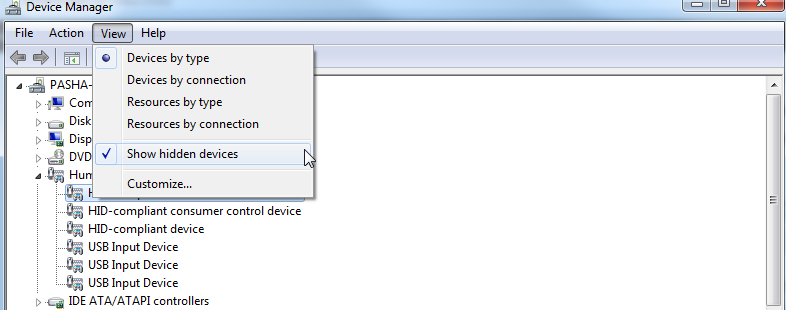
One more possible cause for “USB Device Not Recognized” message is the driver problem. This can be easily diagnosed by means of Device manager.  The problematic device will be listed in the tree of devices with yellow exclamation mark on it (“!”). The solution here would be to reinstall the problem driver or update the driver from the manufacturers web-site. Also the device driver may be in conflict with another driver. Thing is that Windows stores all drivers ever installed. Even if the device is no longer used, Windows will still have its driver. To get rid of the possible root cause, browse through your Device Manager or use third party tools to scan your computer for unused devices and delete them.
Usb device not recognized 05 — USB Device Not Recognized? How to Fix?

Important: Be careful here, do not make any changes in Device Manager in case you are not hundred percent certain in what you are doing.

In case you need assistance in troubleshooting your USB devices, contact our support team for advice.




 

  • On September 20, 2016
  • 0 Comment

Leave Reply Cancel reply

Your email address will not be published. Required fields are marked *

Recent Posts
  • The Password Memo Was Honest. The Checklist Wasn’t.
  • As Is: How Software Became the Only Product You Could Legally Sell Broken
  • The Production Incident Class Your Postmortem Template Doesn’t Have
  • Why Load Test Numbers Lie
  • When Config Became Executable: The Twenty-Year Pattern Behind Supply Chain Attacks
Categories
  • ai (8)
  • android (18)
  • apple (36)
  • chart (18)
  • cloud (1)
  • fix (42)
  • games (11)
  • google (31)
  • hardware (73)
  • healthcare (3)
  • how to (231)
  • internet (92)
  • ios (23)
  • macos (3)
  • microsoft (82)
  • mobile (36)
  • news (74)
  • optimization (17)
  • osx (4)
  • outsourcing (8)
  • qa (3)
  • regulation (7)
  • review (120)
  • security (40)
  • software (160)
  • windows (150)
Archives
  • August 2026
  • July 2026
  • June 2026
  • May 2026
  • August 2025
  • March 2025
  • February 2025
  • April 2023
  • March 2023
  • February 2023
  • January 2023
  • March 2022
  • January 2022
  • December 2021
  • November 2021
  • October 2021
  • September 2021
  • August 2021
  • July 2021
  • June 2021
  • May 2021
  • April 2021
  • March 2021
  • February 2021
  • January 2021
  • December 2020
  • November 2020
  • October 2020
  • September 2020
  • August 2020
  • July 2020
  • June 2020
  • May 2020
  • April 2020
  • March 2020
  • February 2020
  • January 2020
  • December 2019
  • November 2019
  • October 2019
  • September 2019
  • August 2019
  • April 2019
  • March 2019
  • February 2019
  • January 2019
  • December 2018
  • November 2018
  • October 2018
  • September 2018
  • June 2018
  • May 2018
  • April 2018
  • February 2018
  • January 2018
  • December 2017
  • November 2017
  • October 2017
  • June 2017
  • May 2017
  • April 2017
  • March 2017
  • February 2017
  • January 2017
  • December 2016
  • November 2016
  • October 2016
  • September 2016
  • August 2016
  • July 2016
  • June 2016
  • May 2016
  • April 2016
  • March 2016
  • February 2016
  • January 2016
  • December 2015
  • November 2015
  • October 2015
  • September 2015
  • July 2015
  • January 2015
Archives
  • August 2026
  • July 2026
  • June 2026
  • May 2026
  • August 2025
  • March 2025
  • February 2025
  • April 2023
  • March 2023
  • February 2023
  • January 2023
  • March 2022
  • January 2022
  • December 2021
  • November 2021
  • October 2021
  • September 2021
  • August 2021
  • July 2021
  • June 2021
  • May 2021
  • April 2021
  • March 2021
  • February 2021
  • January 2021
  • December 2020
  • November 2020
  • October 2020
  • September 2020
  • August 2020
  • July 2020
  • June 2020
  • May 2020
  • April 2020
  • March 2020
  • February 2020
  • January 2020
  • December 2019
  • November 2019
  • October 2019
  • September 2019
  • August 2019
  • April 2019
  • March 2019
  • February 2019
  • January 2019
  • December 2018
  • November 2018
  • October 2018
  • September 2018
  • June 2018
  • May 2018
  • April 2018
  • February 2018
  • January 2018
  • December 2017
  • November 2017
  • October 2017
  • June 2017
  • May 2017
  • April 2017
  • March 2017
  • February 2017
  • January 2017
  • December 2016
  • November 2016
  • October 2016
  • September 2016
  • August 2016
  • July 2016
  • June 2016
  • May 2016
  • April 2016
  • March 2016
  • February 2016
  • January 2016
  • December 2015
  • November 2015
  • October 2015
  • September 2015
  • July 2015
  • January 2015

Sync Google Drive with your PC

Previous thumb

No Sound in Gear VR movies

Next thumb
Scroll

Services

  • Software Development
  • Quality Assurance
  • Customer Support
  • Managed Services
  • 24/7 Emergency IT Support
  • Competency Center
  • Local AI Agent Development
  • Software as a Medical Device

Compliance

  • Compliance Audit
  • GDPR Compliance
  • What is GDPR
  • ISO 9001:2015 Certification

Company

  • About Us
  • All Services
  • Projects
  • Case Studies
  • Articles
  • Contact
About HiTech Service

With 10 year experience of working together, we have reached tangible synergetic effect in performance and productivity, which results in highest quality services and satisfied clients.

Privacy Policy   Cookie Policy


  • Facebook
  • X
  • LinkedIn
CONTACT INFO
  • 900 Foulk Rd, Suite 201, Wilmington, DE, USA, 19803
  • Kudryavs’kyi descent 5b, Kyiv, Ukraine, 04053
  • +1 646.844.5712 (US)
ISO 9001:2015 certificate issued to HiTech Service LLC by Veritas
RIPE Atlas logo, the network measurement community HiTech Service takes part in
BrainBasket Foundation logo, IT education initiative HiTech Service supports
HiTech Service LLC membership badge of the Hi-Tech Office Ukraine association Dun & Bradstreet verified business badge for HiTech Service LLC
YouTeam partner badge for HiTech Service LLC
Hitech Service LLC

Copyright 2026