
Have any questions? +1 646.844.5712 (US)

  • Facebook
  • LinkedIn
  • Twitter
HiTech ServiceHiTech Service
  • Home
  • About
  • Services
    • Software Development
    • Customer Support
    • Quality Assurance
    • Managed Services
    • Compliance Audit
    • GDPR Compliance
    • Competency Center
    • Emergency IT Support
    • Software as medical device
    • Local AI Agent Development
  • Projects
  • GDPR
  • Articles
  • Case Studies
  • Contact
Menu
  • Home
  • About
  • Services
    • Software Development
    • Customer Support
    • Quality Assurance
    • Managed Services
    • Compliance Audit
    • GDPR Compliance
    • Competency Center
    • Emergency IT Support
    • Software as medical device
    • Local AI Agent Development
  • Projects
  • GDPR
  • Articles
  • Case Studies
  • Contact
How to create your custom budget tracker?

How to create your custom budget tracker?

Doing your home budget accounting is a really good idea. It allows to track the flow of your funds and do some budget planning. There are tons of mobile applications on app stores. Part of them are paid applications; others are free but full of advertisements. The most uncomfortable in these apps is that you have to work with presets and do not have many possibilities to customize.


We want to present you a very quick way to create your budget tracker within several minutes. Moreover, the main advantage – it is absolutely customizable and you can add there anything you want.

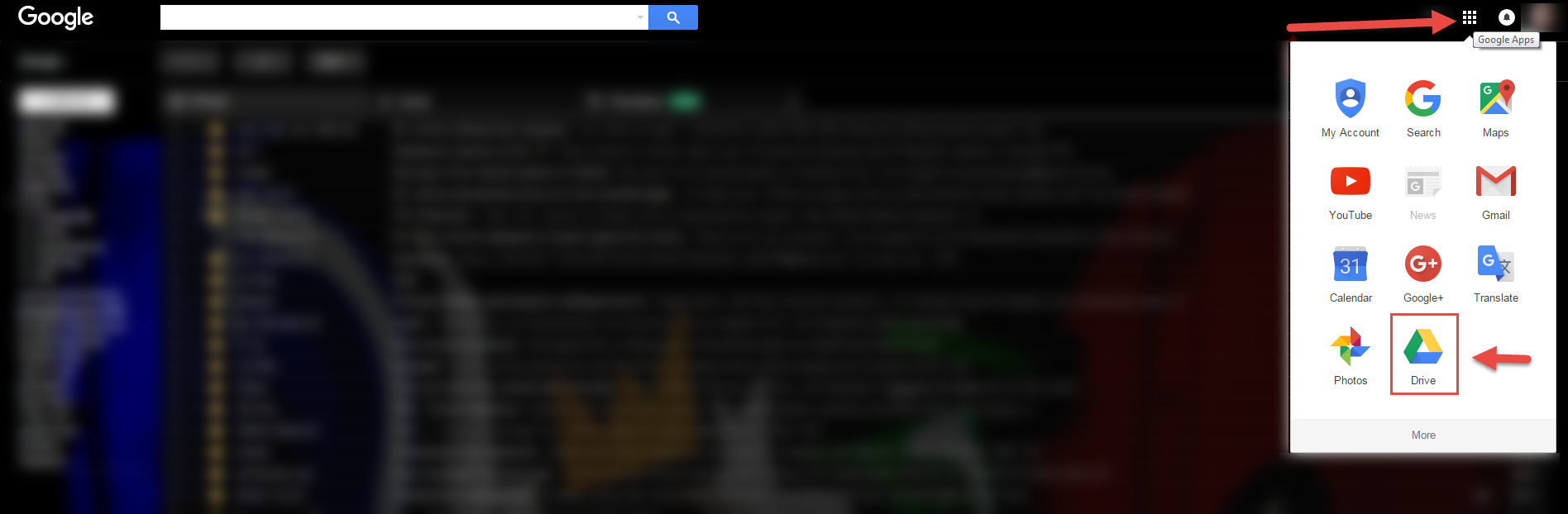
So let’s start. First of all, you will need to access your Google Drive. If you have you Gmail account already, you can access it from your mail box. If not, it is worth to create one.
How to create your own custom budget tracker1 — How to create your custom budget tracker?

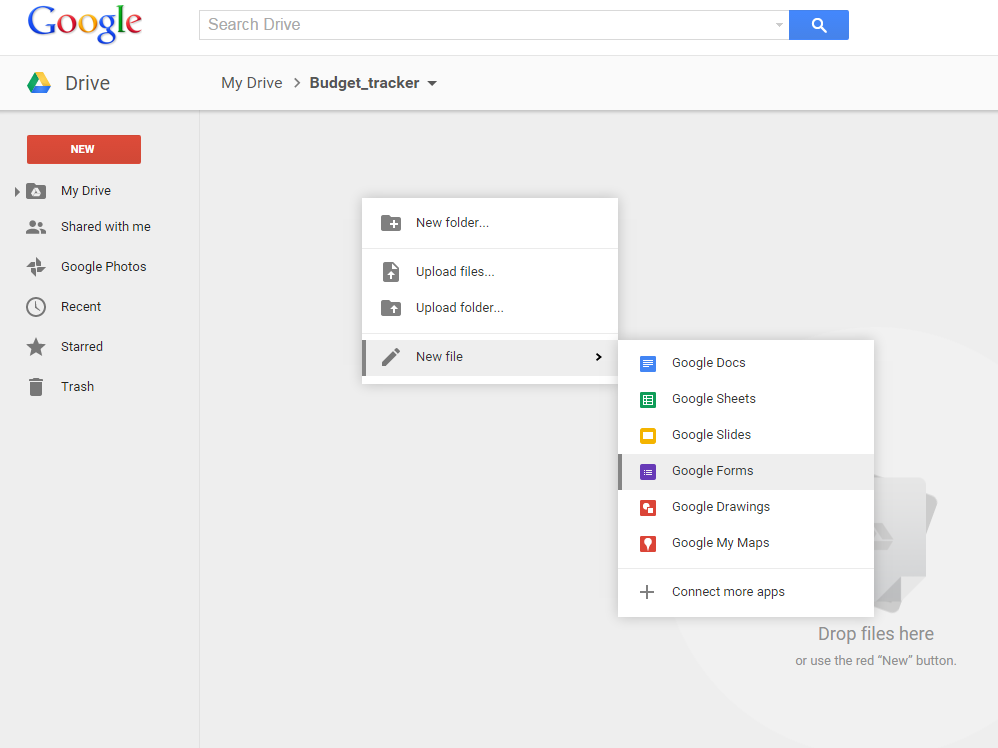
When you accessed you Google drive, you may want to create a separate folder to store your tracker files. In this folder right click on the main area (as on the screenshot) and select to create a new file and then Google Forms.
How to create your own custom budget tracker2 — How to create your custom budget tracker?

Click on UNTITLED FORM in the upper left corner and name your form. This will also save the document.

How to create your own custom budget tracker3 — How to create your custom budget tracker?

After the form is saved, we can start creating a form itself. Let’s define what information do you want to collect and how. We would recommend to build your form using following fields, but you can always add more as it is fully customizable.

1. Date

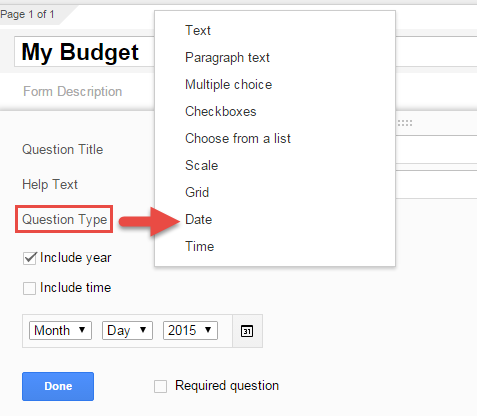
Date can be populated automatically or if you want to enter date manually (to be able to record future and past dates), you will need to add a field as “date” question type ( and time if needed).


How to create your own custom budget tracker4 — How to create your custom budget tracker?

2. Amount

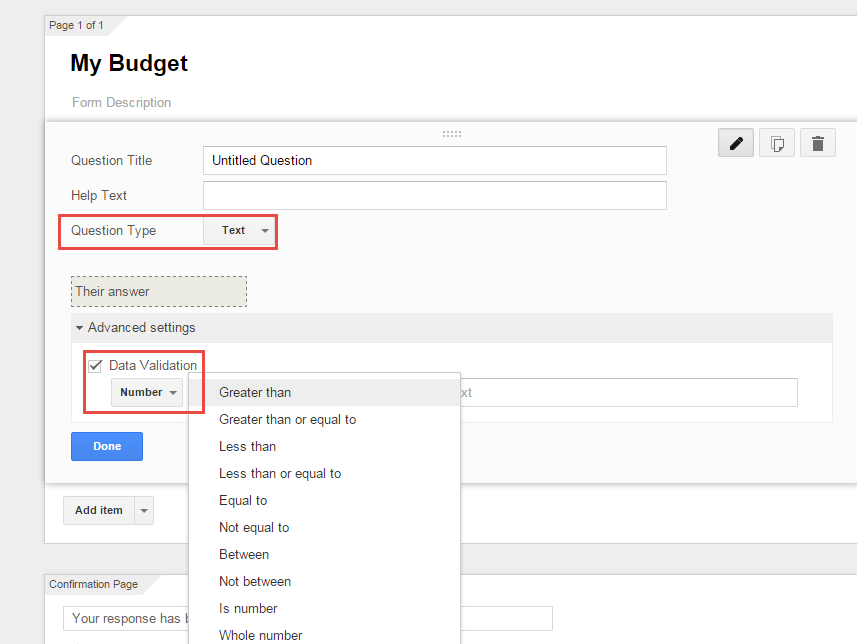
This is a field that you add to enter the transactions/amount of money spent. Just use “text” as question type and make sure that data validation is on. Set data validation to number, so it will not allow enter nothing but the number is that field. It will be set to “Greater than”: if you want to be able to enter negative values set it to -999999; if no – keep it blank.
How to create your own custom budget tracker5 — How to create your custom budget tracker?

3. Expense type

Create several expense types like transportation, groceries, leisure, etc. Make sure create “other” category in case expenses will not fit into any category you have. These categories you add as “choose from a list” question type and then create the list itself.
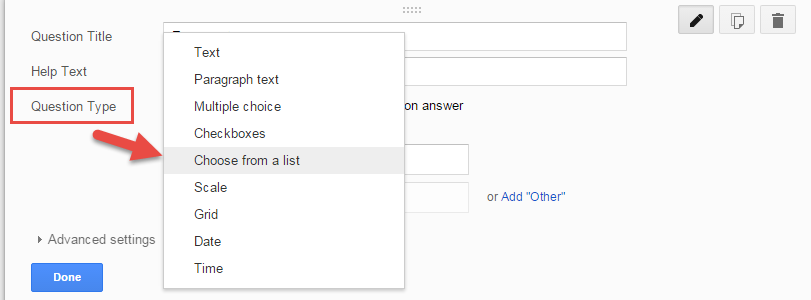
How to create your own custom budget tracker6 — How to create your custom budget tracker?

4. Notes

Create notes field to be able to add more info on expenses if needed. Use “paragraph” questions type for this.
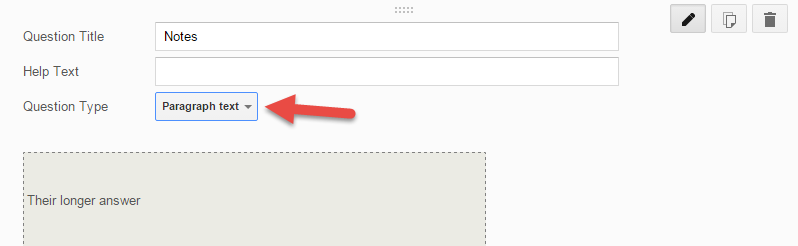
How to create your own custom budget tracker7 — How to create your custom budget tracker?

5. Who?

You might need this question in case there are multiple family members using this form. This allows to separate everybody’s expenses if needed. Use “choose from the list” question type.

For majority of the questions you would want to have them as required fields to avoid empty data.

You can go to “change theme” to make your form look better.

How to create your own custom budget tracker8 — How to create your custom budget tracker?

Hit “send form” in right upper corner to share this form with other family members. It will send a link, and you just save it on you phone as the favourite to able to open it any time. After the form is shared, you will get an option to create an answers file. Just hit CREATE and the file with the expenses will be created on Google Drive.

That works really good on the mobile devices and is comfortable to use.

How to create your own custom budget tracker9 — How to create your custom budget tracker?

If you want to check the expenses and get some totals and stats, just go to you google drive and you will see an Excel file near your form.
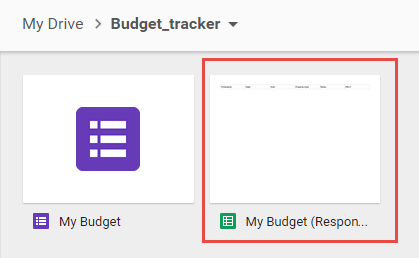
How to create your own custom budget tracker10 — How to create your custom budget tracker?

Open it up and you will get all the information you need.

Enjoy


  • On September 24, 2015
  • 0 Comment

Leave Reply Cancel reply

Your email address will not be published. Required fields are marked *

Recent Posts
  • Managed IT Services vs. In-House IT: What Should You Choose?
  • When the Model Is the Vendor: What Happens to Compliance When You Don’t Own the Weights
  • The Edge Device Is the Perimeter: Why the Box You Bought to Keep Them Out Is How They Get In
  • The Password Memo Was Honest. The Checklist Wasn’t.
  • As Is: How Software Became the Only Product You Could Legally Sell Broken
Categories
  • ai (9)
  • android (18)
  • apple (36)
  • chart (18)
  • cloud (1)
  • fix (42)
  • games (11)
  • google (31)
  • hardware (73)
  • healthcare (3)
  • how to (231)
  • internet (92)
  • ios (23)
  • macos (3)
  • microsoft (82)
  • mobile (36)
  • news (74)
  • optimization (17)
  • osx (4)
  • outsourcing (9)
  • qa (3)
  • regulation (8)
  • review (120)
  • security (41)
  • software (160)
  • windows (150)
Archives
  • September 2026
  • August 2026
  • July 2026
  • June 2026
  • May 2026
  • August 2025
  • March 2025
  • February 2025
  • April 2023
  • March 2023
  • February 2023
  • January 2023
  • March 2022
  • January 2022
  • December 2021
  • November 2021
  • October 2021
  • September 2021
  • August 2021
  • July 2021
  • June 2021
  • May 2021
  • April 2021
  • March 2021
  • February 2021
  • January 2021
  • December 2020
  • November 2020
  • October 2020
  • September 2020
  • August 2020
  • July 2020
  • June 2020
  • May 2020
  • April 2020
  • March 2020
  • February 2020
  • January 2020
  • December 2019
  • November 2019
  • October 2019
  • September 2019
  • August 2019
  • April 2019
  • March 2019
  • February 2019
  • January 2019
  • December 2018
  • November 2018
  • October 2018
  • September 2018
  • June 2018
  • May 2018
  • April 2018
  • February 2018
  • January 2018
  • December 2017
  • November 2017
  • October 2017
  • June 2017
  • May 2017
  • April 2017
  • March 2017
  • February 2017
  • January 2017
  • December 2016
  • November 2016
  • October 2016
  • September 2016
  • August 2016
  • July 2016
  • June 2016
  • May 2016
  • April 2016
  • March 2016
  • February 2016
  • January 2016
  • December 2015
  • November 2015
  • October 2015
  • September 2015
  • July 2015
  • January 2015
Archives
  • September 2026
  • August 2026
  • July 2026
  • June 2026
  • May 2026
  • August 2025
  • March 2025
  • February 2025
  • April 2023
  • March 2023
  • February 2023
  • January 2023
  • March 2022
  • January 2022
  • December 2021
  • November 2021
  • October 2021
  • September 2021
  • August 2021
  • July 2021
  • June 2021
  • May 2021
  • April 2021
  • March 2021
  • February 2021
  • January 2021
  • December 2020
  • November 2020
  • October 2020
  • September 2020
  • August 2020
  • July 2020
  • June 2020
  • May 2020
  • April 2020
  • March 2020
  • February 2020
  • January 2020
  • December 2019
  • November 2019
  • October 2019
  • September 2019
  • August 2019
  • April 2019
  • March 2019
  • February 2019
  • January 2019
  • December 2018
  • November 2018
  • October 2018
  • September 2018
  • June 2018
  • May 2018
  • April 2018
  • February 2018
  • January 2018
  • December 2017
  • November 2017
  • October 2017
  • June 2017
  • May 2017
  • April 2017
  • March 2017
  • February 2017
  • January 2017
  • December 2016
  • November 2016
  • October 2016
  • September 2016
  • August 2016
  • July 2016
  • June 2016
  • May 2016
  • April 2016
  • March 2016
  • February 2016
  • January 2016
  • December 2015
  • November 2015
  • October 2015
  • September 2015
  • July 2015
  • January 2015

Windows 7: How to convert values to a different format?

Previous thumb

What do Sony, HTC, Samsung, Razer have in common?

Next thumb
Scroll

Services

  • Software Development
  • Quality Assurance
  • Customer Support
  • Managed Services
  • 24/7 Emergency IT Support
  • Competency Center
  • Local AI Agent Development
  • Software as a Medical Device

Compliance

  • Compliance Audit
  • GDPR Compliance
  • What is GDPR
  • ISO 9001:2015 Certification

Company

  • About Us
  • All Services
  • Projects
  • Case Studies
  • Articles
  • Contact
About HiTech Service

With 10 year experience of working together, we have reached tangible synergetic effect in performance and productivity, which results in highest quality services and satisfied clients.

Privacy Policy   Cookie Policy


  • Facebook
  • X
  • LinkedIn
CONTACT INFO
  • 900 Foulk Rd, Suite 201, Wilmington, DE, USA, 19803
  • Kudryavs’kyi descent 5b, Kyiv, Ukraine, 04053
  • +1 646.844.5712 (US)
ISO 9001:2015 certificate issued to HiTech Service LLC by Veritas
RIPE Atlas logo, the network measurement community HiTech Service takes part in
BrainBasket Foundation logo, IT education initiative HiTech Service supports
HiTech Service LLC membership badge of the Hi-Tech Office Ukraine association Dun & Bradstreet verified business badge for HiTech Service LLC
YouTeam partner badge for HiTech Service LLC
Hitech Service LLC

Copyright 2026