Have any questions? +1 646.844.5712 (US)

  • Facebook
  • LinkedIn
  • Twitter
HiTech ServiceHiTech Service
  • Home
  • About
  • Services
    • Software Development
    • Customer Support
    • Quality Assurance
    • Managed Services
    • Compliance Audit
    • GDPR Compliance
    • Competency Center
    • Emergency IT Support
    • Software as medical device
    • Local AI Agent Development
  • Projects
  • GDPR
  • Articles
  • Case Studies
  • Contact
Menu
  • Home
  • About
  • Services
    • Software Development
    • Customer Support
    • Quality Assurance
    • Managed Services
    • Compliance Audit
    • GDPR Compliance
    • Competency Center
    • Emergency IT Support
    • Software as medical device
    • Local AI Agent Development
  • Projects
  • GDPR
  • Articles
  • Case Studies
  • Contact
Windows logo

How to roll back to Windows 10 from Windows 11?

Windows 11 has been present in our lives since October 5, 2021. Almost two months are over, and feedback regarding the new OS by Microsoft is different. Some users say that Windows 10 is far better and stable, so there is no reason to update your PC. The other share of users (I can consider myself a part of it) claim that they love the new design and are ready to close their eyes on most issues.

Although I have not noticed anything annoying and use the new OS with joy, we would help those who dislike Windows 11 and want to return to the predecessor. This guide would be almost identical to what we all had in Windows 10 but with minor changes.

Set of rules before the process

  1. Even though the system is going to keep your files, we recommend that you make needed backups.
  2. Do not forget to put your tablet or laptop on the charge if you are using mentioned devices.
  3. Make sure that you saved problematic drivers that would not be set up on their own during Windows installation.

How to roll back to Windows 10?

  • Open the Settings app from the Start menu or by using the Win + I combination.
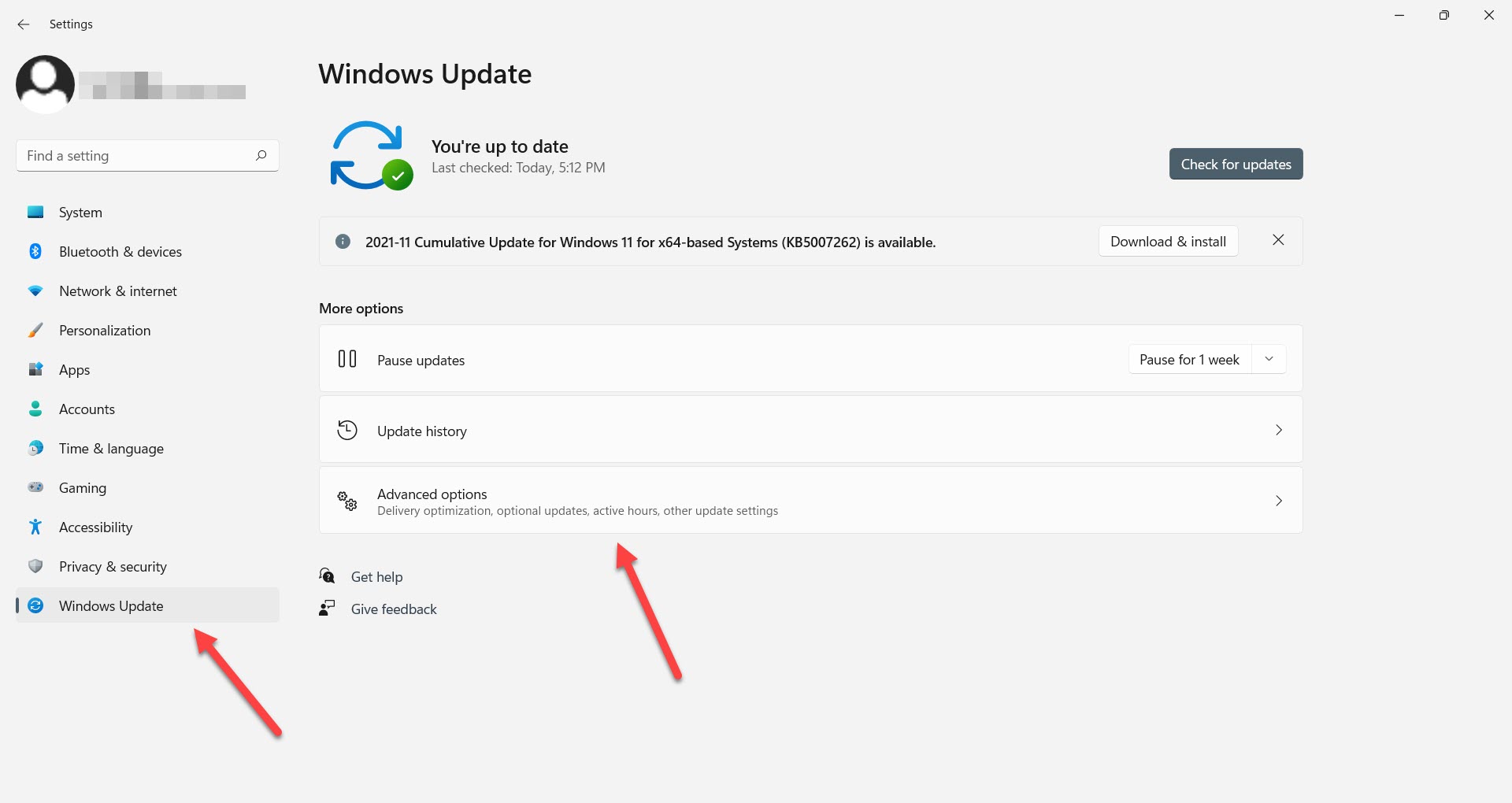
Windows Update screen
  • Go to Windows Update > Advanced options
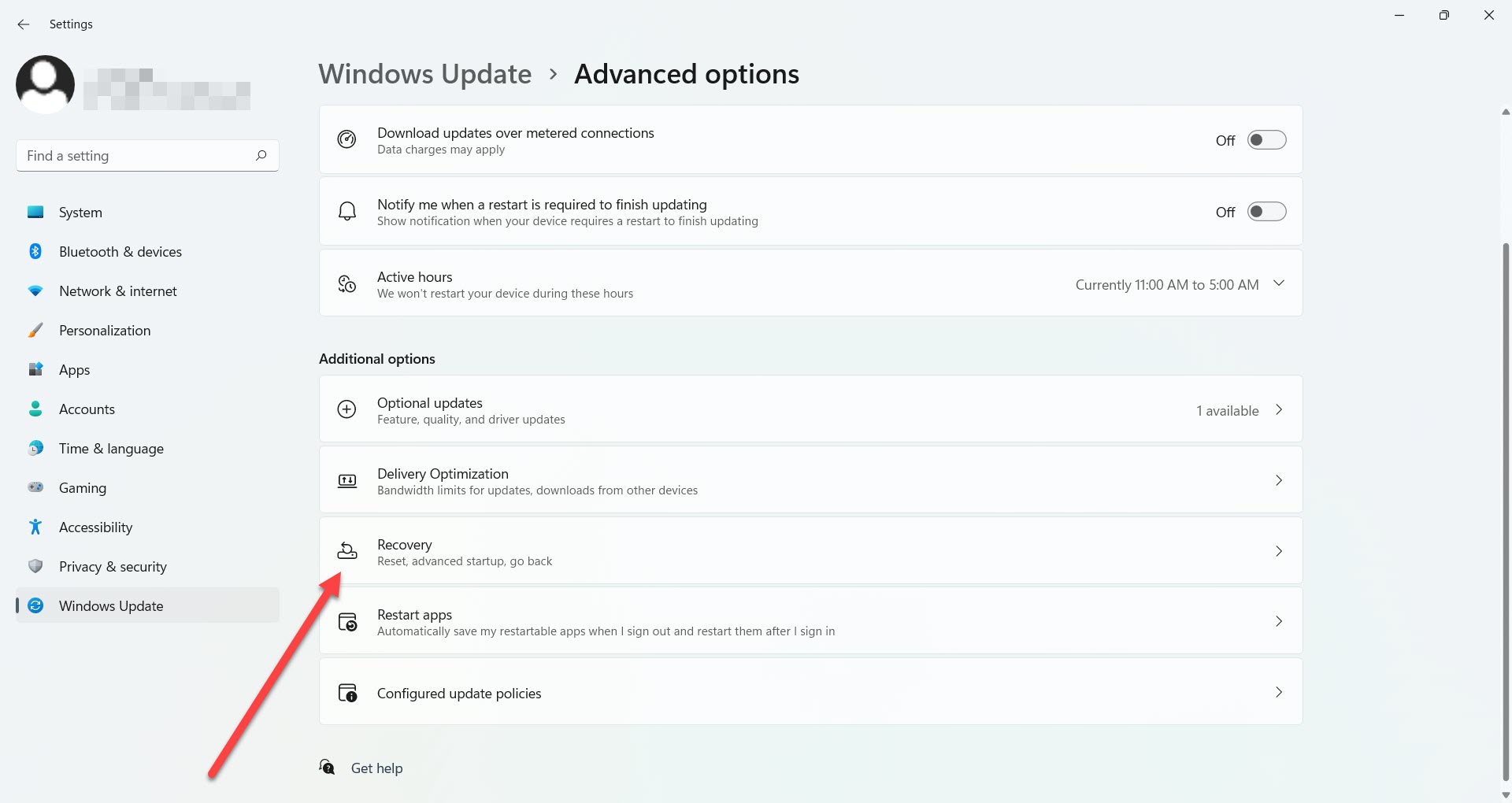
Advanced update options screen
  • Click Recovery.
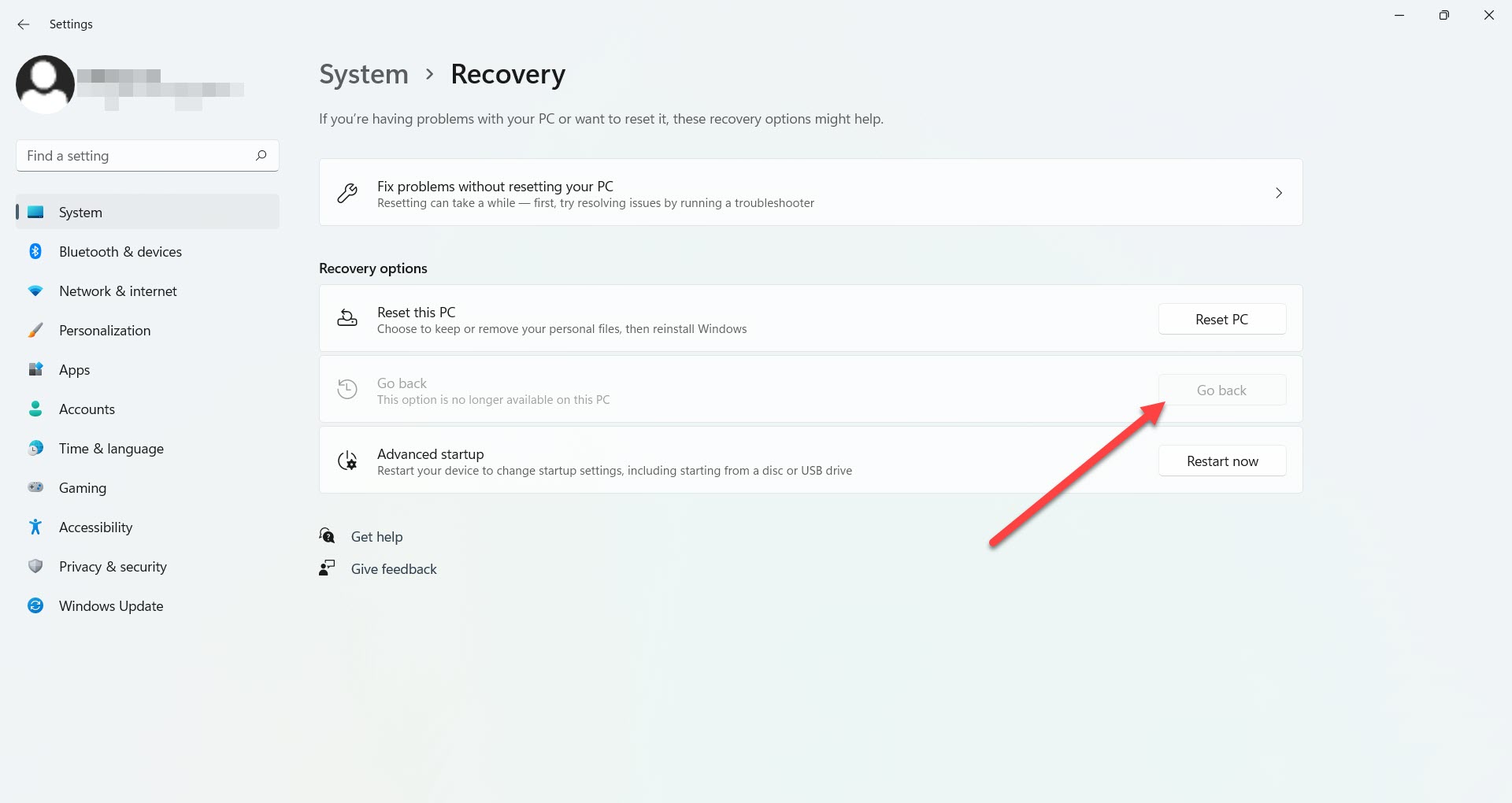
Recovery screen
  • In the “Recovery” section, look for the “Go Back” option.
  • Click on “Go Back.”
  • Provide a reason why you want to roll back to Windows 10. You can simply select “For other reasons.” Click “Next.” 
  • State your reasons in the next step. 
  • Microsoft will prompt you to check for updates. Click “No thanks.” 
  • Microsoft will then warn you that your computer will be unavailable for some time while you return to Windows 10 from Windows 11. Click “Next.” 
  • Confirm the password warning and click “Next.”
  • Finally, click the “Go back to the previous build” button. Revert Windows 10 from Windows 11.
  • Wait for Windows to complete the process.

This is how you can go back to Windows 10 BEFORE 10 days have passed after your upgrade to the new OS. If you decided to roll back after the trial ended, the system would not allow you to do it via the Settings interface.

How to roll back to Windows 10 if the “Go Back” button is inactive?

As we have mentioned, you have only ten days to go back to Windows 10 after your upgrade. This is more than enough time to check the new OS and make your mind about it. However, many might have missed this condition or just forgotten about it, and now this option is unavailable.

We strongly recommend making backups for your files since Windows 10 requires a clean installation. 

  1. Go to Windows 10 download page on Microsoft website.
  2. Click “Download tool now.”
  3. After the file is ready, click on it to run the installation.
  4. Agree to all the terms and conditions.
  5. Then select “Upgrade this PC now.”
  6. The download process starts, and you can use your computer in the meantime.
  7. Once the download is finished, again accept terms and conditions.
  8. Make sure you choose “Nothing” on the “Choose what to keep” screen.
  9. Go through the installation process.

Once the process is finished, you will need to go through the “Welcome” phase of WIndows and set up the system. Installation should not take long, and you will be live in a few minutes.

  • On November 29, 2021
  • 0 Comment

Leave Reply Cancel reply

Your email address will not be published. Required fields are marked *

Recent Posts
  • How AI and Automation Are Changing IT Service Delivery
  • Managed IT Services vs. In-House IT: What Should You Choose?
  • When the Model Is the Vendor: What Happens to Compliance When You Don’t Own the Weights
  • The Edge Device Is the Perimeter: Why the Box You Bought to Keep Them Out Is How They Get In
  • The Password Memo Was Honest. The Checklist Wasn’t.
Categories
  • ai (10)
  • android (18)
  • apple (36)
  • chart (18)
  • cloud (1)
  • fix (42)
  • games (11)
  • google (31)
  • hardware (73)
  • healthcare (3)
  • how to (231)
  • internet (92)
  • ios (23)
  • macos (3)
  • microsoft (82)
  • mobile (36)
  • news (74)
  • optimization (17)
  • osx (4)
  • outsourcing (9)
  • qa (3)
  • regulation (8)
  • review (120)
  • security (41)
  • software (160)
  • windows (150)
Archives
  • September 2026
  • August 2026
  • July 2026
  • June 2026
  • May 2026
  • August 2025
  • March 2025
  • February 2025
  • April 2023
  • March 2023
  • February 2023
  • January 2023
  • March 2022
  • January 2022
  • December 2021
  • November 2021
  • October 2021
  • September 2021
  • August 2021
  • July 2021
  • June 2021
  • May 2021
  • April 2021
  • March 2021
  • February 2021
  • January 2021
  • December 2020
  • November 2020
  • October 2020
  • September 2020
  • August 2020
  • July 2020
  • June 2020
  • May 2020
  • April 2020
  • March 2020
  • February 2020
  • January 2020
  • December 2019
  • November 2019
  • October 2019
  • September 2019
  • August 2019
  • April 2019
  • March 2019
  • February 2019
  • January 2019
  • December 2018
  • November 2018
  • October 2018
  • September 2018
  • June 2018
  • May 2018
  • April 2018
  • February 2018
  • January 2018
  • December 2017
  • November 2017
  • October 2017
  • June 2017
  • May 2017
  • April 2017
  • March 2017
  • February 2017
  • January 2017
  • December 2016
  • November 2016
  • October 2016
  • September 2016
  • August 2016
  • July 2016
  • June 2016
  • May 2016
  • April 2016
  • March 2016
  • February 2016
  • January 2016
  • December 2015
  • November 2015
  • October 2015
  • September 2015
  • July 2015
  • January 2015
Archives
  • September 2026
  • August 2026
  • July 2026
  • June 2026
  • May 2026
  • August 2025
  • March 2025
  • February 2025
  • April 2023
  • March 2023
  • February 2023
  • January 2023
  • March 2022
  • January 2022
  • December 2021
  • November 2021
  • October 2021
  • September 2021
  • August 2021
  • July 2021
  • June 2021
  • May 2021
  • April 2021
  • March 2021
  • February 2021
  • January 2021
  • December 2020
  • November 2020
  • October 2020
  • September 2020
  • August 2020
  • July 2020
  • June 2020
  • May 2020
  • April 2020
  • March 2020
  • February 2020
  • January 2020
  • December 2019
  • November 2019
  • October 2019
  • September 2019
  • August 2019
  • April 2019
  • March 2019
  • February 2019
  • January 2019
  • December 2018
  • November 2018
  • October 2018
  • September 2018
  • June 2018
  • May 2018
  • April 2018
  • February 2018
  • January 2018
  • December 2017
  • November 2017
  • October 2017
  • June 2017
  • May 2017
  • April 2017
  • March 2017
  • February 2017
  • January 2017
  • December 2016
  • November 2016
  • October 2016
  • September 2016
  • August 2016
  • July 2016
  • June 2016
  • May 2016
  • April 2016
  • March 2016
  • February 2016
  • January 2016
  • December 2015
  • November 2015
  • October 2015
  • September 2015
  • July 2015
  • January 2015

How to Choose the Best Customer Support Team

Previous thumb

How to Check Windows Experience Index Score on Windows 11

Next thumb
Scroll

Services

  • Software Development
  • Quality Assurance
  • Customer Support
  • Managed Services
  • 24/7 Emergency IT Support
  • Competency Center
  • Local AI Agent Development
  • Software as a Medical Device

Compliance

  • Compliance Audit
  • GDPR Compliance
  • What is GDPR
  • ISO 9001:2015 Certification

Company

  • About Us
  • All Services
  • Projects
  • Case Studies
  • Articles
  • Contact
About HiTech Service

With 10 year experience of working together, we have reached tangible synergetic effect in performance and productivity, which results in highest quality services and satisfied clients.

Privacy Policy   Cookie Policy


  • Facebook
  • X
  • LinkedIn
CONTACT INFO
  • 900 Foulk Rd, Suite 201, Wilmington, DE, USA, 19803
  • Kudryavs’kyi descent 5b, Kyiv, Ukraine, 04053
  • +1 646.844.5712 (US)
ISO 9001:2015 certificate issued to HiTech Service LLC by Veritas
RIPE Atlas logo, the network measurement community HiTech Service takes part in
BrainBasket Foundation logo, IT education initiative HiTech Service supports
HiTech Service LLC membership badge of the Hi-Tech Office Ukraine association Dun & Bradstreet verified business badge for HiTech Service LLC
YouTeam partner badge for HiTech Service LLC
Hitech Service LLC

Copyright 2026