
Have any questions? +1 646.844.5712 (US)

  • Facebook
  • LinkedIn
  • Twitter
HiTech ServiceHiTech Service
  • Home
  • About
  • Services
    • Software Development
    • Customer Support
    • Quality Assurance
    • Managed Services
    • Compliance Audit
    • GDPR Compliance
    • Competency Center
    • Emergency IT Support
    • Software as medical device
    • Local AI Agent Development
  • Projects
  • GDPR
  • Articles
  • Case Studies
  • Contact
Menu
  • Home
  • About
  • Services
    • Software Development
    • Customer Support
    • Quality Assurance
    • Managed Services
    • Compliance Audit
    • GDPR Compliance
    • Competency Center
    • Emergency IT Support
    • Software as medical device
    • Local AI Agent Development
  • Projects
  • GDPR
  • Articles
  • Case Studies
  • Contact
Disabling Get Windows 10 notifications

Disabling Get Windows 10 notifications

Starting with the introduction of Windows 10 by Microsoft, Windows 7 and WIndows 8 users have been constantly bugged and spammed with upgrade notifications, all due to little Windows icon in their system trays called GWX (Get Windows 10). Here is how to disable and remove that icon and put an end to annoying notifications.


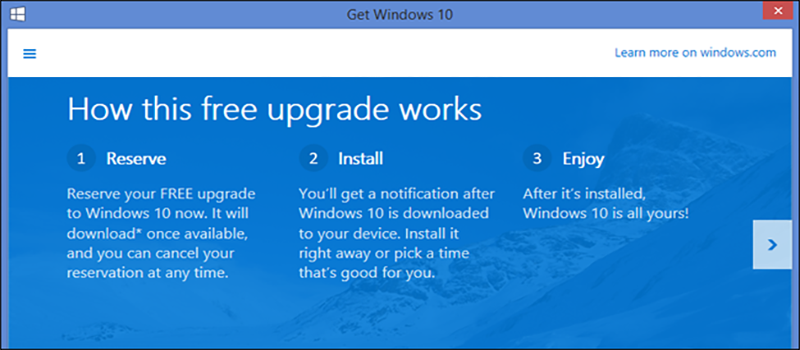
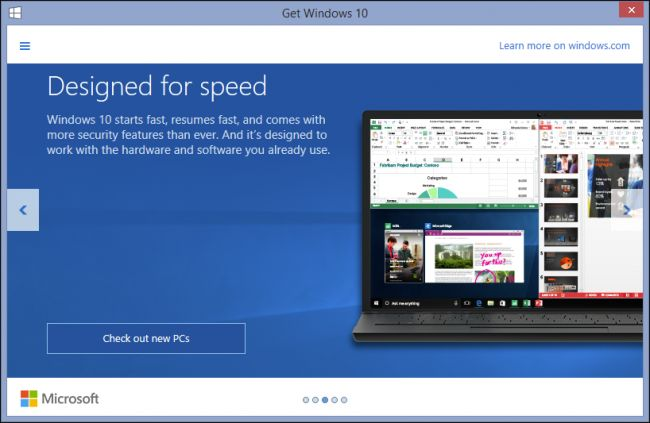
GWX upgrade is an icon and dialog that resides in user’s system trays and has been bugging Windows users for quite some time now. There people who are not sure if they want to upgrade to Windows 10, or even those wanting to stay on earlier versions. When you click this icon, a dialog will appear, which will determine if your PC is Windows 10 ready, if you’re eligible to upgrade for free and, of course, regale you with all the wonderful things Windows 10 will mean to you.
Disabling Get Windows 10 notifications 02 — Disabling Get Windows 10 notifications

This new icon and its resulting dialog are actually part of an application that appeared in late April 2015 as a recommended Windows update (KB3035583), and which has undergone several revisions to facilitate the upgrade process as well as skirt efforts to remove it.

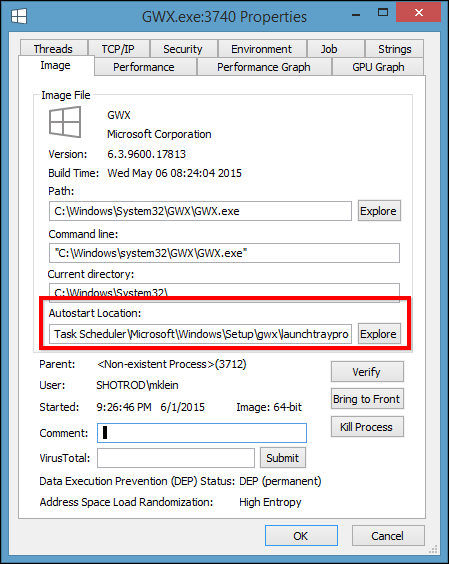
Basically, KB3035583 simply lets Windows Update pester you about upgrading to Windows 10. KB3035583, otherwise known as GWX, is an executable that starts with your system via the Task Scheduler.
Disabling Get Windows 10 notifications 03 1 — Disabling Get Windows 10 notifications

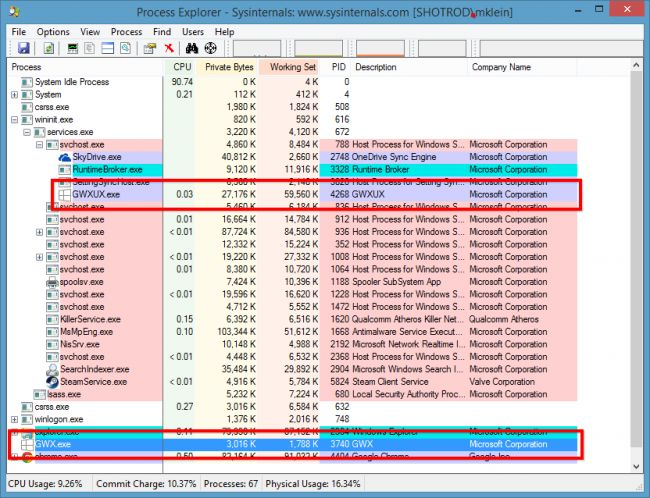
GWX.exe is the system tray icon. When clicked, it launches an application, which is actually an upgrade dialog went over earlier.
Disabling Get Windows 10 notifications 04 — Disabling Get Windows 10 notifications

Microsoft itself have given instruction on deactivating these notifications. And they do work…. until you restart your PC.
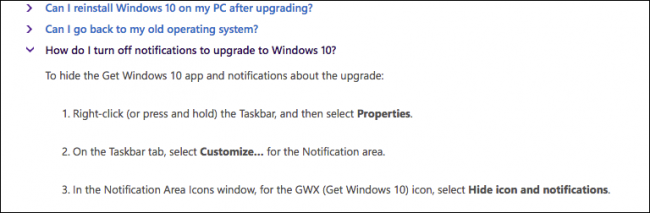


Disabling Get Windows 10 notifications 05 — Disabling Get Windows 10 notifications

You can’t right-click on the icon and tell it not to bug you anymore, and while you could remove its entry from the Task Scheduler, that doesn’t actually remove the GWX application from your system.

The best way to prevent Windows 10 upgrade notifications

So, what follows is what currently appears to be the absolute best way to do so, by using a small (81KB) freeware tool called Never10

This little app was developed by a respected security researcher Steve Gibson, so you can be sure that it will not cause any harm security wise.

Never10 doesn’t require installation; it runs as a standalone executable. So just double-click it to start it up.
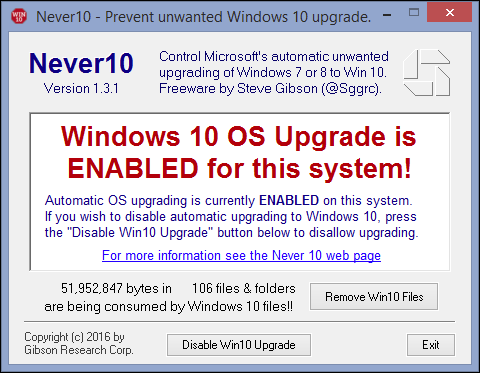
Disabling Get Windows 10 notifications 06 — Disabling Get Windows 10 notifications

When app opens, click on Disable Win10 Upgrade and you shouldn.t be bother by GWX again.
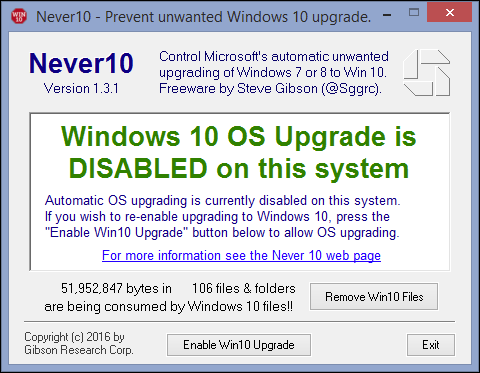
Disabling Get Windows 10 notifications 07 — Disabling Get Windows 10 notifications

Keep in mind that the GWX system tray icon may not immediately disappear from your system tray, instead continuing to reside there and even offering to help you with the upgrade if you click on it. I discovered however that it did indeed go away after a simple restart.

In HiTech Service however we need to reiterate that we do believe that if you’re using any recent version of Windows (7 or 8.1), or you’ve held off and are still using Vista or even XP, that this is the time to finally take the plunge. Windows 10 is a worthy upgrade and probably an unqualified success at retaining the spirit of Windows 7 while correcting the ills of Windows 8.1. That being said, installing a separate application as a recommended update is a sneaky way to go about ensuring user adoption. Add to that the fact that there’s no simple way to disable the GWX.exe application other than removing its autostart line from the Task Scheduler or uninstalling it through Windows Update, and we’re further puzzled at Microsoft’s reasoning and lack of transparency.

Hope this article helped! Be sure to check more tips and tricks in the articles section of hitech-us.hitech.dev




  • On June 27, 2016
  • 0 Comment

Leave Reply Cancel reply

Your email address will not be published. Required fields are marked *

Recent Posts
  • The Password Memo Was Honest. The Checklist Wasn’t.
  • As Is: How Software Became the Only Product You Could Legally Sell Broken
  • The Production Incident Class Your Postmortem Template Doesn’t Have
  • Why Load Test Numbers Lie
  • When Config Became Executable: The Twenty-Year Pattern Behind Supply Chain Attacks
Categories
  • ai (8)
  • android (18)
  • apple (36)
  • chart (18)
  • cloud (1)
  • fix (42)
  • games (11)
  • google (31)
  • hardware (73)
  • healthcare (3)
  • how to (231)
  • internet (92)
  • ios (23)
  • macos (3)
  • microsoft (82)
  • mobile (36)
  • news (74)
  • optimization (17)
  • osx (4)
  • outsourcing (8)
  • qa (3)
  • regulation (7)
  • review (120)
  • security (40)
  • software (160)
  • windows (150)
Archives
  • August 2026
  • July 2026
  • June 2026
  • May 2026
  • August 2025
  • March 2025
  • February 2025
  • April 2023
  • March 2023
  • February 2023
  • January 2023
  • March 2022
  • January 2022
  • December 2021
  • November 2021
  • October 2021
  • September 2021
  • August 2021
  • July 2021
  • June 2021
  • May 2021
  • April 2021
  • March 2021
  • February 2021
  • January 2021
  • December 2020
  • November 2020
  • October 2020
  • September 2020
  • August 2020
  • July 2020
  • June 2020
  • May 2020
  • April 2020
  • March 2020
  • February 2020
  • January 2020
  • December 2019
  • November 2019
  • October 2019
  • September 2019
  • August 2019
  • April 2019
  • March 2019
  • February 2019
  • January 2019
  • December 2018
  • November 2018
  • October 2018
  • September 2018
  • June 2018
  • May 2018
  • April 2018
  • February 2018
  • January 2018
  • December 2017
  • November 2017
  • October 2017
  • June 2017
  • May 2017
  • April 2017
  • March 2017
  • February 2017
  • January 2017
  • December 2016
  • November 2016
  • October 2016
  • September 2016
  • August 2016
  • July 2016
  • June 2016
  • May 2016
  • April 2016
  • March 2016
  • February 2016
  • January 2016
  • December 2015
  • November 2015
  • October 2015
  • September 2015
  • July 2015
  • January 2015
Archives
  • August 2026
  • July 2026
  • June 2026
  • May 2026
  • August 2025
  • March 2025
  • February 2025
  • April 2023
  • March 2023
  • February 2023
  • January 2023
  • March 2022
  • January 2022
  • December 2021
  • November 2021
  • October 2021
  • September 2021
  • August 2021
  • July 2021
  • June 2021
  • May 2021
  • April 2021
  • March 2021
  • February 2021
  • January 2021
  • December 2020
  • November 2020
  • October 2020
  • September 2020
  • August 2020
  • July 2020
  • June 2020
  • May 2020
  • April 2020
  • March 2020
  • February 2020
  • January 2020
  • December 2019
  • November 2019
  • October 2019
  • September 2019
  • August 2019
  • April 2019
  • March 2019
  • February 2019
  • January 2019
  • December 2018
  • November 2018
  • October 2018
  • September 2018
  • June 2018
  • May 2018
  • April 2018
  • February 2018
  • January 2018
  • December 2017
  • November 2017
  • October 2017
  • June 2017
  • May 2017
  • April 2017
  • March 2017
  • February 2017
  • January 2017
  • December 2016
  • November 2016
  • October 2016
  • September 2016
  • August 2016
  • July 2016
  • June 2016
  • May 2016
  • April 2016
  • March 2016
  • February 2016
  • January 2016
  • December 2015
  • November 2015
  • October 2015
  • September 2015
  • July 2015
  • January 2015

Screen is getting dark in Windows 10? Fixed!

Previous thumb

How to control taskbar icons in WIndows 10?

Next thumb
Scroll

Services

  • Software Development
  • Quality Assurance
  • Customer Support
  • Managed Services
  • 24/7 Emergency IT Support
  • Competency Center
  • Local AI Agent Development
  • Software as a Medical Device

Compliance

  • Compliance Audit
  • GDPR Compliance
  • What is GDPR
  • ISO 9001:2015 Certification

Company

  • About Us
  • All Services
  • Projects
  • Case Studies
  • Articles
  • Contact
About HiTech Service

With 10 year experience of working together, we have reached tangible synergetic effect in performance and productivity, which results in highest quality services and satisfied clients.

Privacy Policy   Cookie Policy


  • Facebook
  • X
  • LinkedIn
CONTACT INFO
  • 900 Foulk Rd, Suite 201, Wilmington, DE, USA, 19803
  • Kudryavs’kyi descent 5b, Kyiv, Ukraine, 04053
  • +1 646.844.5712 (US)
ISO 9001:2015 certificate issued to HiTech Service LLC by Veritas
RIPE Atlas logo, the network measurement community HiTech Service takes part in
BrainBasket Foundation logo, IT education initiative HiTech Service supports
HiTech Service LLC membership badge of the Hi-Tech Office Ukraine association Dun & Bradstreet verified business badge for HiTech Service LLC
YouTeam partner badge for HiTech Service LLC
Hitech Service LLC

Copyright 2026