
Have any questions? +1 646.844.5712 (US)

  • Facebook
  • LinkedIn
  • Twitter
HiTech ServiceHiTech Service
  • Home
  • About
  • Services
    • Software Development
    • Customer Support
    • Quality Assurance
    • Managed Services
    • Compliance Audit
    • GDPR Compliance
    • Competency Center
    • Emergency IT Support
    • Software as medical device
    • Local AI Agent Development
  • Projects
  • GDPR
  • Articles
  • Case Studies
  • Contact
Menu
  • Home
  • About
  • Services
    • Software Development
    • Customer Support
    • Quality Assurance
    • Managed Services
    • Compliance Audit
    • GDPR Compliance
    • Competency Center
    • Emergency IT Support
    • Software as medical device
    • Local AI Agent Development
  • Projects
  • GDPR
  • Articles
  • Case Studies
  • Contact
sound

Low sounds or can barely hear dialogs in movies or games? Fixed!

You did not have sound problems on your computer? Then you are lucky, because these are very irritating, destroying all the pleasant experience from watching a movie or playing a game.


First let’s focus on low sound problem in Windows, despite speaker volume and all related configurations maxed. This can be diagnosed by very low green bar level at your sound control while in playback.
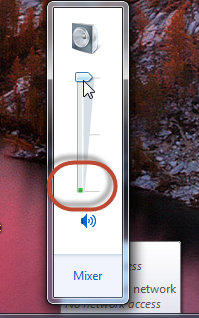
Sound is too low or can barely hear dialogs in movies or games 02 — Low sounds or can barely hear dialogs in movies or games? Fixed!

If this problem exists only while using some definite application, maybe you have the sound levellowered in the Sound Mixer. To check this, click on the Mixer link under your Speakers settings, find the problem application in the list and check what level is set there. Note, you will be able to find your application in the list only if it is started.
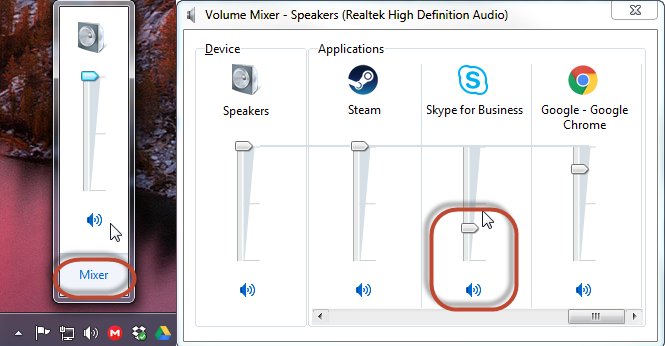
Sound is too low or can barely hear dialogs in movies or games 03 — Low sounds or can barely hear dialogs in movies or games? Fixed!

If this problem irritates you while using any program, do the following. Right click on the Speakers icon and choose Playback Devices.
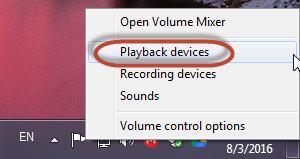
Sound is too low or can barely hear dialogs in movies or games 04 — Low sounds or can barely hear dialogs in movies or games? Fixed!

Then double click on your problematic speakers, navigate to Enhancements tab, put check marks next to Equalizer and Loudness Equalization and save changes.
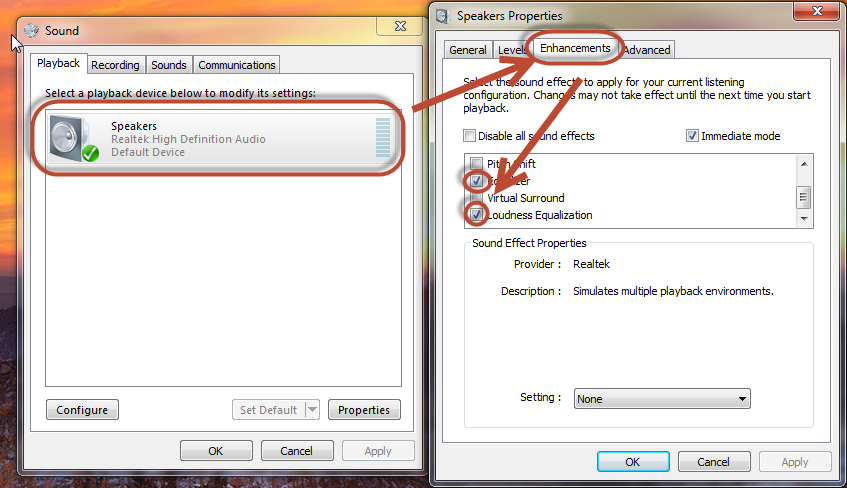
Sound is too low or can barely hear dialogs in movies or games 05 — Low sounds or can barely hear dialogs in movies or games? Fixed!

This should fix the problem with low sound levels.

Now lets return to the problem with quiet dialogues in movies and games. This one can have many root causes and consequently different approaches to get fixed. Just keep in mind that if this problem exists with one specific game or movie, this is not the configuration problem but unprofessional audio mixing.

In case the problem exists all the time, check if you plugged in correct speakers to the correct output. If you have 5.1 or 7.1 sound system, some speakers may not level the sound correctly if plugged to a different output, since were designed for different sound levels.


The problem may be in the output itself. It may happen that you did not plug the jack completely, so try to position the jack correctly if this is you case. It may also happen that someone accidentally hit the audio cable that resulted in jack or plug slight damage, so one may need some time to catch the sound or have this repaired.

Now that we are done with most common analogue root causes, let’s focus on possible sound config problems in Windows. In most recent versions of Windows, generic Windows drivers often take priority in choice over those that came from the manufacturer during OS installation process. So first thing is to try to update you sound drivers from the manufacturers web site. If you have an onboard sound card, it is most likely that you have Realtek audio chip. Their drivers can be downloaded from here.

Next scenario may be that you turned on the karaoke mode and did not turn it off. Navigate to the same Enhancements tab in sound settings as was described above and check that you have Voice Cancellation disabled there.
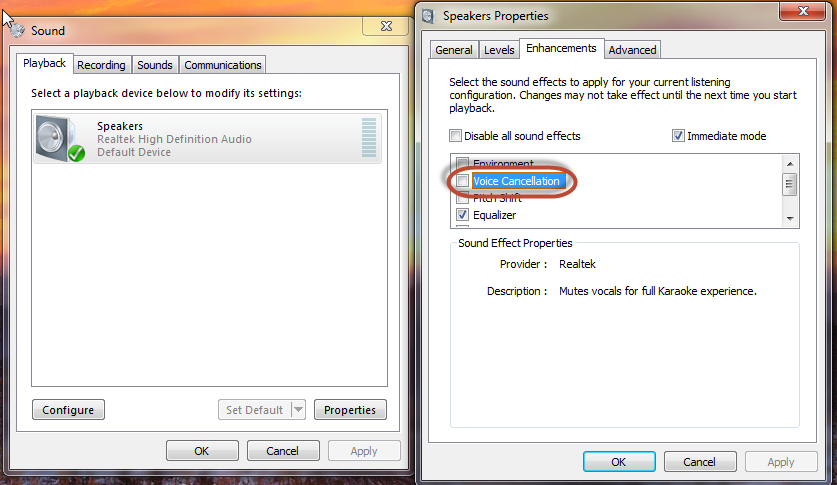
Sound is too low or can barely hear dialogs in movies or games 06 — Low sounds or can barely hear dialogs in movies or games? Fixed!

And one more tweak here – scroll to the top, and check Environment option. Then move your focus to the bottom of the window and choose Room or Living Room there. This will make the dialogs louder because of the environment settings.

Sound is too low or can barely hear dialogs in movies or games 07 — Low sounds or can barely hear dialogs in movies or games? Fixed!

All the above should fix the trouble with low voice in movies and games and overall low sound level.


  • On August 3, 2016
  • 0 Comment

Leave Reply Cancel reply

Your email address will not be published. Required fields are marked *

Recent Posts
  • Managed IT Services vs. In-House IT: What Should You Choose?
  • When the Model Is the Vendor: What Happens to Compliance When You Don’t Own the Weights
  • The Edge Device Is the Perimeter: Why the Box You Bought to Keep Them Out Is How They Get In
  • The Password Memo Was Honest. The Checklist Wasn’t.
  • As Is: How Software Became the Only Product You Could Legally Sell Broken
Categories
  • ai (9)
  • android (18)
  • apple (36)
  • chart (18)
  • cloud (1)
  • fix (42)
  • games (11)
  • google (31)
  • hardware (73)
  • healthcare (3)
  • how to (231)
  • internet (92)
  • ios (23)
  • macos (3)
  • microsoft (82)
  • mobile (36)
  • news (74)
  • optimization (17)
  • osx (4)
  • outsourcing (9)
  • qa (3)
  • regulation (8)
  • review (120)
  • security (41)
  • software (160)
  • windows (150)
Archives
  • September 2026
  • August 2026
  • July 2026
  • June 2026
  • May 2026
  • August 2025
  • March 2025
  • February 2025
  • April 2023
  • March 2023
  • February 2023
  • January 2023
  • March 2022
  • January 2022
  • December 2021
  • November 2021
  • October 2021
  • September 2021
  • August 2021
  • July 2021
  • June 2021
  • May 2021
  • April 2021
  • March 2021
  • February 2021
  • January 2021
  • December 2020
  • November 2020
  • October 2020
  • September 2020
  • August 2020
  • July 2020
  • June 2020
  • May 2020
  • April 2020
  • March 2020
  • February 2020
  • January 2020
  • December 2019
  • November 2019
  • October 2019
  • September 2019
  • August 2019
  • April 2019
  • March 2019
  • February 2019
  • January 2019
  • December 2018
  • November 2018
  • October 2018
  • September 2018
  • June 2018
  • May 2018
  • April 2018
  • February 2018
  • January 2018
  • December 2017
  • November 2017
  • October 2017
  • June 2017
  • May 2017
  • April 2017
  • March 2017
  • February 2017
  • January 2017
  • December 2016
  • November 2016
  • October 2016
  • September 2016
  • August 2016
  • July 2016
  • June 2016
  • May 2016
  • April 2016
  • March 2016
  • February 2016
  • January 2016
  • December 2015
  • November 2015
  • October 2015
  • September 2015
  • July 2015
  • January 2015
Archives
  • September 2026
  • August 2026
  • July 2026
  • June 2026
  • May 2026
  • August 2025
  • March 2025
  • February 2025
  • April 2023
  • March 2023
  • February 2023
  • January 2023
  • March 2022
  • January 2022
  • December 2021
  • November 2021
  • October 2021
  • September 2021
  • August 2021
  • July 2021
  • June 2021
  • May 2021
  • April 2021
  • March 2021
  • February 2021
  • January 2021
  • December 2020
  • November 2020
  • October 2020
  • September 2020
  • August 2020
  • July 2020
  • June 2020
  • May 2020
  • April 2020
  • March 2020
  • February 2020
  • January 2020
  • December 2019
  • November 2019
  • October 2019
  • September 2019
  • August 2019
  • April 2019
  • March 2019
  • February 2019
  • January 2019
  • December 2018
  • November 2018
  • October 2018
  • September 2018
  • June 2018
  • May 2018
  • April 2018
  • February 2018
  • January 2018
  • December 2017
  • November 2017
  • October 2017
  • June 2017
  • May 2017
  • April 2017
  • March 2017
  • February 2017
  • January 2017
  • December 2016
  • November 2016
  • October 2016
  • September 2016
  • August 2016
  • July 2016
  • June 2016
  • May 2016
  • April 2016
  • March 2016
  • February 2016
  • January 2016
  • December 2015
  • November 2015
  • October 2015
  • September 2015
  • July 2015
  • January 2015

Windows Ink: for those in love with handwriting and for designers

Previous thumb

Outsourcing in numbers

Next thumb
Scroll

Services

  • Software Development
  • Quality Assurance
  • Customer Support
  • Managed Services
  • 24/7 Emergency IT Support
  • Competency Center
  • Local AI Agent Development
  • Software as a Medical Device

Compliance

  • Compliance Audit
  • GDPR Compliance
  • What is GDPR
  • ISO 9001:2015 Certification

Company

  • About Us
  • All Services
  • Projects
  • Case Studies
  • Articles
  • Contact
About HiTech Service

With 10 year experience of working together, we have reached tangible synergetic effect in performance and productivity, which results in highest quality services and satisfied clients.

Privacy Policy   Cookie Policy


  • Facebook
  • X
  • LinkedIn
CONTACT INFO
  • 900 Foulk Rd, Suite 201, Wilmington, DE, USA, 19803
  • Kudryavs’kyi descent 5b, Kyiv, Ukraine, 04053
  • +1 646.844.5712 (US)
ISO 9001:2015 certificate issued to HiTech Service LLC by Veritas
RIPE Atlas logo, the network measurement community HiTech Service takes part in
BrainBasket Foundation logo, IT education initiative HiTech Service supports
HiTech Service LLC membership badge of the Hi-Tech Office Ukraine association Dun & Bradstreet verified business badge for HiTech Service LLC
YouTeam partner badge for HiTech Service LLC
Hitech Service LLC

Copyright 2026