

Have any questions? +1 646.844.5712 (US)

  • Facebook
  • LinkedIn
  • Twitter
HiTech ServiceHiTech Service
  • Home
  • About
  • Services
    • Software Development
    • Customer Support
    • Quality Assurance
    • Managed Services
    • Compliance Audit
    • GDPR Compliance
    • Competency Center
    • Emergency IT Support
    • Software as medical device
    • Local AI Agent Development
  • Projects
  • GDPR
  • Articles
  • Case Studies
  • Contact
Menu
  • Home
  • About
  • Services
    • Software Development
    • Customer Support
    • Quality Assurance
    • Managed Services
    • Compliance Audit
    • GDPR Compliance
    • Competency Center
    • Emergency IT Support
    • Software as medical device
    • Local AI Agent Development
  • Projects
  • GDPR
  • Articles
  • Case Studies
  • Contact
How to block YouTube on computers and mobile devices?

How to block YouTube on computers and mobile devices?

Limiting access to specific websites can be useful not only for offices but for home networks as well.


Let’s say your kids spend lots of time watching YouTube instead of doing homework, so you can either block YouTube completely, limit Youtube at some specific time or block the website on one specific device (permanently or temporarily).

Today we will teach you to limit access to the specific website with YouTube as an example and there is a reason why.

The thing is, that YouTube can be accessed directly through website or specific iOS or Android app on your device, and to block YouTube on mobile devices you need to make some extra steps.

We will use TP-Link Wireless router to illustrate the necessary settings as its configuration is much alike to the most common wireless routers.
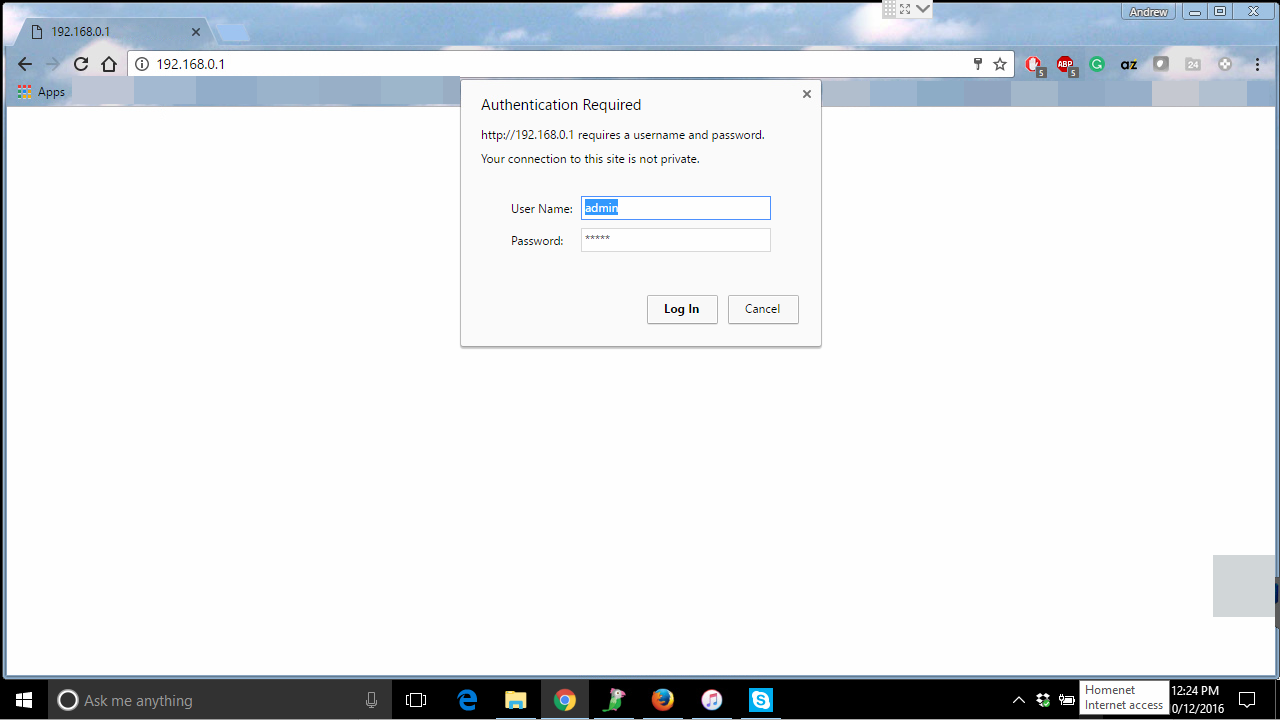
So the first step would be to access the router’s settings. For that, simply type in its IP address in your web browser. By default it would be 192.168.0.1. A pop up window will prompt you to enter your admin credentials. By the way, by default it is admin\admin and we strongly recommend to change it.
How to block youtube on computer and mobile devices 02 — How to block YouTube on computers and mobile devices?

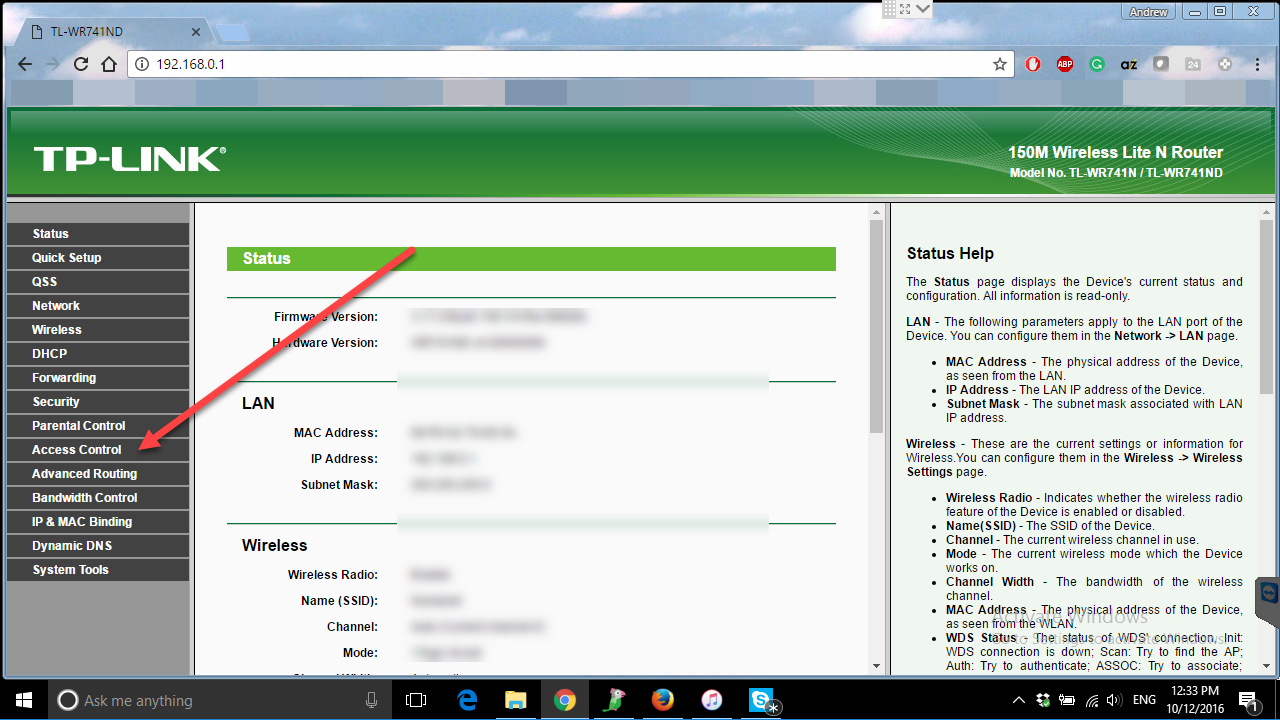
The main page would contain the basic information about your network and the router. In the left part of the window you would see navigation panel, where you need to choose Access Control section.
How to block youtube on computer and mobile devices 03 — How to block YouTube on computers and mobile devices?

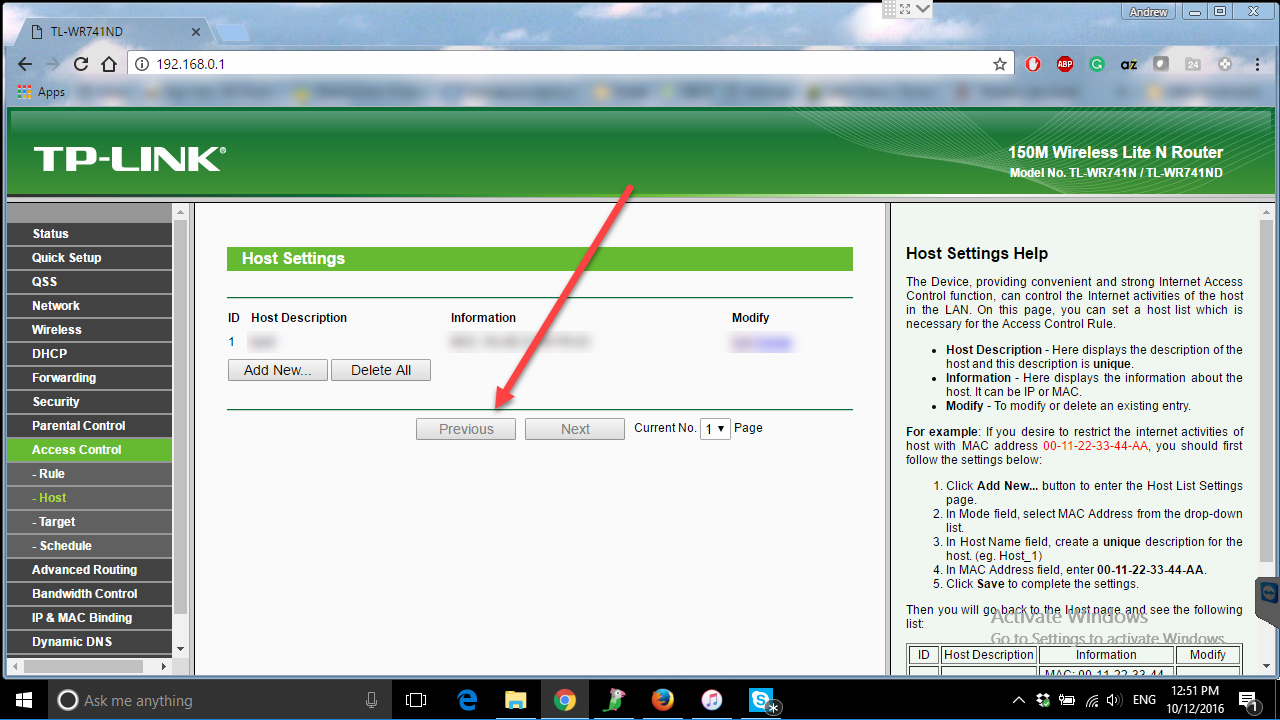
Under Access Control you will find 4 different submenus that allow to create access rules.

Host is responsible for the device you want to limit access on. You need to enter the MAC address of the phone, tablet or the PC. (You can find them in settings screen of the specific device or through the list of connected devices in the router menu). And vice versa, if you want to limit access for all the devices except the one, that would be the place where you need to enter Mac address of the device, which will not be affected by the limitation rule.
How to block youtube on computer and mobile devices 04 — How to block YouTube on computers and mobile devices?

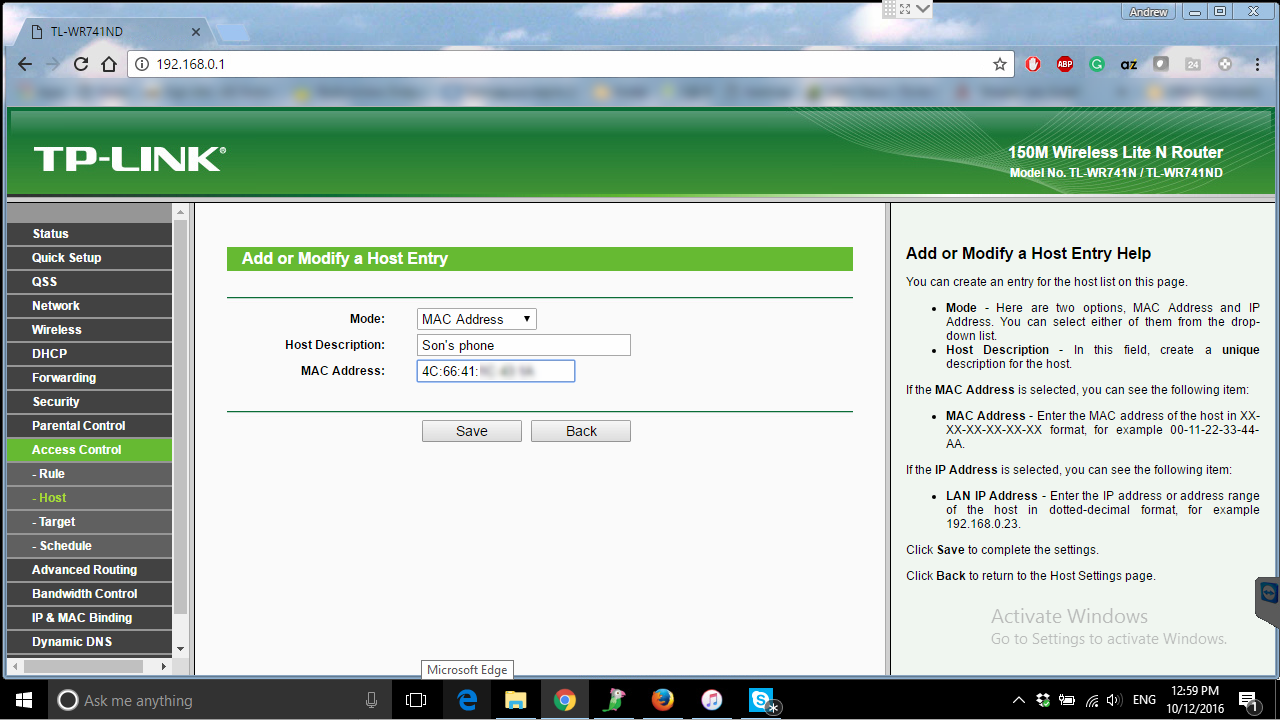
Click “Add  new” button and enter the MAC address of the device you want to limit access for.


How to block youtube on computer and mobile devices 05 — How to block YouTube on computers and mobile devices?

Hit “Save” button and navigate to Target submenu.

This is the very menu that’s responsible for the website you want to block or allow. You will need to enter the address of the website that will be used in the rule. In our case that would be YouTube.com
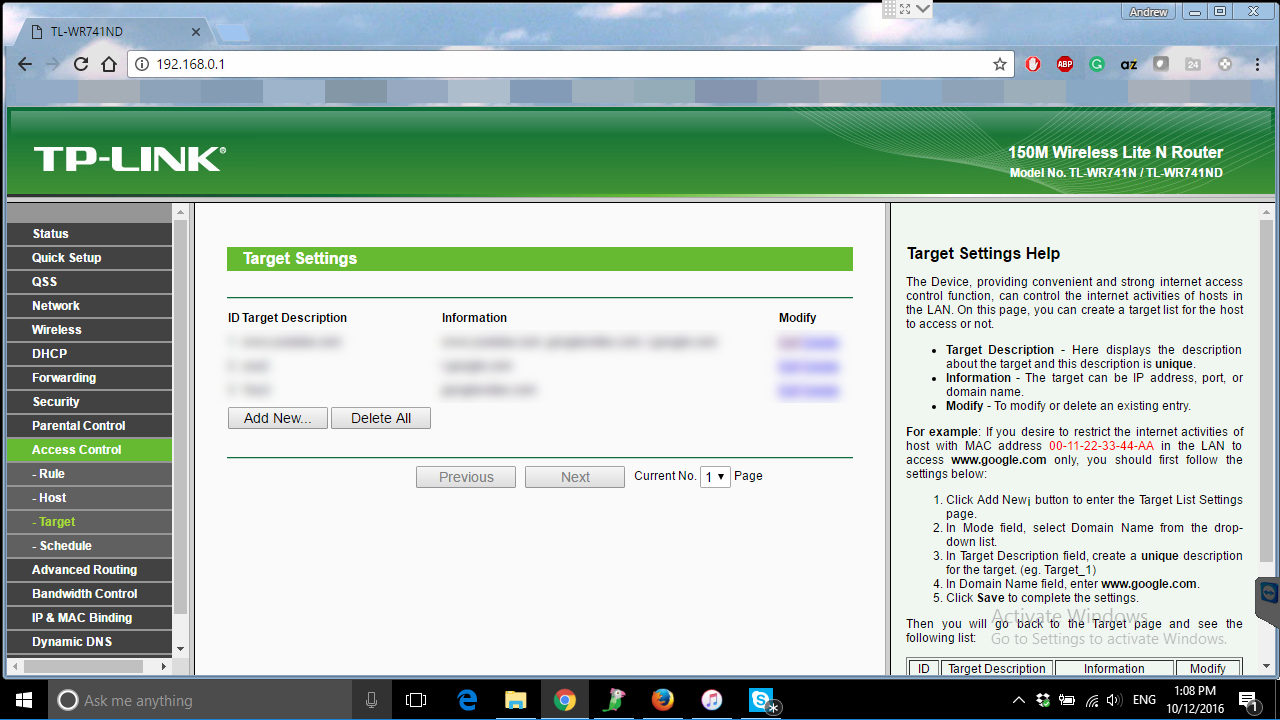
How to block youtube on computer and mobile devices 06 — How to block YouTube on computers and mobile devices?

Hit Add New button and choose “Domain Name” as the Mode.

In Target description enter YouTube – it’s just a name, and the Domain Name would be responsible for the web address that would be blocked. As you can see, there are several lines under Domain Name that you can fill in under single Target to block one or several websites. Talking about YouTube, we will use all of them to block access to it.
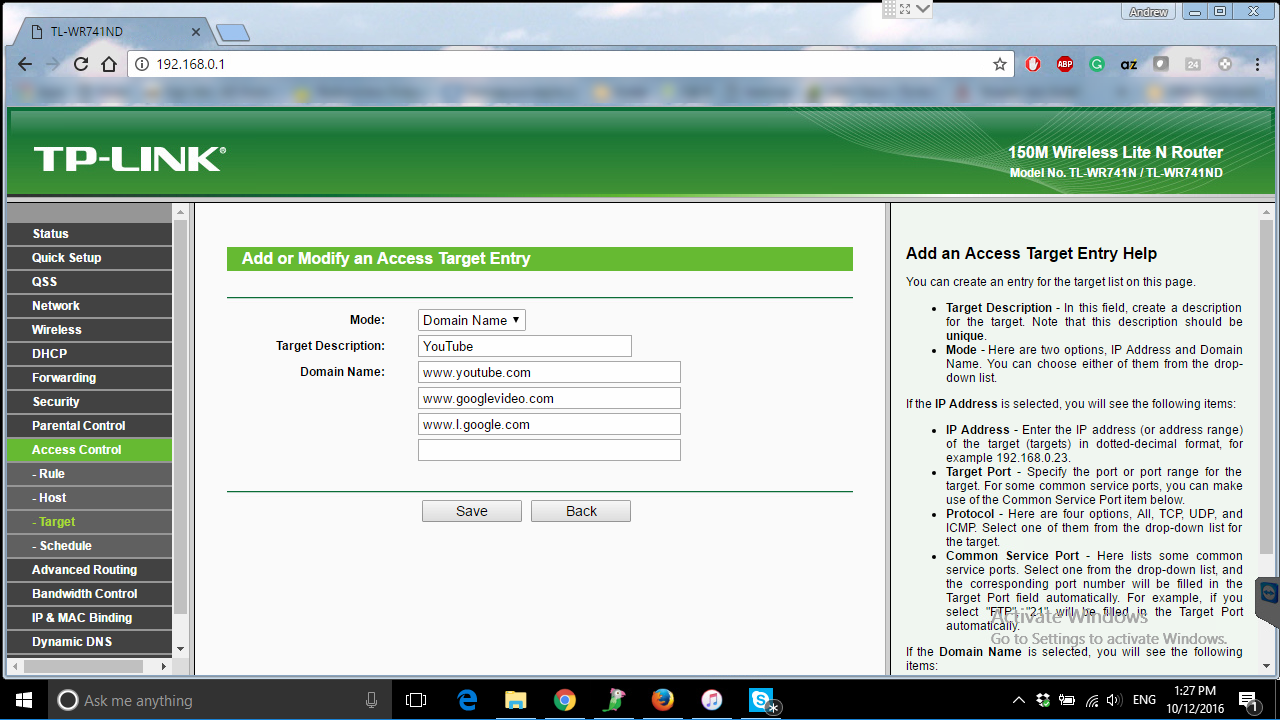
How to block youtube on computer and mobile devices 07 — How to block YouTube on computers and mobile devices?

Enter www.youtube.com – this will block access to YouTube through a webbrowser.

Next line – www.l.google.com – to lock access through mobile apps.

Next line www.googlevideo.com – also locks access through mobile applications.

Save it and navigate to Rule submenu.
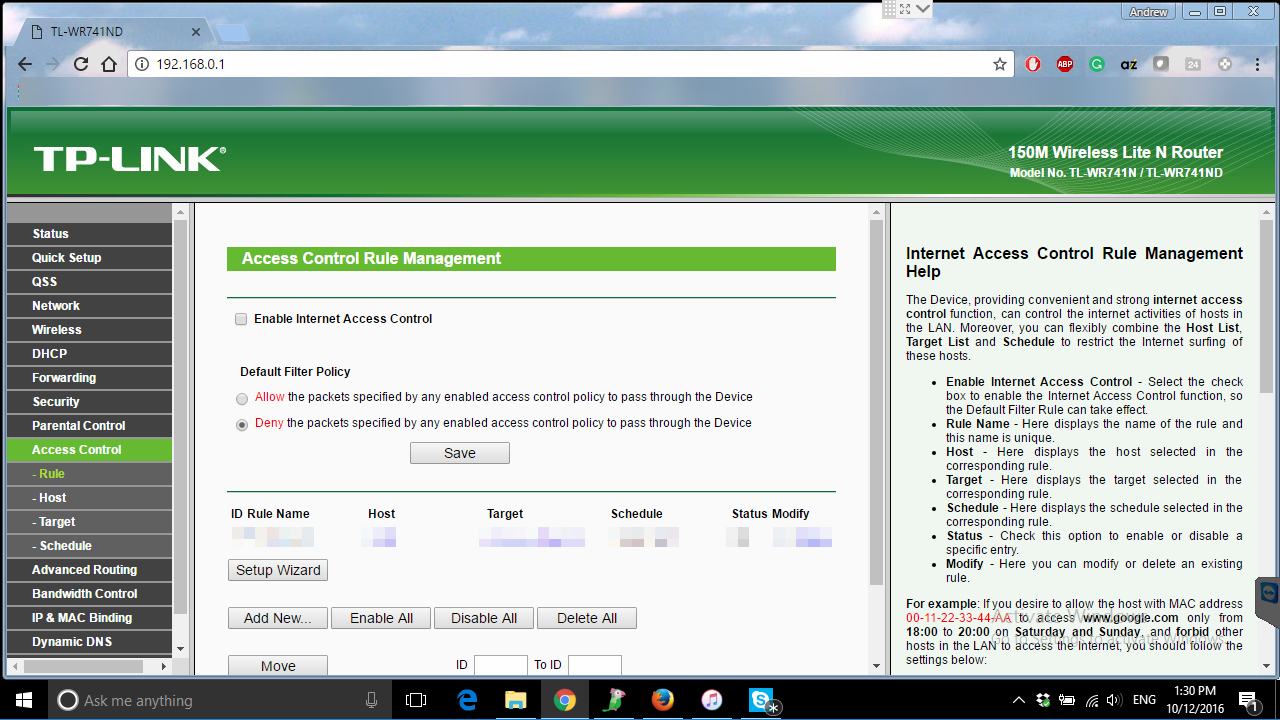
How to block youtube on computer and mobile devices 08 — How to block YouTube on computers and mobile devices?

Click on “Add New” button and fill in all the fields – enter the name of the rule, select the device from Host drop down menu, target – YouTube and set enable. As you can see there is one more menu – Schedule, that you can use in case you want to limit access for some certain time.
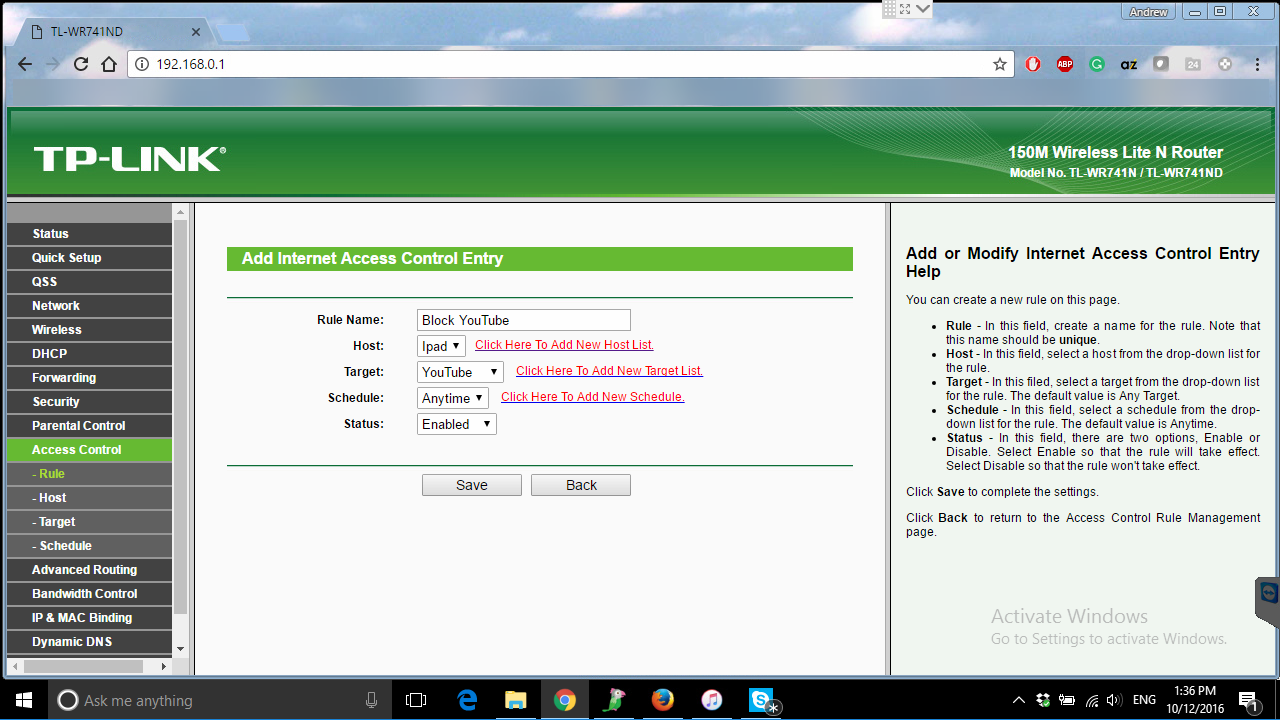
How to block youtube on computer and mobile devices 09 — How to block YouTube on computers and mobile devices?

Hit Save button. We are almost ready.

All you need to do is to put the checkmark to “Enable Internet Access Control” and hit Save button.
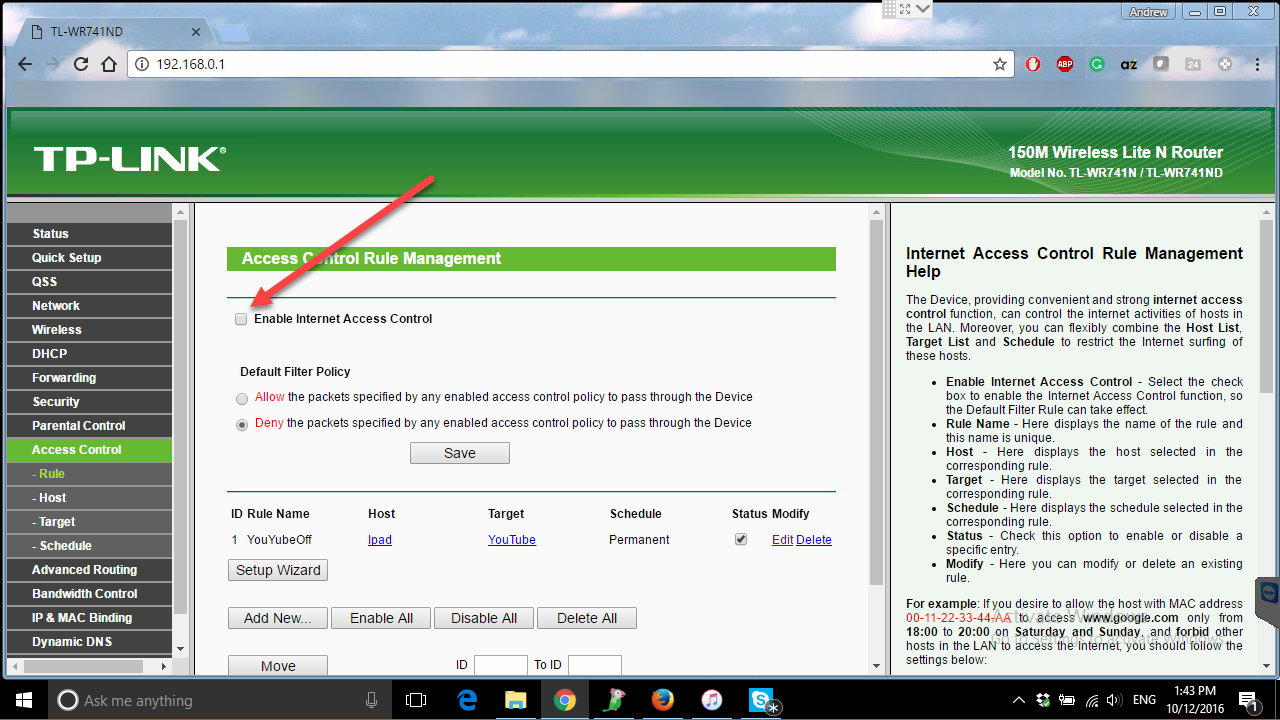
How to block youtube on computer and mobile devices 10 — How to block YouTube on computers and mobile devices?

With that you will have YouTube blocked on smartphones, tablets and computers that you have selected.

Feel free to contact our IT support in case you have any networking or any other computer related questions or issues.




 

  • On October 12, 2016
  • 0 Comment

Leave Reply Cancel reply

Your email address will not be published. Required fields are marked *

Recent Posts
  • The Password Memo Was Honest. The Checklist Wasn’t.
  • As Is: How Software Became the Only Product You Could Legally Sell Broken
  • The Production Incident Class Your Postmortem Template Doesn’t Have
  • Why Load Test Numbers Lie
  • When Config Became Executable: The Twenty-Year Pattern Behind Supply Chain Attacks
Categories
  • ai (8)
  • android (18)
  • apple (36)
  • chart (18)
  • cloud (1)
  • fix (42)
  • games (11)
  • google (31)
  • hardware (73)
  • healthcare (3)
  • how to (231)
  • internet (92)
  • ios (23)
  • macos (3)
  • microsoft (82)
  • mobile (36)
  • news (74)
  • optimization (17)
  • osx (4)
  • outsourcing (8)
  • qa (3)
  • regulation (7)
  • review (120)
  • security (40)
  • software (160)
  • windows (150)
Archives
  • August 2026
  • July 2026
  • June 2026
  • May 2026
  • August 2025
  • March 2025
  • February 2025
  • April 2023
  • March 2023
  • February 2023
  • January 2023
  • March 2022
  • January 2022
  • December 2021
  • November 2021
  • October 2021
  • September 2021
  • August 2021
  • July 2021
  • June 2021
  • May 2021
  • April 2021
  • March 2021
  • February 2021
  • January 2021
  • December 2020
  • November 2020
  • October 2020
  • September 2020
  • August 2020
  • July 2020
  • June 2020
  • May 2020
  • April 2020
  • March 2020
  • February 2020
  • January 2020
  • December 2019
  • November 2019
  • October 2019
  • September 2019
  • August 2019
  • April 2019
  • March 2019
  • February 2019
  • January 2019
  • December 2018
  • November 2018
  • October 2018
  • September 2018
  • June 2018
  • May 2018
  • April 2018
  • February 2018
  • January 2018
  • December 2017
  • November 2017
  • October 2017
  • June 2017
  • May 2017
  • April 2017
  • March 2017
  • February 2017
  • January 2017
  • December 2016
  • November 2016
  • October 2016
  • September 2016
  • August 2016
  • July 2016
  • June 2016
  • May 2016
  • April 2016
  • March 2016
  • February 2016
  • January 2016
  • December 2015
  • November 2015
  • October 2015
  • September 2015
  • July 2015
  • January 2015
Archives
  • August 2026
  • July 2026
  • June 2026
  • May 2026
  • August 2025
  • March 2025
  • February 2025
  • April 2023
  • March 2023
  • February 2023
  • January 2023
  • March 2022
  • January 2022
  • December 2021
  • November 2021
  • October 2021
  • September 2021
  • August 2021
  • July 2021
  • June 2021
  • May 2021
  • April 2021
  • March 2021
  • February 2021
  • January 2021
  • December 2020
  • November 2020
  • October 2020
  • September 2020
  • August 2020
  • July 2020
  • June 2020
  • May 2020
  • April 2020
  • March 2020
  • February 2020
  • January 2020
  • December 2019
  • November 2019
  • October 2019
  • September 2019
  • August 2019
  • April 2019
  • March 2019
  • February 2019
  • January 2019
  • December 2018
  • November 2018
  • October 2018
  • September 2018
  • June 2018
  • May 2018
  • April 2018
  • February 2018
  • January 2018
  • December 2017
  • November 2017
  • October 2017
  • June 2017
  • May 2017
  • April 2017
  • March 2017
  • February 2017
  • January 2017
  • December 2016
  • November 2016
  • October 2016
  • September 2016
  • August 2016
  • July 2016
  • June 2016
  • May 2016
  • April 2016
  • March 2016
  • February 2016
  • January 2016
  • December 2015
  • November 2015
  • October 2015
  • September 2015
  • July 2015
  • January 2015

How to make 360 photos on facebook?

Previous thumb

TOP 5: Browsers for secure and anonymous web surfing

Next thumb
Scroll

Services

  • Software Development
  • Quality Assurance
  • Customer Support
  • Managed Services
  • 24/7 Emergency IT Support
  • Competency Center
  • Local AI Agent Development
  • Software as a Medical Device

Compliance

  • Compliance Audit
  • GDPR Compliance
  • What is GDPR
  • ISO 9001:2015 Certification

Company

  • About Us
  • All Services
  • Projects
  • Case Studies
  • Articles
  • Contact
About HiTech Service

With 10 year experience of working together, we have reached tangible synergetic effect in performance and productivity, which results in highest quality services and satisfied clients.

Privacy Policy   Cookie Policy


  • Facebook
  • X
  • LinkedIn
CONTACT INFO
  • 900 Foulk Rd, Suite 201, Wilmington, DE, USA, 19803
  • Kudryavs’kyi descent 5b, Kyiv, Ukraine, 04053
  • +1 646.844.5712 (US)
ISO 9001:2015 certificate issued to HiTech Service LLC by Veritas
RIPE Atlas logo, the network measurement community HiTech Service takes part in
BrainBasket Foundation logo, IT education initiative HiTech Service supports
HiTech Service LLC membership badge of the Hi-Tech Office Ukraine association Dun & Bradstreet verified business badge for HiTech Service LLC
YouTeam partner badge for HiTech Service LLC
Hitech Service LLC

Copyright 2026