
Have any questions? +1 646.844.5712 (US)

  • Facebook
  • LinkedIn
  • Twitter
HiTech ServiceHiTech Service
  • Home
  • About
  • Services
    • Software Development
    • Customer Support
    • Quality Assurance
    • Managed Services
    • Compliance Audit
    • GDPR Compliance
    • Competency Center
    • Emergency IT Support
    • Software as medical device
    • Local AI Agent Development
  • Projects
  • GDPR
  • Articles
  • Case Studies
  • Contact
Menu
  • Home
  • About
  • Services
    • Software Development
    • Customer Support
    • Quality Assurance
    • Managed Services
    • Compliance Audit
    • GDPR Compliance
    • Competency Center
    • Emergency IT Support
    • Software as medical device
    • Local AI Agent Development
  • Projects
  • GDPR
  • Articles
  • Case Studies
  • Contact
MS Word features and tips you probably did not know about!

MS Word features and tips you probably did not know about!

Microsoft Word is one of the most widely used text editors nowadays. But are you sure that you know it well? I do not think so. Actually I’m sure you are not using even five percent of its features. Yes, there are lots of things that you do not need for the everyday use of MS Word, and still there are some MS Word features that may be useful, but are not so obvious to be discovered. So here are some hidden MS Word features that we think you should know.


1. The power of the CTRL button.

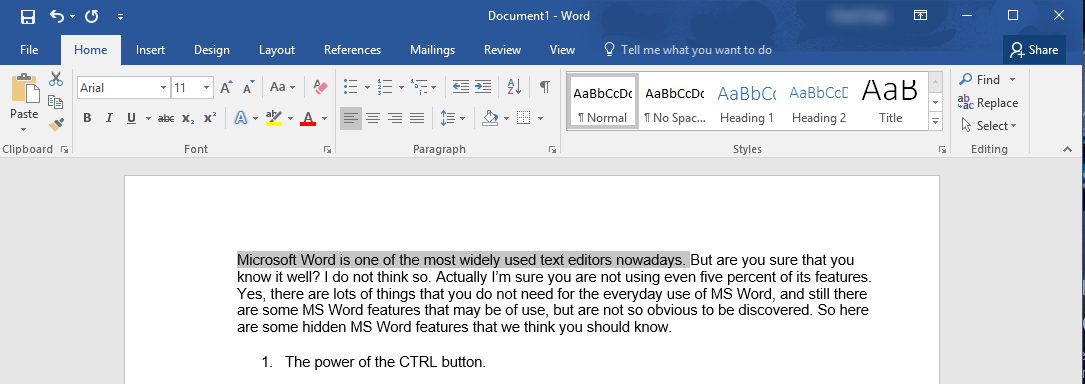
Using CTRL with your usual commands in MS Word will open new horizons for you in selecting, removing and editing text. For example, left-clicking on a word with CTRL pressed will select the entire sentence, CTRL + Arrow Up / Down combination will speed up your vertical navigation, increasing its pace from one line to one passage up or down every time you press or hold it. Same with Right /Left Arrow keys – the navigation will increase from one symbol per click to one word. The same behaviour with Backspace – pressing CTRL will make it delete the whole word, not just one symbol.
Ms word features secret 02 3 — MS Word features and tips you probably did not know about!

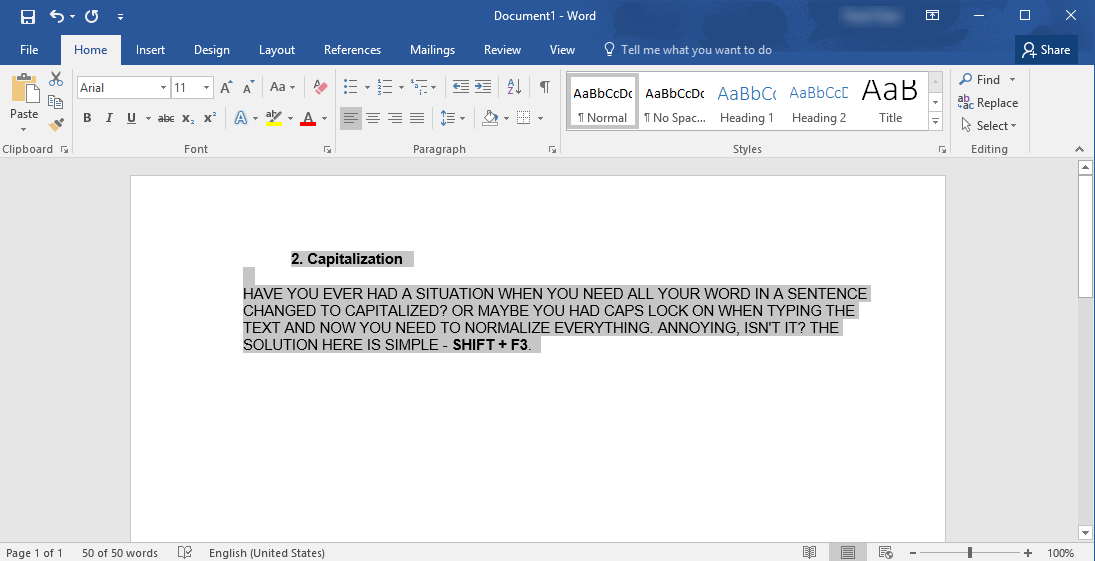
2. Capitalization

Have you ever had a situation when you need all your word in a sentence changed to capitalized? Or maybe you had Caps Lock on when typing the text and now you need to normalize everything. Annoying, isn’t it? The solution here is simple – Shift + F3. Just select the text that you need to change and press it.
Ms word features secret 03 — MS Word features and tips you probably did not know about!

3. Random text

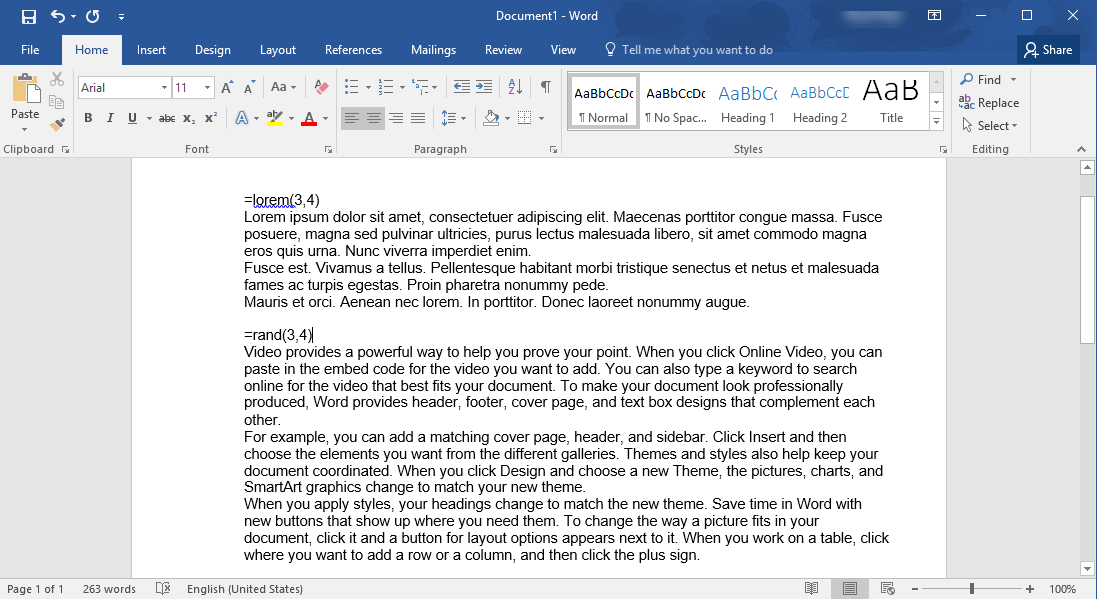
It may happen that you need some random text to fill in a pattern and check the looks and formatting.  Word can generate random text for you. The commands to use are =lorem(3,4) or =rand(3,4), where 3 stands for the number of paragraphs and 4 is the number of sentences in each one. The lorem command will generate meaningless latin-like text, while rand will generate text having some sense.
Ms word features secret 04 — MS Word features and tips you probably did not know about!

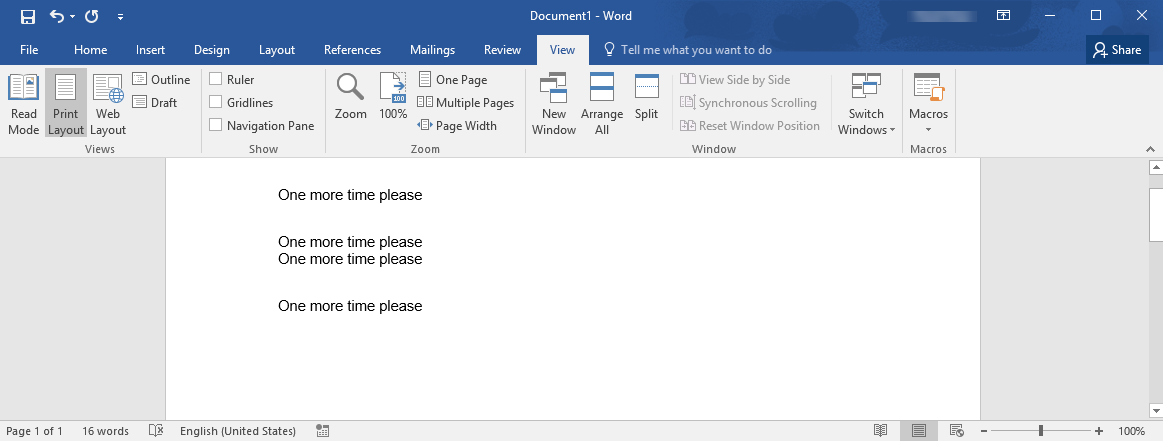
4. One more time please

Making repeated actions in MS Word? Do not waste your time on that! Simple clicking on F4 will repeat for you the last action made no matter what that was – inserting text, deleting text, changing formats, etc. For more complex repeated actions, we recommend to use Macros feature (under View => Macros).


Ms word features secret 05 — MS Word features and tips you probably did not know about!

5. Taking screenshots

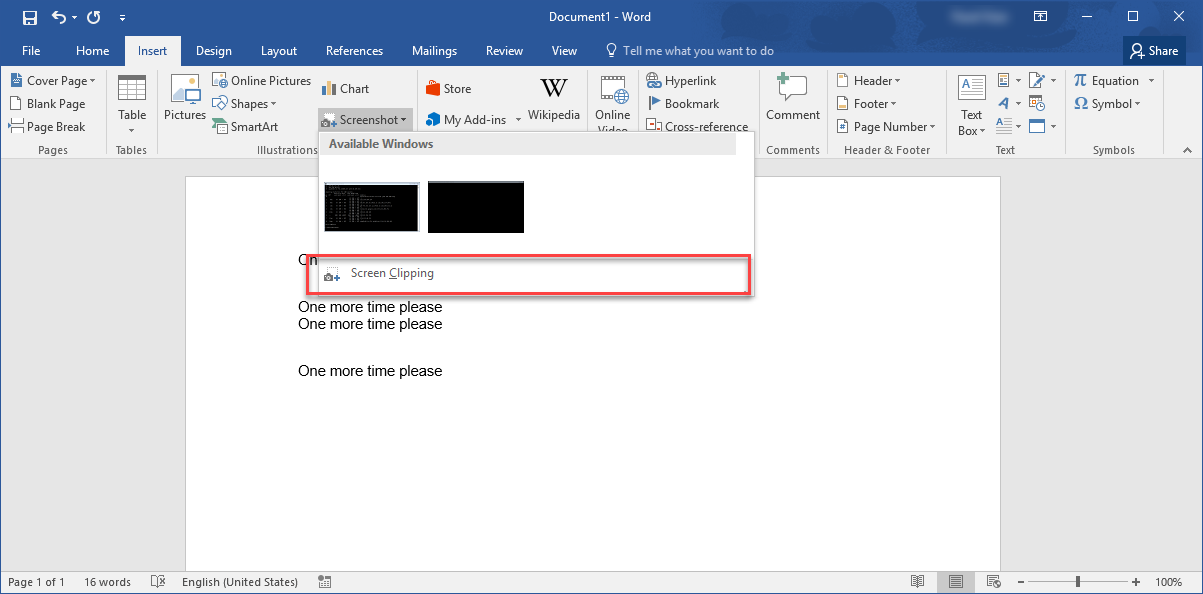
Yes, it can do that. No need to use any third party tools for taking screenshots or just parts of the screen to paste them later to your text. Navigate to Insert => Screenshot => Screen Clipping and just select an application window or outline the part of the screen that you would like to include into the document.
Ms word features secret 06 — MS Word features and tips you probably did not know about!

6. Vertical text selection

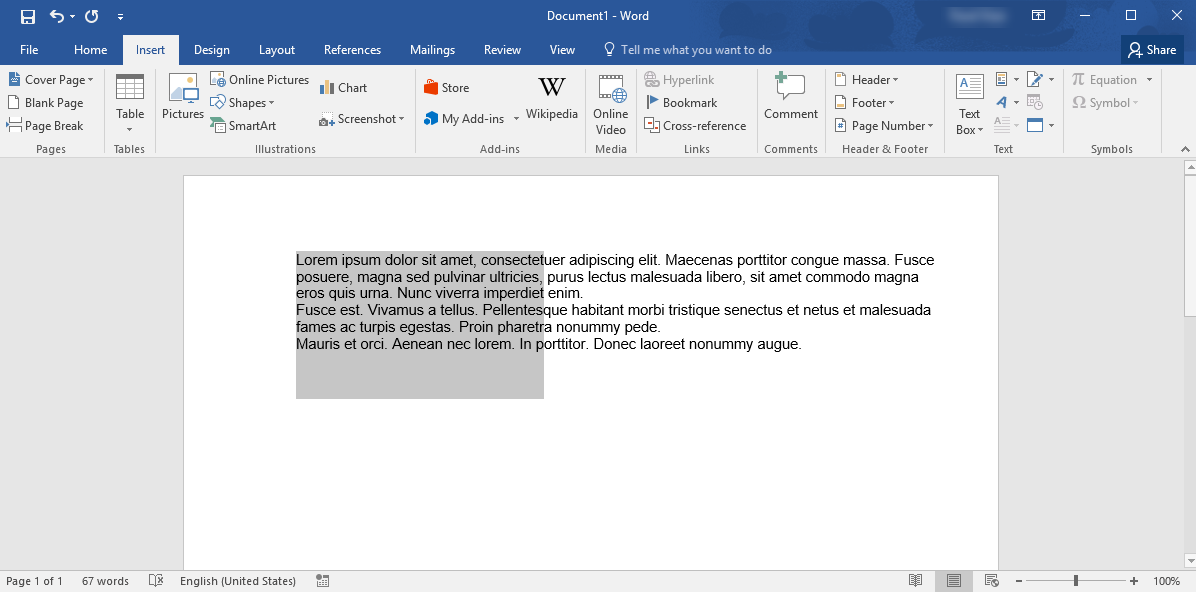
When one selects the text in MS Word, the selection process goes line by line, but if you press ALT key while selecting the text, the selection will go vertically, not horizontally. This is extremely useful when the text has several columns and one needs to select only one of them.
Ms word features secret 07 — MS Word features and tips you probably did not know about!

This is actually a tip of the iceberg called MS Word features, more of them to come in our next articles.




  • On December 26, 2016
  • 0 Comment

Leave Reply Cancel reply

Your email address will not be published. Required fields are marked *

Recent Posts
  • How AI and Automation Are Changing IT Service Delivery
  • Managed IT Services vs. In-House IT: What Should You Choose?
  • When the Model Is the Vendor: What Happens to Compliance When You Don’t Own the Weights
  • The Edge Device Is the Perimeter: Why the Box You Bought to Keep Them Out Is How They Get In
  • The Password Memo Was Honest. The Checklist Wasn’t.
Categories
  • ai (10)
  • android (18)
  • apple (36)
  • chart (18)
  • cloud (1)
  • fix (42)
  • games (11)
  • google (31)
  • hardware (73)
  • healthcare (3)
  • how to (231)
  • internet (92)
  • ios (23)
  • macos (3)
  • microsoft (82)
  • mobile (36)
  • news (74)
  • optimization (17)
  • osx (4)
  • outsourcing (9)
  • qa (3)
  • regulation (8)
  • review (120)
  • security (41)
  • software (160)
  • windows (150)
Archives
  • September 2026
  • August 2026
  • July 2026
  • June 2026
  • May 2026
  • August 2025
  • March 2025
  • February 2025
  • April 2023
  • March 2023
  • February 2023
  • January 2023
  • March 2022
  • January 2022
  • December 2021
  • November 2021
  • October 2021
  • September 2021
  • August 2021
  • July 2021
  • June 2021
  • May 2021
  • April 2021
  • March 2021
  • February 2021
  • January 2021
  • December 2020
  • November 2020
  • October 2020
  • September 2020
  • August 2020
  • July 2020
  • June 2020
  • May 2020
  • April 2020
  • March 2020
  • February 2020
  • January 2020
  • December 2019
  • November 2019
  • October 2019
  • September 2019
  • August 2019
  • April 2019
  • March 2019
  • February 2019
  • January 2019
  • December 2018
  • November 2018
  • October 2018
  • September 2018
  • June 2018
  • May 2018
  • April 2018
  • February 2018
  • January 2018
  • December 2017
  • November 2017
  • October 2017
  • June 2017
  • May 2017
  • April 2017
  • March 2017
  • February 2017
  • January 2017
  • December 2016
  • November 2016
  • October 2016
  • September 2016
  • August 2016
  • July 2016
  • June 2016
  • May 2016
  • April 2016
  • March 2016
  • February 2016
  • January 2016
  • December 2015
  • November 2015
  • October 2015
  • September 2015
  • July 2015
  • January 2015
Archives
  • September 2026
  • August 2026
  • July 2026
  • June 2026
  • May 2026
  • August 2025
  • March 2025
  • February 2025
  • April 2023
  • March 2023
  • February 2023
  • January 2023
  • March 2022
  • January 2022
  • December 2021
  • November 2021
  • October 2021
  • September 2021
  • August 2021
  • July 2021
  • June 2021
  • May 2021
  • April 2021
  • March 2021
  • February 2021
  • January 2021
  • December 2020
  • November 2020
  • October 2020
  • September 2020
  • August 2020
  • July 2020
  • June 2020
  • May 2020
  • April 2020
  • March 2020
  • February 2020
  • January 2020
  • December 2019
  • November 2019
  • October 2019
  • September 2019
  • August 2019
  • April 2019
  • March 2019
  • February 2019
  • January 2019
  • December 2018
  • November 2018
  • October 2018
  • September 2018
  • June 2018
  • May 2018
  • April 2018
  • February 2018
  • January 2018
  • December 2017
  • November 2017
  • October 2017
  • June 2017
  • May 2017
  • April 2017
  • March 2017
  • February 2017
  • January 2017
  • December 2016
  • November 2016
  • October 2016
  • September 2016
  • August 2016
  • July 2016
  • June 2016
  • May 2016
  • April 2016
  • March 2016
  • February 2016
  • January 2016
  • December 2015
  • November 2015
  • October 2015
  • September 2015
  • July 2015
  • January 2015

Gaming profile security!

Previous thumb

Why do I have low quality photos on Facebook and messanger?

Next thumb
Scroll

Services

  • Software Development
  • Quality Assurance
  • Customer Support
  • Managed Services
  • 24/7 Emergency IT Support
  • Competency Center
  • Local AI Agent Development
  • Software as a Medical Device

Compliance

  • Compliance Audit
  • GDPR Compliance
  • What is GDPR
  • ISO 9001:2015 Certification

Company

  • About Us
  • All Services
  • Projects
  • Case Studies
  • Articles
  • Contact
About HiTech Service

With 10 year experience of working together, we have reached tangible synergetic effect in performance and productivity, which results in highest quality services and satisfied clients.

Privacy Policy   Cookie Policy


  • Facebook
  • X
  • LinkedIn
CONTACT INFO
  • 900 Foulk Rd, Suite 201, Wilmington, DE, USA, 19803
  • Kudryavs’kyi descent 5b, Kyiv, Ukraine, 04053
  • +1 646.844.5712 (US)
ISO 9001:2015 certificate issued to HiTech Service LLC by Veritas
RIPE Atlas logo, the network measurement community HiTech Service takes part in
BrainBasket Foundation logo, IT education initiative HiTech Service supports
HiTech Service LLC membership badge of the Hi-Tech Office Ukraine association Dun & Bradstreet verified business badge for HiTech Service LLC
YouTeam partner badge for HiTech Service LLC
Hitech Service LLC

Copyright 2026