Have any questions? +1 646.844.5712 (US)

  • Facebook
  • LinkedIn
  • Twitter
HiTech ServiceHiTech Service
  • Home
  • About
  • Services
    • Software Development
    • Customer Support
    • Quality Assurance
    • Managed Services
    • Compliance Audit
    • GDPR Compliance
    • Competency Center
    • Emergency IT Support
    • Software as medical device
    • Local AI Agent Development
  • Projects
  • GDPR
  • Articles
  • Case Studies
  • Contact
Menu
  • Home
  • About
  • Services
    • Software Development
    • Customer Support
    • Quality Assurance
    • Managed Services
    • Compliance Audit
    • GDPR Compliance
    • Competency Center
    • Emergency IT Support
    • Software as medical device
    • Local AI Agent Development
  • Projects
  • GDPR
  • Articles
  • Case Studies
  • Contact
Drivers stopped working after upgrading to Windows 10?

Drivers stopped working after upgrading to Windows 10?

Many people who upgraded to Windows 10 from earlier versions of Windows may have experienced driver problem with this or that piece of hardware installed on PC or laptop. Windows 10 is a comparatively fresh operating system and does have some issues that Microsoft it rapidly fixing now. Actually, they plan to release their first major fix in early November. But what if this fix does not help, and you need this hardware working asap?


Right now there are several possible ways to fix driver problem in Windows 10 depending on the route cause.

First of all we recommend visiting manufacturer’s web-site to check for driver upgrades. Yes, you might have checked it before with no luck, but manufacturers try to stay in trend and the driver may be there already.

If this is not helping, second step will be to delete previous version of the driver and let Windows 10download it from the web itself.

To do this:

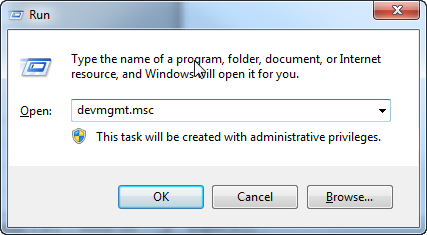
1. Open Device Manager

Press the combination of “Windows + R”, type in “devmgmt.msc” and click OK.
Drivers stopped working after upgrading to Windows 10 1 — Drivers stopped working after upgrading to Windows 10?

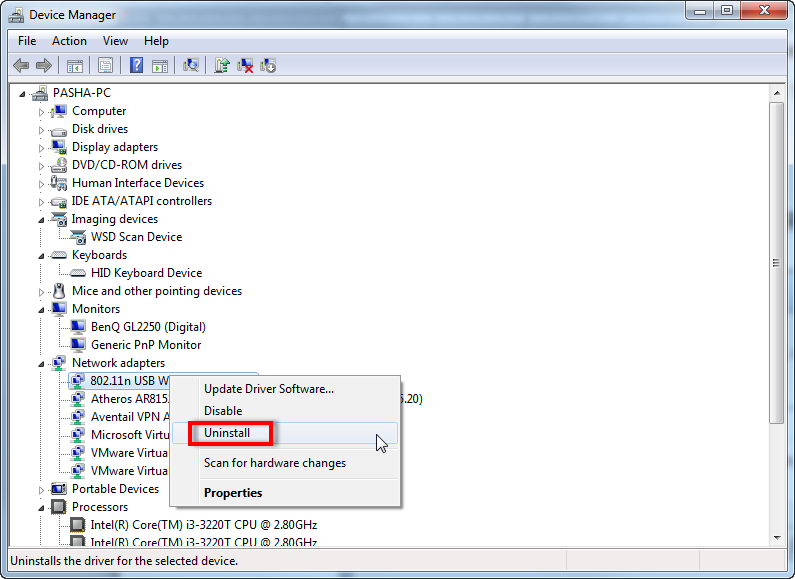
2. Delete your problem driver.

Locate your problem hardware, right click on its name and choose “Uninstall”. Confirm your choice.
Drivers stopped working after upgrading to Windows 10 2 — Drivers stopped working after upgrading to Windows 10?

Right click on the problem hardware again, but choose “Update Driver Software…” this time. Choose the option to automatically update driver.

Wait until Windows finds and installs the driver and you are very likely to be lucky. System restart may be necessary.
If the driver still does not operate properly or Windows did not find one for you we can still try to have Windows 10 accept the driver using compatibility settings.


You should download the latest driver for your hardware from manufacturer’s web-site, then right click on driver *.exe file and choose “Properties”. Switch to “Compatibility” tab, put checkmark next to the option “Run this program in compatibility mode for”, choose the operating system that you downloaded the driver for and click OK. Now try installing the driver again.

Also the problem may be that the driver you are trying to install is not signed. This requirement dates back to Windows 8 and does not allow unsigned x64 drivers to be installed.

To allow installing unsigned drivers, you would need to:

1. Restart your Windows 10 holding SHIFT key on your keyboard.

Start => Power => Restart with SHIFT key pressed.

2. Once restarted to the blue screen, navigate to Startup Settings.

Troubleshoot => Advanced Options => Startup Settings

3. Here we will need to restart your PC one more time. Click Restart.

4. When back to Startup Settings options, click 7 or F7 on your keyboard.

Windows will now allow too install unsigned drivers. You will just need to choose “Install this driver software anyway” option, while installing the driver.

One of the above should help you to have your hardware work correctly with Windows 10, but do not get upset if none of the options helped. As was said, Windows 10 is a fresh operating system, so manufacturers are working now to get their devices compatible with this new OS. Just give them some time.

You just skipped those ”smart” screenshots and bunch of scary text while reading the article.


  • On October 28, 2015
  • 0 Comment

Leave Reply Cancel reply

Your email address will not be published. Required fields are marked *

Recent Posts
  • When the Model Is the Vendor: What Happens to Compliance When You Don’t Own the Weights
  • The Edge Device Is the Perimeter: Why the Box You Bought to Keep Them Out Is How They Get In
  • The Password Memo Was Honest. The Checklist Wasn’t.
  • As Is: How Software Became the Only Product You Could Legally Sell Broken
  • The Production Incident Class Your Postmortem Template Doesn’t Have
Categories
  • ai (9)
  • android (18)
  • apple (36)
  • chart (18)
  • cloud (1)
  • fix (42)
  • games (11)
  • google (31)
  • hardware (73)
  • healthcare (3)
  • how to (231)
  • internet (92)
  • ios (23)
  • macos (3)
  • microsoft (82)
  • mobile (36)
  • news (74)
  • optimization (17)
  • osx (4)
  • outsourcing (8)
  • qa (3)
  • regulation (8)
  • review (120)
  • security (41)
  • software (160)
  • windows (150)
Archives
  • September 2026
  • August 2026
  • July 2026
  • June 2026
  • May 2026
  • August 2025
  • March 2025
  • February 2025
  • April 2023
  • March 2023
  • February 2023
  • January 2023
  • March 2022
  • January 2022
  • December 2021
  • November 2021
  • October 2021
  • September 2021
  • August 2021
  • July 2021
  • June 2021
  • May 2021
  • April 2021
  • March 2021
  • February 2021
  • January 2021
  • December 2020
  • November 2020
  • October 2020
  • September 2020
  • August 2020
  • July 2020
  • June 2020
  • May 2020
  • April 2020
  • March 2020
  • February 2020
  • January 2020
  • December 2019
  • November 2019
  • October 2019
  • September 2019
  • August 2019
  • April 2019
  • March 2019
  • February 2019
  • January 2019
  • December 2018
  • November 2018
  • October 2018
  • September 2018
  • June 2018
  • May 2018
  • April 2018
  • February 2018
  • January 2018
  • December 2017
  • November 2017
  • October 2017
  • June 2017
  • May 2017
  • April 2017
  • March 2017
  • February 2017
  • January 2017
  • December 2016
  • November 2016
  • October 2016
  • September 2016
  • August 2016
  • July 2016
  • June 2016
  • May 2016
  • April 2016
  • March 2016
  • February 2016
  • January 2016
  • December 2015
  • November 2015
  • October 2015
  • September 2015
  • July 2015
  • January 2015
Archives
  • September 2026
  • August 2026
  • July 2026
  • June 2026
  • May 2026
  • August 2025
  • March 2025
  • February 2025
  • April 2023
  • March 2023
  • February 2023
  • January 2023
  • March 2022
  • January 2022
  • December 2021
  • November 2021
  • October 2021
  • September 2021
  • August 2021
  • July 2021
  • June 2021
  • May 2021
  • April 2021
  • March 2021
  • February 2021
  • January 2021
  • December 2020
  • November 2020
  • October 2020
  • September 2020
  • August 2020
  • July 2020
  • June 2020
  • May 2020
  • April 2020
  • March 2020
  • February 2020
  • January 2020
  • December 2019
  • November 2019
  • October 2019
  • September 2019
  • August 2019
  • April 2019
  • March 2019
  • February 2019
  • January 2019
  • December 2018
  • November 2018
  • October 2018
  • September 2018
  • June 2018
  • May 2018
  • April 2018
  • February 2018
  • January 2018
  • December 2017
  • November 2017
  • October 2017
  • June 2017
  • May 2017
  • April 2017
  • March 2017
  • February 2017
  • January 2017
  • December 2016
  • November 2016
  • October 2016
  • September 2016
  • August 2016
  • July 2016
  • June 2016
  • May 2016
  • April 2016
  • March 2016
  • February 2016
  • January 2016
  • December 2015
  • November 2015
  • October 2015
  • September 2015
  • July 2015
  • January 2015

What to remove first when your phone storage is full

Previous thumb

How to turn your Windows laptop into Wi-Fi hotspot

Next thumb
Scroll

Services

  • Software Development
  • Quality Assurance
  • Customer Support
  • Managed Services
  • 24/7 Emergency IT Support
  • Competency Center
  • Local AI Agent Development
  • Software as a Medical Device

Compliance

  • Compliance Audit
  • GDPR Compliance
  • What is GDPR
  • ISO 9001:2015 Certification

Company

  • About Us
  • All Services
  • Projects
  • Case Studies
  • Articles
  • Contact
About HiTech Service

With 10 year experience of working together, we have reached tangible synergetic effect in performance and productivity, which results in highest quality services and satisfied clients.

Privacy Policy   Cookie Policy


  • Facebook
  • X
  • LinkedIn
CONTACT INFO
  • 900 Foulk Rd, Suite 201, Wilmington, DE, USA, 19803
  • Kudryavs’kyi descent 5b, Kyiv, Ukraine, 04053
  • +1 646.844.5712 (US)
ISO 9001:2015 certificate issued to HiTech Service LLC by Veritas
RIPE Atlas logo, the network measurement community HiTech Service takes part in
BrainBasket Foundation logo, IT education initiative HiTech Service supports
HiTech Service LLC membership badge of the Hi-Tech Office Ukraine association Dun & Bradstreet verified business badge for HiTech Service LLC
YouTeam partner badge for HiTech Service LLC
Hitech Service LLC

Copyright 2026