

Have any questions? +1 646.844.5712 (US)

  • Facebook
  • LinkedIn
  • Twitter
HiTech ServiceHiTech Service
  • Home
  • About
  • Services
    • Software Development
    • Customer Support
    • Quality Assurance
    • Managed Services
    • Compliance Audit
    • GDPR Compliance
    • Competency Center
    • Emergency IT Support
    • Software as medical device
    • Local AI Agent Development
  • Projects
  • GDPR
  • Articles
  • Case Studies
  • Contact
Menu
  • Home
  • About
  • Services
    • Software Development
    • Customer Support
    • Quality Assurance
    • Managed Services
    • Compliance Audit
    • GDPR Compliance
    • Competency Center
    • Emergency IT Support
    • Software as medical device
    • Local AI Agent Development
  • Projects
  • GDPR
  • Articles
  • Case Studies
  • Contact
How to speed up your android phone or tablet

How to speed up your android phone or tablet

The smartphone users have different expectations from their gadgets – tastes differ, but there is one thing in common that everyone expects from their device – we want our gadgets to be fast. Have you ever experienced a moment, when you realize that your phone has become much slower than it was right after the purchase? Well, as an Android device owner, I can say it happened to me several times. So, is it possible to speed up your Android smartphone or tablet? The answer is yes.


Standard User Mode

Well, there are several ways to add some speed back to your device that many people often use.

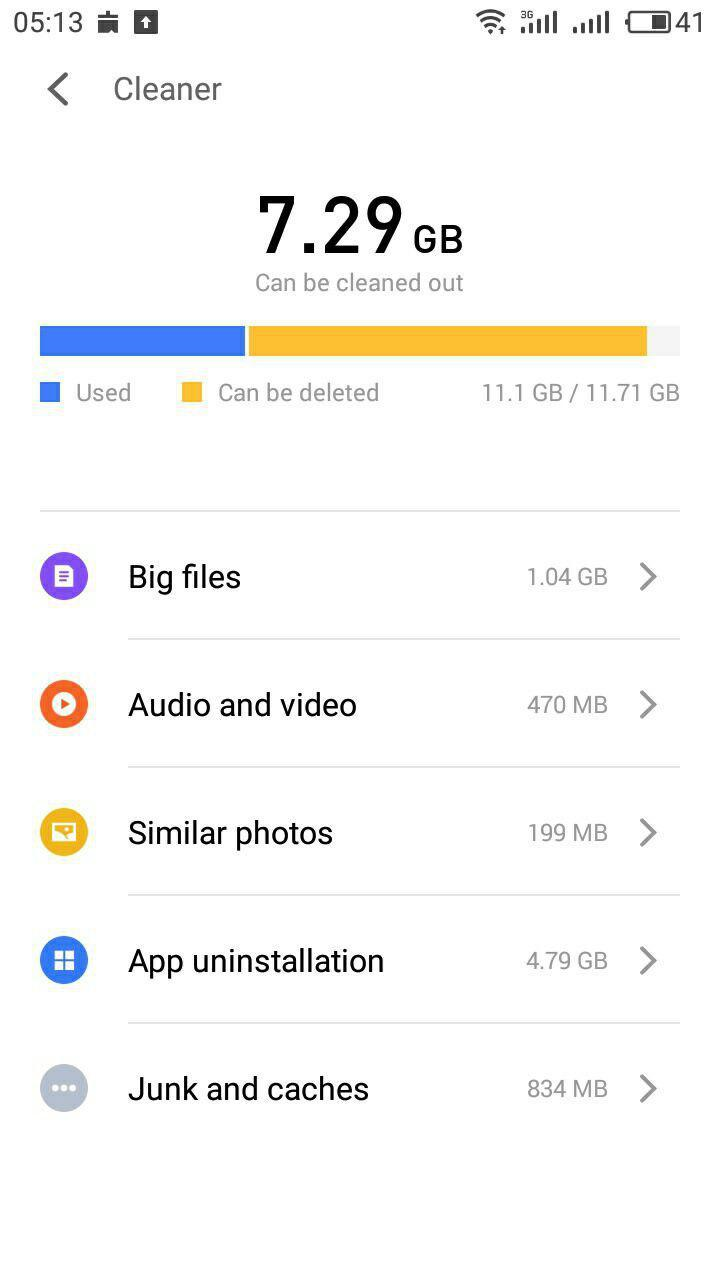
1. Freeing some space. If you want your device to run smoothly, you have to delete all the unnecessary files on a regular basis. Apps that you do not use, media, documents, etc. – cleaning all these will give your device more breathing room.
Speed up android 01 — How to speed up your android phone or tablet

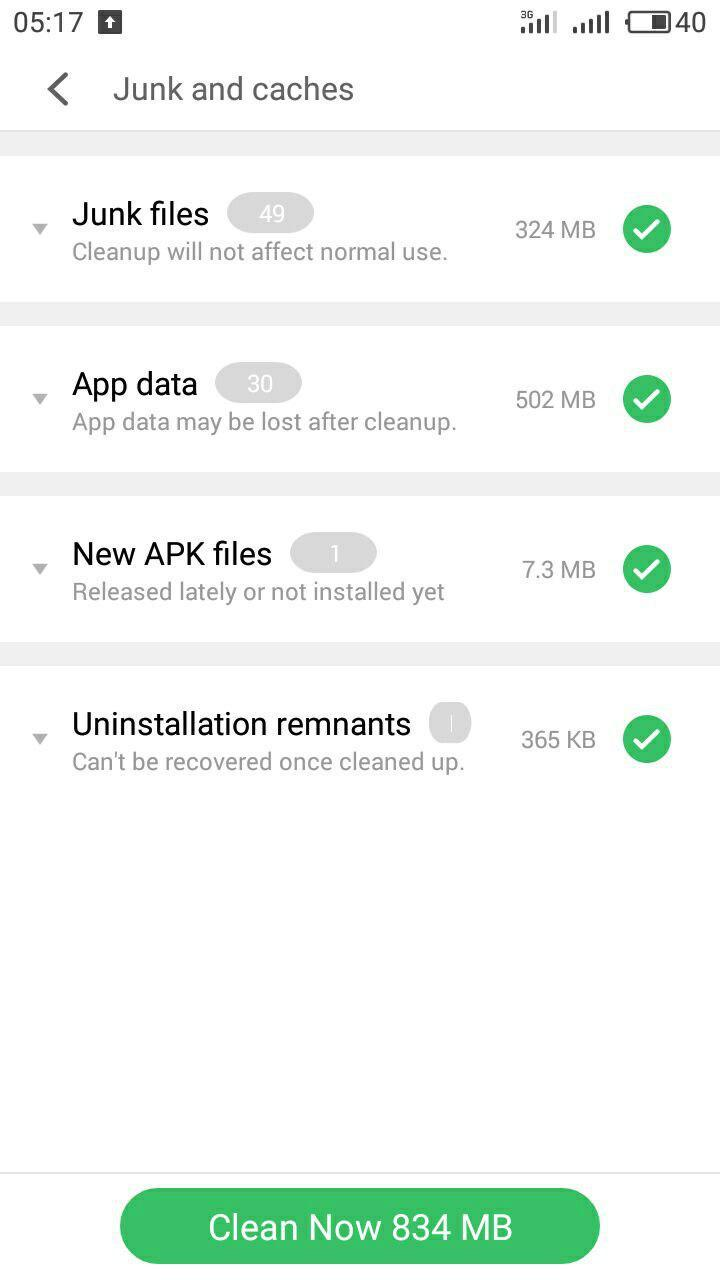
2. Clearing your cache. Many apps are set to store a lot of processed information such as pictures, texts, audio and video tracks – you can either change it from your app settings or clear it altogether. This does not influence your information in any manner, it is still there on the web, but now it is not eating space from your device.
Speed up android 02 — How to speed up your android phone or tablet

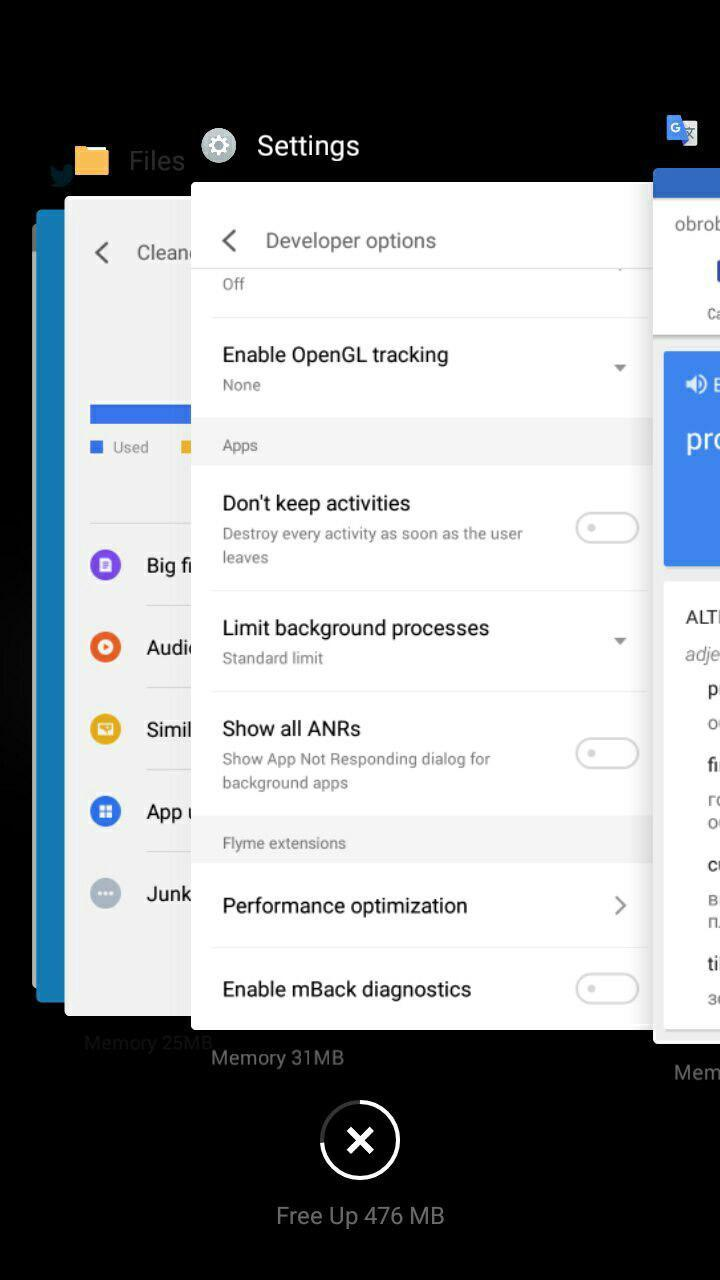
3. Closing running apps. Sometimes I need to use several apps simultaneously, but I can quickly forget about those I have exited. The thing is that they are still running in the background, eating out my RAM and slowing down my phone. Closing these apps is a good idea to add some speed to those apps that you currently have running. Just swipe up and free up some RAM.
Speed up android 03 — How to speed up your android phone or tablet

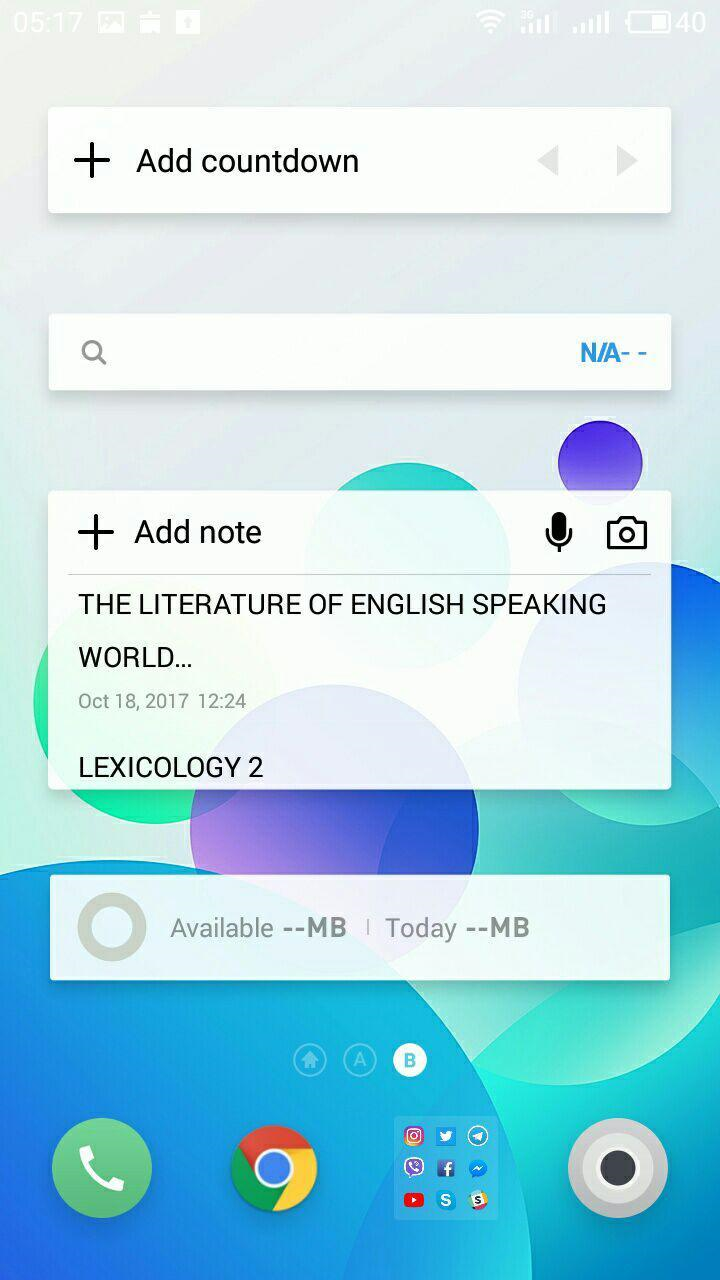
4. Disabling widgets. Widgets use more resources than usual icons. If you have many of these, your gadget may become not that responsive. So it would be a good idea to reconsider your widgets.
Speed up android 04 — How to speed up your android phone or tablet

5. Restarting. It will automatically clear your cache and close all unnecessary tasks, so restarting does make some sense.

Speed up android 05 — How to speed up your android phone or tablet

6. Updating the system. Well, this point may be quite controversial since not all of the updates are related to performance improvements. Sometimes updating can fix serious bugs that make your phone consume more energy and resources. So, it is a good idea to think twice before cancelling the update request.



Speed up android 06 — How to speed up your android phone or tablet

Developer Mode

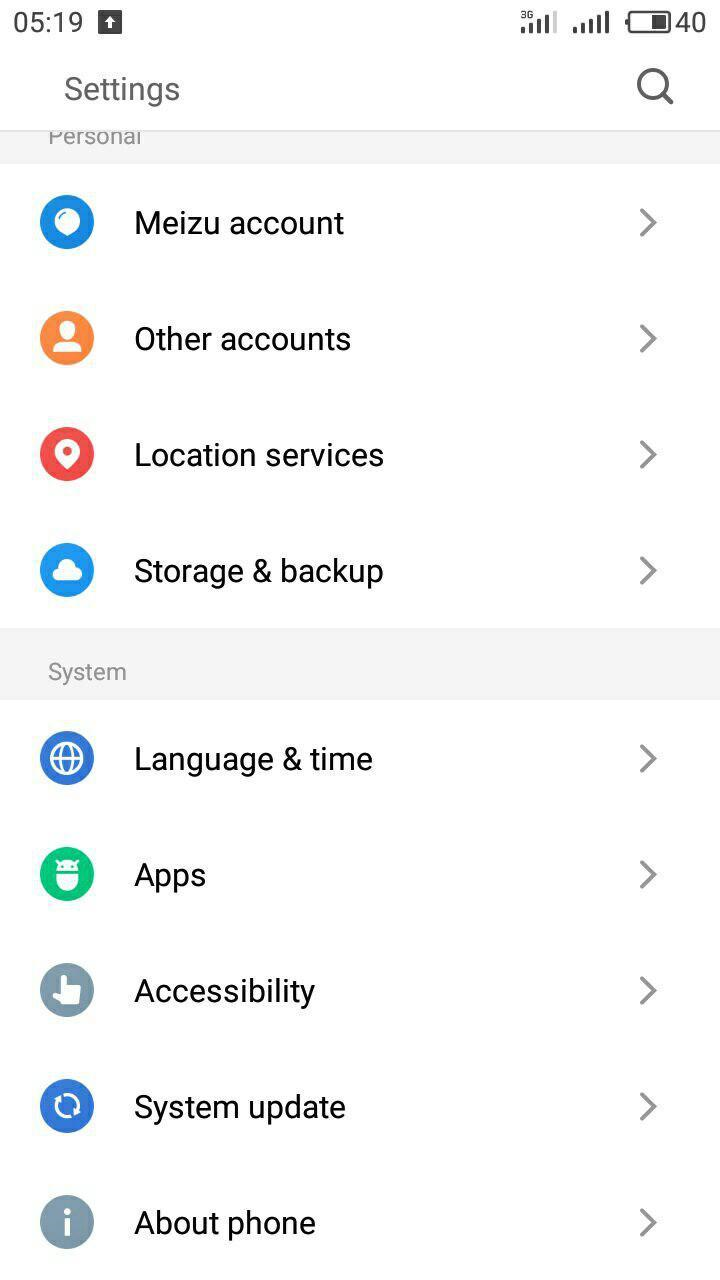
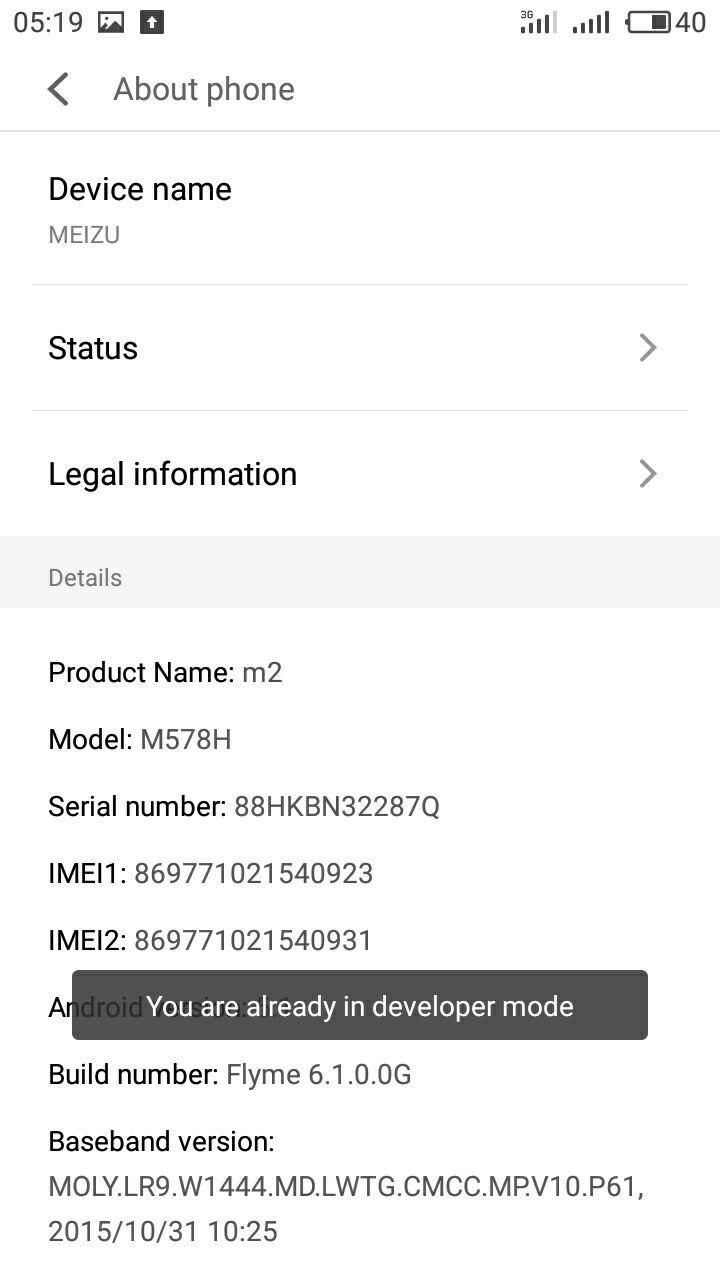
The good thing about Android is that it is versatile. You can do anything there, including several tricks to speed up your device. Still, you have to enter the developer’s mode first; you can do it by going to settings and finding your build number in your phone info section. Tap it seven times, and you will enter developer mode.
Speed up android 07 — How to speed up your android phone or tablet

Speed up android 08 — How to speed up your android phone or tablet

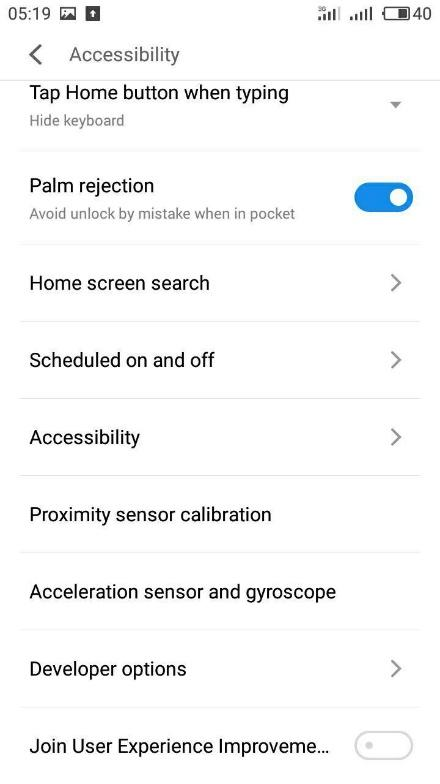
After that, you have to find Developer Options menu. Its location can vary in different phones. In my Meizu, I have to go to system section of the settings, then to accessibility, and then to developer options. Now, there are a lot of things to toy with: you can check process statistics, examine CPU usage, and many more. For now, we are interested in only two of options.
Speed up android 09 — How to speed up your android phone or tablet

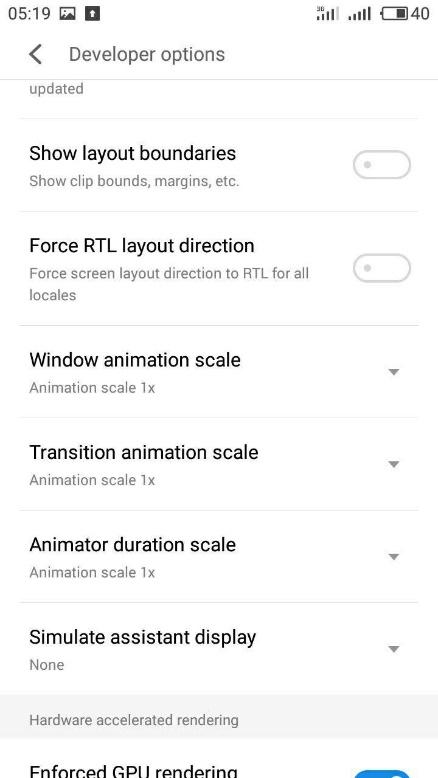
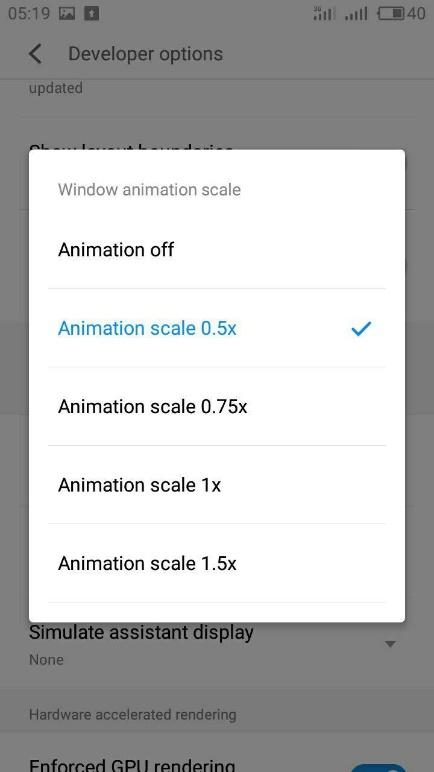
1. Disabling animations. I cannot argue that animations look cool, but sometimes they may be time consuming. There are three animation options where you can change their speed. It is set to 1x by default. You can turn animation off or put it to 0.5x or 0.75x – it all depends on how much time you would like to wait to switch between apps and menus (or how snappy you want your device to be). For me, 0.5x speed is just perfect.
Speed up android 10 — How to speed up your android phone or tablet

Speed up android 11 — How to speed up your android phone or tablet

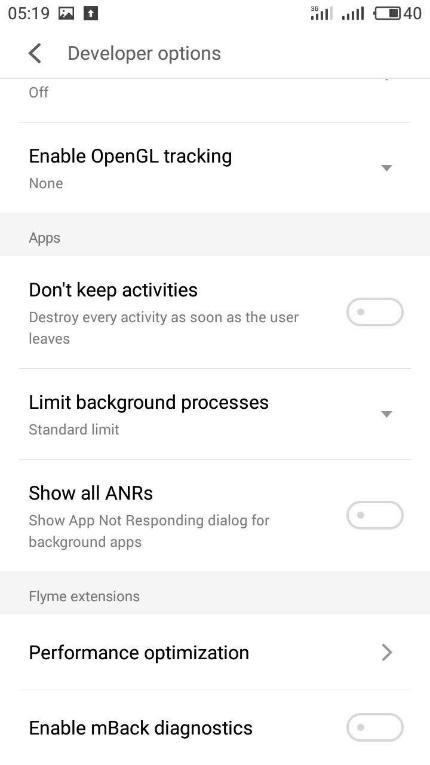
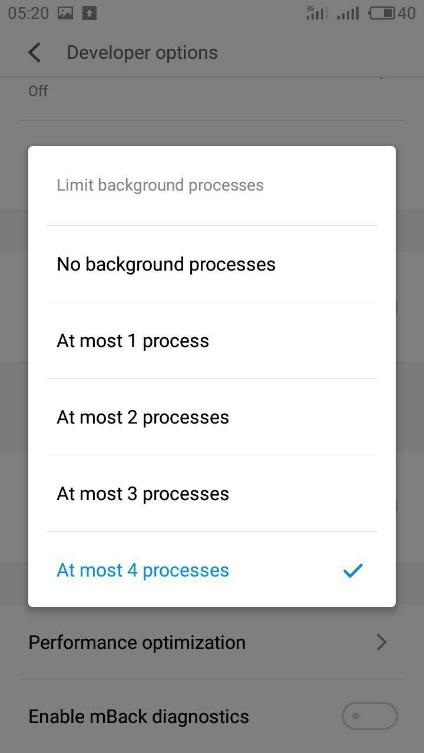
2. Disabling background apps automatically. For sure you can do it manually yourself any time, but you can also close every application as soon as you leave it. If you always work with several apps at once, you can set a limit to the number of active application processes in the range from 1 to 4. I find four very useful since you do not use more than that number of apps at a time.
Speed up android 12 — How to speed up your android phone or tablet

Speed up android 13 — How to speed up your android phone or tablet

So, that is how you can speed up your Android device. Do you find the tips useful? Are there more we did not mention? Let us know in the comments below!



 

  • On May 10, 2018
  • 0 Comment

Leave Reply Cancel reply

Your email address will not be published. Required fields are marked *

Recent Posts
  • How AI and Automation Are Changing IT Service Delivery
  • Managed IT Services vs. In-House IT: What Should You Choose?
  • When the Model Is the Vendor: What Happens to Compliance When You Don’t Own the Weights
  • The Edge Device Is the Perimeter: Why the Box You Bought to Keep Them Out Is How They Get In
  • The Password Memo Was Honest. The Checklist Wasn’t.
Categories
  • ai (10)
  • android (18)
  • apple (36)
  • chart (18)
  • cloud (1)
  • fix (42)
  • games (11)
  • google (31)
  • hardware (73)
  • healthcare (3)
  • how to (231)
  • internet (92)
  • ios (23)
  • macos (3)
  • microsoft (82)
  • mobile (36)
  • news (74)
  • optimization (17)
  • osx (4)
  • outsourcing (9)
  • qa (3)
  • regulation (8)
  • review (120)
  • security (41)
  • software (160)
  • windows (150)
Archives
  • September 2026
  • August 2026
  • July 2026
  • June 2026
  • May 2026
  • August 2025
  • March 2025
  • February 2025
  • April 2023
  • March 2023
  • February 2023
  • January 2023
  • March 2022
  • January 2022
  • December 2021
  • November 2021
  • October 2021
  • September 2021
  • August 2021
  • July 2021
  • June 2021
  • May 2021
  • April 2021
  • March 2021
  • February 2021
  • January 2021
  • December 2020
  • November 2020
  • October 2020
  • September 2020
  • August 2020
  • July 2020
  • June 2020
  • May 2020
  • April 2020
  • March 2020
  • February 2020
  • January 2020
  • December 2019
  • November 2019
  • October 2019
  • September 2019
  • August 2019
  • April 2019
  • March 2019
  • February 2019
  • January 2019
  • December 2018
  • November 2018
  • October 2018
  • September 2018
  • June 2018
  • May 2018
  • April 2018
  • February 2018
  • January 2018
  • December 2017
  • November 2017
  • October 2017
  • June 2017
  • May 2017
  • April 2017
  • March 2017
  • February 2017
  • January 2017
  • December 2016
  • November 2016
  • October 2016
  • September 2016
  • August 2016
  • July 2016
  • June 2016
  • May 2016
  • April 2016
  • March 2016
  • February 2016
  • January 2016
  • December 2015
  • November 2015
  • October 2015
  • September 2015
  • July 2015
  • January 2015
Archives
  • September 2026
  • August 2026
  • July 2026
  • June 2026
  • May 2026
  • August 2025
  • March 2025
  • February 2025
  • April 2023
  • March 2023
  • February 2023
  • January 2023
  • March 2022
  • January 2022
  • December 2021
  • November 2021
  • October 2021
  • September 2021
  • August 2021
  • July 2021
  • June 2021
  • May 2021
  • April 2021
  • March 2021
  • February 2021
  • January 2021
  • December 2020
  • November 2020
  • October 2020
  • September 2020
  • August 2020
  • July 2020
  • June 2020
  • May 2020
  • April 2020
  • March 2020
  • February 2020
  • January 2020
  • December 2019
  • November 2019
  • October 2019
  • September 2019
  • August 2019
  • April 2019
  • March 2019
  • February 2019
  • January 2019
  • December 2018
  • November 2018
  • October 2018
  • September 2018
  • June 2018
  • May 2018
  • April 2018
  • February 2018
  • January 2018
  • December 2017
  • November 2017
  • October 2017
  • June 2017
  • May 2017
  • April 2017
  • March 2017
  • February 2017
  • January 2017
  • December 2016
  • November 2016
  • October 2016
  • September 2016
  • August 2016
  • July 2016
  • June 2016
  • May 2016
  • April 2016
  • March 2016
  • February 2016
  • January 2016
  • December 2015
  • November 2015
  • October 2015
  • September 2015
  • July 2015
  • January 2015

PS/2 mouse is not working on Windows 10

Previous thumb

How to make Google Chrome Secure. Best extensions!

Next thumb
Scroll

Services

  • Software Development
  • Quality Assurance
  • Customer Support
  • Managed Services
  • 24/7 Emergency IT Support
  • Competency Center
  • Local AI Agent Development
  • Software as a Medical Device

Compliance

  • Compliance Audit
  • GDPR Compliance
  • What is GDPR
  • ISO 9001:2015 Certification

Company

  • About Us
  • All Services
  • Projects
  • Case Studies
  • Articles
  • Contact
About HiTech Service

With 10 year experience of working together, we have reached tangible synergetic effect in performance and productivity, which results in highest quality services and satisfied clients.

Privacy Policy   Cookie Policy


  • Facebook
  • X
  • LinkedIn
CONTACT INFO
  • 900 Foulk Rd, Suite 201, Wilmington, DE, USA, 19803
  • Kudryavs’kyi descent 5b, Kyiv, Ukraine, 04053
  • +1 646.844.5712 (US)
ISO 9001:2015 certificate issued to HiTech Service LLC by Veritas
RIPE Atlas logo, the network measurement community HiTech Service takes part in
BrainBasket Foundation logo, IT education initiative HiTech Service supports
HiTech Service LLC membership badge of the Hi-Tech Office Ukraine association Dun & Bradstreet verified business badge for HiTech Service LLC
YouTeam partner badge for HiTech Service LLC
Hitech Service LLC

Copyright 2026