
Have any questions? +1 646.844.5712 (US)

  • Facebook
  • LinkedIn
  • Twitter
HiTech ServiceHiTech Service
  • Home
  • About
  • Services
    • Software Development
    • Customer Support
    • Quality Assurance
    • Managed Services
    • Compliance Audit
    • GDPR Compliance
    • Competency Center
    • Emergency IT Support
    • Software as medical device
    • Local AI Agent Development
  • Projects
  • GDPR
  • Articles
  • Case Studies
  • Contact
Menu
  • Home
  • About
  • Services
    • Software Development
    • Customer Support
    • Quality Assurance
    • Managed Services
    • Compliance Audit
    • GDPR Compliance
    • Competency Center
    • Emergency IT Support
    • Software as medical device
    • Local AI Agent Development
  • Projects
  • GDPR
  • Articles
  • Case Studies
  • Contact
How to transfer big files across your devices

How to transfer big files across your devices

If you hate Google Drive and do not want to use it for sharing huge files, then we have a solution for you. This is a free software for all platforms that help you to send any file. This is a panacea – Send Anywhere is the name – that will be suitable for those, who strive to send files only once and need them to be accessible only for a limited time. Let’s take a look at the tool.

Send Anywhere File Transfer

Send Anywhere is available for free for all common operating systems – Windows, Mac OS, Linux, Android, and iOS. There are also some additional options, such as a plugin for Outlook. You can find the application in the official Android and iOS stores or on the official website https://send-anywhere.com/file-transfer

After installing the application on the desired device, you can start transferring files right away. Without registration, such a transfer and subsequent receipt of the file will look like this (with no limit on the file size):

  1. Run Send Anywhere on the device that is sending the file. The image below is an iPhone device. On the Send tab, select the files you want to send. Pay attention to the category tabs at the top of the application window – if the file you are sending does not apply to photos, videos, audio, and applications, scroll to the Files section to select any file. On a computer, it will be enough to either drag the files to the “Send” section or click on the “Plus” button and select the files to send from the desired folders.
VN7tNeq zH0k24ZyxlXzs8VFCpAbPfQQg3b8HXH2ym2FpBvrUqpROH2DZ0mWxjSbk9h5JvlvSwcwu6NrYOQjDBRt8ubeR5aNXVPvyMVbTyAINQPgU7AmcKaXyNo3 LKoiT55RkNl — How to transfer big files across your devices
  1. After selecting the file, click Submit. A 6-digit code and a QR code valid for 10 minutes will be automatically generated, which must be used to receive it on another device.
V8qTJ3CqKWM5OQ3WKExw n3m7L2DEX0qmoQJrpMmqSOnDfQ7wSr008pz8aY3AQq34 oqWQOCX6htlUtbhwiLQGQjRvQW3yArCul0yT8r1jdTJfseBx4r7i3eEkXNp0LXq1nPTnki — How to transfer big files across your devices
  1. On another device: if this is a mobile device, open the “Receive” section in the application and enter the code (or, if you are nearby, remove the QR code), and if receiving via Send Anywhere on your computer, simply enter the code in the Receive section.
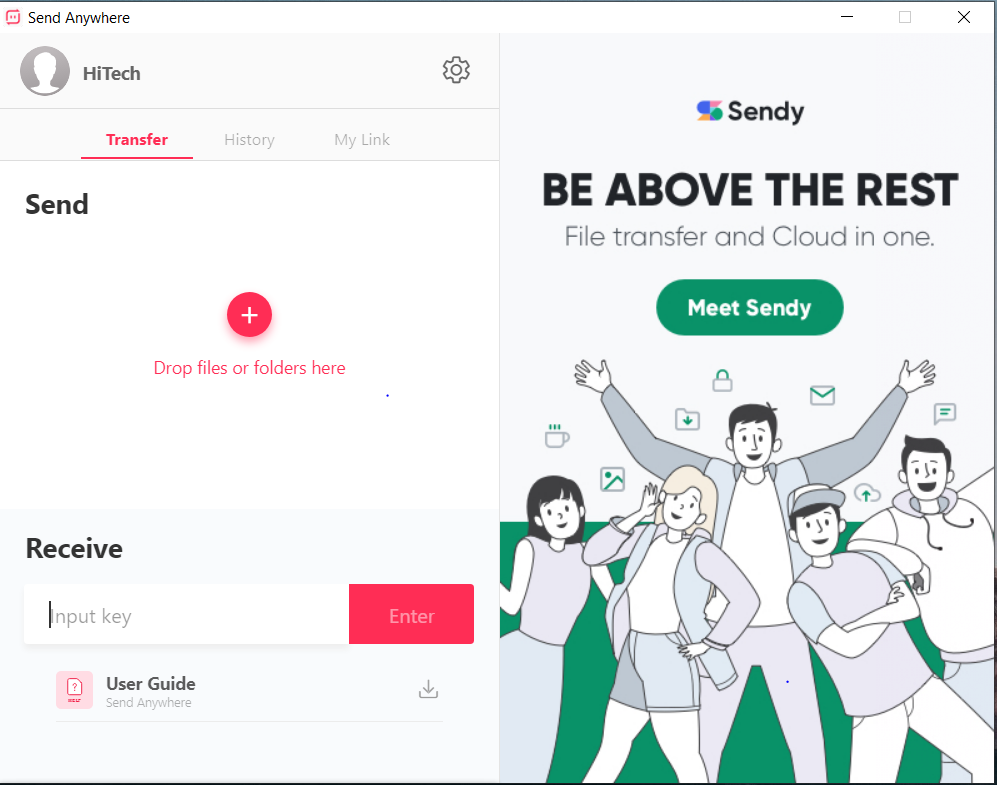
How to transfer big files across your devices — illustration 3
  1. A list of files to download will be displayed (not all can be selected) and all you have to do is click the Download button to get the file.
  2. To use the Share Link function (when using it, the file is uploaded to the Send Anywhere server and is stored for 48 hours, the free version is limited to 10 GB), you need to register in advance and log in with your account. This can be done in the “My Link” section of the mobile application and programs on a PC or laptop.

Using the method described in steps 1-4, transmission occurs without storage on the Send Anywhere server, but between devices over the Internet.

Sending and receiving files in Send Anywhere without installing an app

The main page of the Send Anywhere website https://send-anywhere.com/ allows you to send and receive files without installing a program on a computer or an application on a mobile device. This can be useful if the person to whom you are sending the file does not want to install the program or the transfer of a large file is required only once.

Di0jQ7Dj0Vr7BU42IRZF3cx5YIG6YPSuVieDI8N2pR RsvtNWMLsU yswhs152EuAP8t4rJnXfFhdr 7yKCYIQis5m3QY2wdyTYpYOPTNOv JJlXt98z9HDYhJRbmOIap tLhZW4 — How to transfer big files across your devices

Please note that the panel for sending and receiving files is not displayed in the mobile version of the official website, however, if you enable the PC version in the mobile browser (for example, you can do this in the Google Chrome menu on Android and iPhone), it will appear and work.


  • On October 5, 2020
  • 0 Comment

Leave Reply Cancel reply

Your email address will not be published. Required fields are marked *

Recent Posts
  • As Is: How Software Became the Only Product You Could Legally Sell Broken
  • The Production Incident Class Your Postmortem Template Doesn’t Have
  • Why Load Test Numbers Lie
  • When Config Became Executable: The Twenty-Year Pattern Behind Supply Chain Attacks
  • How Software Became a Medical Device
Categories
  • ai (8)
  • android (18)
  • apple (36)
  • chart (18)
  • cloud (1)
  • fix (42)
  • games (11)
  • google (31)
  • hardware (73)
  • healthcare (3)
  • how to (231)
  • internet (92)
  • ios (23)
  • macos (3)
  • microsoft (82)
  • mobile (36)
  • news (74)
  • optimization (17)
  • osx (4)
  • outsourcing (8)
  • qa (3)
  • regulation (7)
  • review (120)
  • security (39)
  • software (160)
  • windows (150)
Archives
  • August 2026
  • July 2026
  • June 2026
  • May 2026
  • August 2025
  • March 2025
  • February 2025
  • April 2023
  • March 2023
  • February 2023
  • January 2023
  • March 2022
  • January 2022
  • December 2021
  • November 2021
  • October 2021
  • September 2021
  • August 2021
  • July 2021
  • June 2021
  • May 2021
  • April 2021
  • March 2021
  • February 2021
  • January 2021
  • December 2020
  • November 2020
  • October 2020
  • September 2020
  • August 2020
  • July 2020
  • June 2020
  • May 2020
  • April 2020
  • March 2020
  • February 2020
  • January 2020
  • December 2019
  • November 2019
  • October 2019
  • September 2019
  • August 2019
  • April 2019
  • March 2019
  • February 2019
  • January 2019
  • December 2018
  • November 2018
  • October 2018
  • September 2018
  • June 2018
  • May 2018
  • April 2018
  • February 2018
  • January 2018
  • December 2017
  • November 2017
  • October 2017
  • June 2017
  • May 2017
  • April 2017
  • March 2017
  • February 2017
  • January 2017
  • December 2016
  • November 2016
  • October 2016
  • September 2016
  • August 2016
  • July 2016
  • June 2016
  • May 2016
  • April 2016
  • March 2016
  • February 2016
  • January 2016
  • December 2015
  • November 2015
  • October 2015
  • September 2015
  • July 2015
  • January 2015
Archives
  • August 2026
  • July 2026
  • June 2026
  • May 2026
  • August 2025
  • March 2025
  • February 2025
  • April 2023
  • March 2023
  • February 2023
  • January 2023
  • March 2022
  • January 2022
  • December 2021
  • November 2021
  • October 2021
  • September 2021
  • August 2021
  • July 2021
  • June 2021
  • May 2021
  • April 2021
  • March 2021
  • February 2021
  • January 2021
  • December 2020
  • November 2020
  • October 2020
  • September 2020
  • August 2020
  • July 2020
  • June 2020
  • May 2020
  • April 2020
  • March 2020
  • February 2020
  • January 2020
  • December 2019
  • November 2019
  • October 2019
  • September 2019
  • August 2019
  • April 2019
  • March 2019
  • February 2019
  • January 2019
  • December 2018
  • November 2018
  • October 2018
  • September 2018
  • June 2018
  • May 2018
  • April 2018
  • February 2018
  • January 2018
  • December 2017
  • November 2017
  • October 2017
  • June 2017
  • May 2017
  • April 2017
  • March 2017
  • February 2017
  • January 2017
  • December 2016
  • November 2016
  • October 2016
  • September 2016
  • August 2016
  • July 2016
  • June 2016
  • May 2016
  • April 2016
  • March 2016
  • February 2016
  • January 2016
  • December 2015
  • November 2015
  • October 2015
  • September 2015
  • July 2015
  • January 2015

20 Google Search Easter Eggs

Previous thumb

Built-in Google Chrome password security checker

Next thumb
Scroll

Services

  • Software Development
  • Quality Assurance
  • Customer Support
  • Managed Services
  • 24/7 Emergency IT Support
  • Competency Center
  • Local AI Agent Development
  • Software as a Medical Device

Compliance

  • Compliance Audit
  • GDPR Compliance
  • What is GDPR
  • ISO 9001:2015 Certification

Company

  • About Us
  • All Services
  • Projects
  • Case Studies
  • Articles
  • Contact
About HiTech Service

With 10 year experience of working together, we have reached tangible synergetic effect in performance and productivity, which results in highest quality services and satisfied clients.

Privacy Policy   Cookie Policy


  • Facebook
  • X
  • LinkedIn
CONTACT INFO
  • 900 Foulk Rd, Suite 201, Wilmington, DE, USA, 19803
  • Kudryavs’kyi descent 5b, Kyiv, Ukraine, 04053
  • +1 646.844.5712 (US)
ISO 9001:2015 certificate issued to HiTech Service LLC by Veritas
RIPE Atlas logo, the network measurement community HiTech Service takes part in
BrainBasket Foundation logo, IT education initiative HiTech Service supports
HiTech Service LLC membership badge of the Hi-Tech Office Ukraine association Dun & Bradstreet verified business badge for HiTech Service LLC
YouTeam partner badge for HiTech Service LLC
Hitech Service LLC

Copyright 2026