Have any questions? +1 646.844.5712 (US)

  • Facebook
  • LinkedIn
  • Twitter
HiTech ServiceHiTech Service
  • Home
  • About
  • Services
    • Software Development
    • Customer Support
    • Quality Assurance
    • Managed Services
    • Compliance Audit
    • GDPR Compliance
    • Competency Center
    • Emergency IT Support
    • Software as medical device
    • Local AI Agent Development
  • Projects
  • GDPR
  • Articles
  • Case Studies
  • Contact
Menu
  • Home
  • About
  • Services
    • Software Development
    • Customer Support
    • Quality Assurance
    • Managed Services
    • Compliance Audit
    • GDPR Compliance
    • Competency Center
    • Emergency IT Support
    • Software as medical device
    • Local AI Agent Development
  • Projects
  • GDPR
  • Articles
  • Case Studies
  • Contact
How to get rid of pop-up ads

How to get rid of pop-up ads

If you sick and tired of advertising pop-ups in the browser or new window tabs that permanently open the page with ads, I have good news – you are not alone. These Adware, like any other “wares” annoy thousands of people, so, consequently, there are smart guys who found the way to get rid of this pain in the neck.

Let’s see our options.


Using an Anti-Adware Application

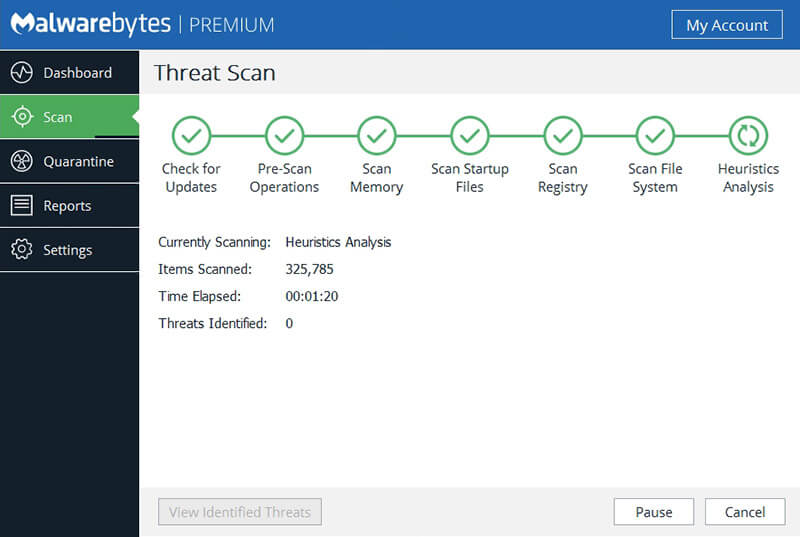
In order not to go deep into the wilds, try using special software tools for removing AdWare, in our case – browser virus. Due to the fact that extensions and programs that cause pop-up windows, literally, are not viruses, antimalware programs do not detect them. However, there are special tools for removing potentially unwanted programs that do a good job of it. Malwarebytes will be as an example.
How to get rid of pop up ads 01 — How to get rid of pop-up ads

Malwarebytes Antimalware is a free tool for removing malware, including Adware, that causes advertisements to appear in Google Chrome, Firefox, etc.

Upon completion of the scan, you will be able to remove malicious programs from your computer that cause advertising to pop up. After that, restart the computer and see if the problem has been solved.

If, after removing ads, a browser shows an error, saying you cannot connect to the proxy server.

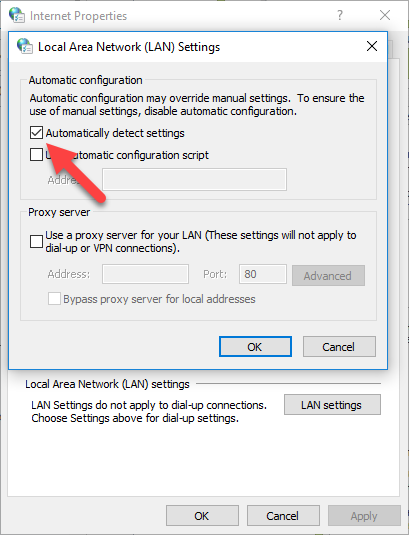
In this case, open the Windows control panel, switch the view to Icons, and open Internet properties. In the properties, go to the Connections tab and click the LAN Settings button.
How to get rid of pop up ads 02 — How to get rid of pop-up ads

Check Automatically detect settings and leave Use a proxy server unchecked.

How to get rid of advertising in the browser manually

If the methods described above did not help to remove ads or pop-up browser windows, we would proceed with fixing it manually.

Task Scheduler

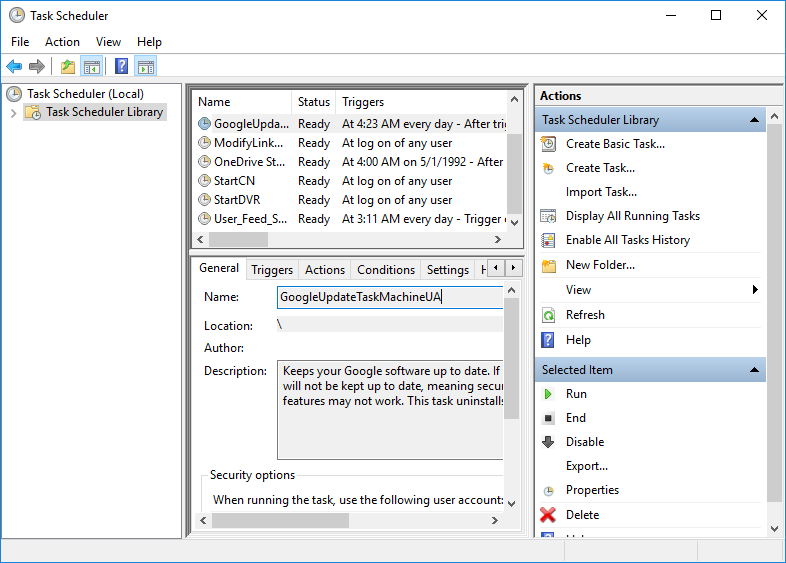
One of the reasons those adds appear on your computer is that the malware set the task in the Windows Task Scheduler. You just need to delete this task from the scheduler:

  1. Open Task Scheduler by pressing Win+R and entering Taskschd.msc
  2. Open the “Task Scheduler Library” section, and then alternately review the “Actions” tab in each of the tasks in the list in the center (you can open the properties of the task by double-clicking on it).How to get rid of pop up ads 03 — How to get rid of pop-up ads
  3. In one of the tasks you will find the path to the browser + the address of the site that opens – this is the desired task. Delete it


Removing programs that cause advertising

First, go to the Windows Control Panel – Apps and Features and see if any strange programs are on the list. If there is, delete and restart the computer. If you do not know if the application is safe or you suspect something, try searching the Internet: if many people are looking for how to get rid of it, then you can also delete the app. Usually, such removal does not help to get rid of Adware completely, and they rarely appear in the list of installed programs, but it’s just the first step. The next one is to open the task manager and in Windows 7 go to the “Processes” tab, and in Windows 10 and 8 – the “Details” tab. Click the “Display processes for all users.” Look for the files with the specified names in the list of running processes.

Pirrit Suggestor, pirritdesktop.exe, and all that contain Pirrit

Search Protect, Browser Protect, and all that contain “search” (ecxept SearchIndexer — this is Windows tool, which is safe)

Conduit, Awesomehp and Babylon

Websocial and Webalta

CodecDefaultKernel.exe

RSTUpdater.exe

Try to right-click on the suspicious process and click on End Task. Most likely, after that, it will immediately start up again. So, we have found the process causing the appearance of an advertisement. Click on it with the right mouse button and select the item “Open file location”. Remember where this file is located.
How to get rid of pop up ads 04 — How to get rid of pop-up ads

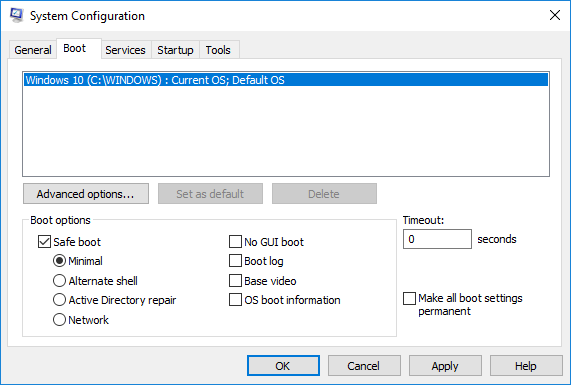
Then press the Win+R and type in msconfig, then click OK. In the Boot tab, checkmark the Safe Boot and click OK. Restart the computer.

How to get rid of pop up ads 05 — How to get rid of pop-up ads

After entering the safe mode, go to the control panel and turn on the display of hidden and system files. Then, go to the folder where the suspicious file was located and delete all its contents.

Restart your computer again.


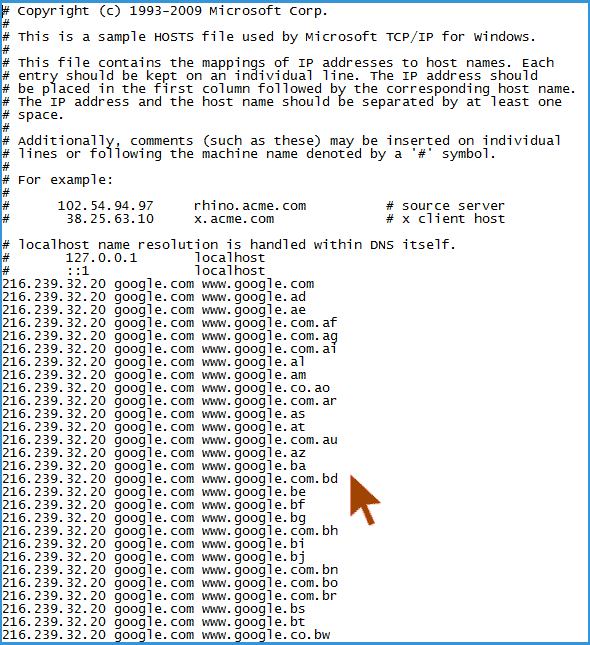
Changes made by the virus in the file hosts for advertising substitution
How to get rid of pop up ads 06 — How to get rid of pop-up ads

In order to fix the hosts file, launch Notepad as administrator, select File – open in the menu. Then, specify that all files are displayed and go to Windows \ System32 \ drivers \ etc \, and open the hosts file. Delete all lines below “127.0.0.1 localhost” if it weren’t you, who added those.

We hope that the steps described above would help you to get rid of Adwares, if no – let us know in the comments. Take care!

  • On March 12, 2019
  • 0 Comment

Leave Reply Cancel reply

Your email address will not be published. Required fields are marked *

Recent Posts
  • Managed IT Services vs. In-House IT: What Should You Choose?
  • When the Model Is the Vendor: What Happens to Compliance When You Don’t Own the Weights
  • The Edge Device Is the Perimeter: Why the Box You Bought to Keep Them Out Is How They Get In
  • The Password Memo Was Honest. The Checklist Wasn’t.
  • As Is: How Software Became the Only Product You Could Legally Sell Broken
Categories
  • ai (9)
  • android (18)
  • apple (36)
  • chart (18)
  • cloud (1)
  • fix (42)
  • games (11)
  • google (31)
  • hardware (73)
  • healthcare (3)
  • how to (231)
  • internet (92)
  • ios (23)
  • macos (3)
  • microsoft (82)
  • mobile (36)
  • news (74)
  • optimization (17)
  • osx (4)
  • outsourcing (9)
  • qa (3)
  • regulation (8)
  • review (120)
  • security (41)
  • software (160)
  • windows (150)
Archives
  • September 2026
  • August 2026
  • July 2026
  • June 2026
  • May 2026
  • August 2025
  • March 2025
  • February 2025
  • April 2023
  • March 2023
  • February 2023
  • January 2023
  • March 2022
  • January 2022
  • December 2021
  • November 2021
  • October 2021
  • September 2021
  • August 2021
  • July 2021
  • June 2021
  • May 2021
  • April 2021
  • March 2021
  • February 2021
  • January 2021
  • December 2020
  • November 2020
  • October 2020
  • September 2020
  • August 2020
  • July 2020
  • June 2020
  • May 2020
  • April 2020
  • March 2020
  • February 2020
  • January 2020
  • December 2019
  • November 2019
  • October 2019
  • September 2019
  • August 2019
  • April 2019
  • March 2019
  • February 2019
  • January 2019
  • December 2018
  • November 2018
  • October 2018
  • September 2018
  • June 2018
  • May 2018
  • April 2018
  • February 2018
  • January 2018
  • December 2017
  • November 2017
  • October 2017
  • June 2017
  • May 2017
  • April 2017
  • March 2017
  • February 2017
  • January 2017
  • December 2016
  • November 2016
  • October 2016
  • September 2016
  • August 2016
  • July 2016
  • June 2016
  • May 2016
  • April 2016
  • March 2016
  • February 2016
  • January 2016
  • December 2015
  • November 2015
  • October 2015
  • September 2015
  • July 2015
  • January 2015
Archives
  • September 2026
  • August 2026
  • July 2026
  • June 2026
  • May 2026
  • August 2025
  • March 2025
  • February 2025
  • April 2023
  • March 2023
  • February 2023
  • January 2023
  • March 2022
  • January 2022
  • December 2021
  • November 2021
  • October 2021
  • September 2021
  • August 2021
  • July 2021
  • June 2021
  • May 2021
  • April 2021
  • March 2021
  • February 2021
  • January 2021
  • December 2020
  • November 2020
  • October 2020
  • September 2020
  • August 2020
  • July 2020
  • June 2020
  • May 2020
  • April 2020
  • March 2020
  • February 2020
  • January 2020
  • December 2019
  • November 2019
  • October 2019
  • September 2019
  • August 2019
  • April 2019
  • March 2019
  • February 2019
  • January 2019
  • December 2018
  • November 2018
  • October 2018
  • September 2018
  • June 2018
  • May 2018
  • April 2018
  • February 2018
  • January 2018
  • December 2017
  • November 2017
  • October 2017
  • June 2017
  • May 2017
  • April 2017
  • March 2017
  • February 2017
  • January 2017
  • December 2016
  • November 2016
  • October 2016
  • September 2016
  • August 2016
  • July 2016
  • June 2016
  • May 2016
  • April 2016
  • March 2016
  • February 2016
  • January 2016
  • December 2015
  • November 2015
  • October 2015
  • September 2015
  • July 2015
  • January 2015

What is the best music streaming service?

Previous thumb

How to generate a strong password in Chrome

Next thumb
Scroll

Services

  • Software Development
  • Quality Assurance
  • Customer Support
  • Managed Services
  • 24/7 Emergency IT Support
  • Competency Center
  • Local AI Agent Development
  • Software as a Medical Device

Compliance

  • Compliance Audit
  • GDPR Compliance
  • What is GDPR
  • ISO 9001:2015 Certification

Company

  • About Us
  • All Services
  • Projects
  • Case Studies
  • Articles
  • Contact
About HiTech Service

With 10 year experience of working together, we have reached tangible synergetic effect in performance and productivity, which results in highest quality services and satisfied clients.

Privacy Policy   Cookie Policy


  • Facebook
  • X
  • LinkedIn
CONTACT INFO
  • 900 Foulk Rd, Suite 201, Wilmington, DE, USA, 19803
  • Kudryavs’kyi descent 5b, Kyiv, Ukraine, 04053
  • +1 646.844.5712 (US)
ISO 9001:2015 certificate issued to HiTech Service LLC by Veritas
RIPE Atlas logo, the network measurement community HiTech Service takes part in
BrainBasket Foundation logo, IT education initiative HiTech Service supports
HiTech Service LLC membership badge of the Hi-Tech Office Ukraine association Dun & Bradstreet verified business badge for HiTech Service LLC
YouTeam partner badge for HiTech Service LLC
Hitech Service LLC

Copyright 2026