Have any questions? +1 646.844.5712 (US)

  • Facebook
  • LinkedIn
  • Twitter
HiTech ServiceHiTech Service
  • Home
  • About
  • Services
    • Software Development
    • Customer Support
    • Quality Assurance
    • Managed Services
    • Compliance Audit
    • GDPR Compliance
    • Competency Center
    • Emergency IT Support
    • Software as medical device
    • Local AI Agent Development
  • Projects
  • GDPR
  • Articles
  • Case Studies
  • Contact
Menu
  • Home
  • About
  • Services
    • Software Development
    • Customer Support
    • Quality Assurance
    • Managed Services
    • Compliance Audit
    • GDPR Compliance
    • Competency Center
    • Emergency IT Support
    • Software as medical device
    • Local AI Agent Development
  • Projects
  • GDPR
  • Articles
  • Case Studies
  • Contact
Error access is denied (Write to disk) uTorrent in Windows 10

Error access is denied (Write to disk) uTorrent in Windows 10

BitTorrent is a communications protocol of peer-to-peer file sharing which is very popular among internet users. Its main benefit is high speed of data transfer, since the file is being downloaded not from one server, but from multiple computers and every user, who has already downloaded the file. One of the most popular BitTottent clients (a program to download\upload p2p files) is uTorrent, however multiple Windows 10 users lately report many issues with this program due to changes in Windows 10 security settings. One of the most annoying issues is “Error access is denied (Write to disk)” message while trying to download a file using uTorrent.



Access denied error utorrent windows 10 02 — Error access is denied (Write to disk) uTorrent in Windows 10

You can find users complaining about this error message on multiple forums, though on every forum you can find a simple answer – just run UTorrent as administrator and download will start.
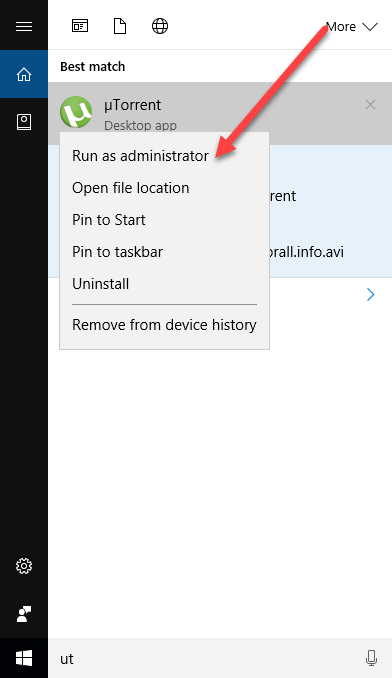
Access denied error utorrent windows 10 03 1 — Error access is denied (Write to disk) uTorrent in Windows 10

Well, that’s true, the problem will be solver for this time, however when you try to download another file by double clicking on torrent file you will get another error message.
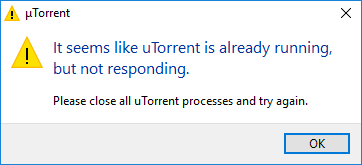
Access denied error utorrent windows 10 04 — Error access is denied (Write to disk) uTorrent in Windows 10

It seems like uTorrent is already running but not responding in Windows 10.

The workaround is simple – you can add the torrent file to the client manually.
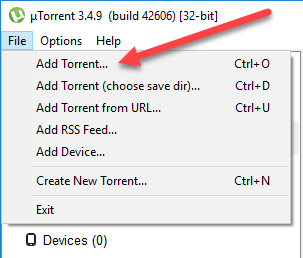
Access denied error utorrent windows 10 05 — Error access is denied (Write to disk) uTorrent in Windows 10

It’s not as convenient as a simple double click on the file, but still helps.

For me these workarounds are very doubtful and inconvenient, since every time I forget to run uTorrent as administrator and I’m too lazy to add a torrent file manually since I have to find it in my crowded Downloads folder. As it turns out it takes only 5 minutes to fix these problems once and for always.

How to fix?

To fix the problem you need to make uTorrent run “as administrator” by default at all times. But that’s not all, there is one extra step you need to take.

Hit Windows button and start typing uTorrent.

Right click on the icon and choose Open file location.
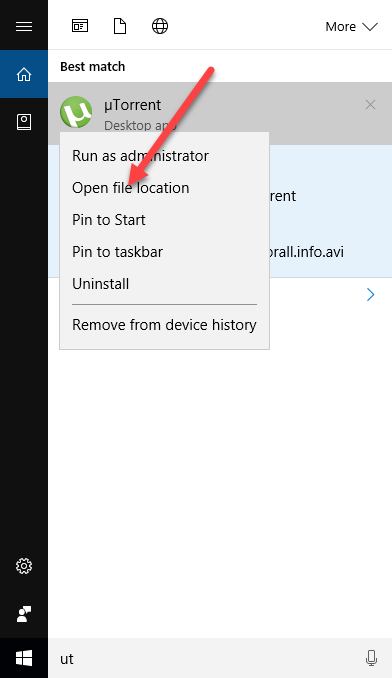
Access denied error utorrent windows 10 06 — Error access is denied (Write to disk) uTorrent in Windows 10

Right click on the uTorrent icon in the opened folder and go to properties.
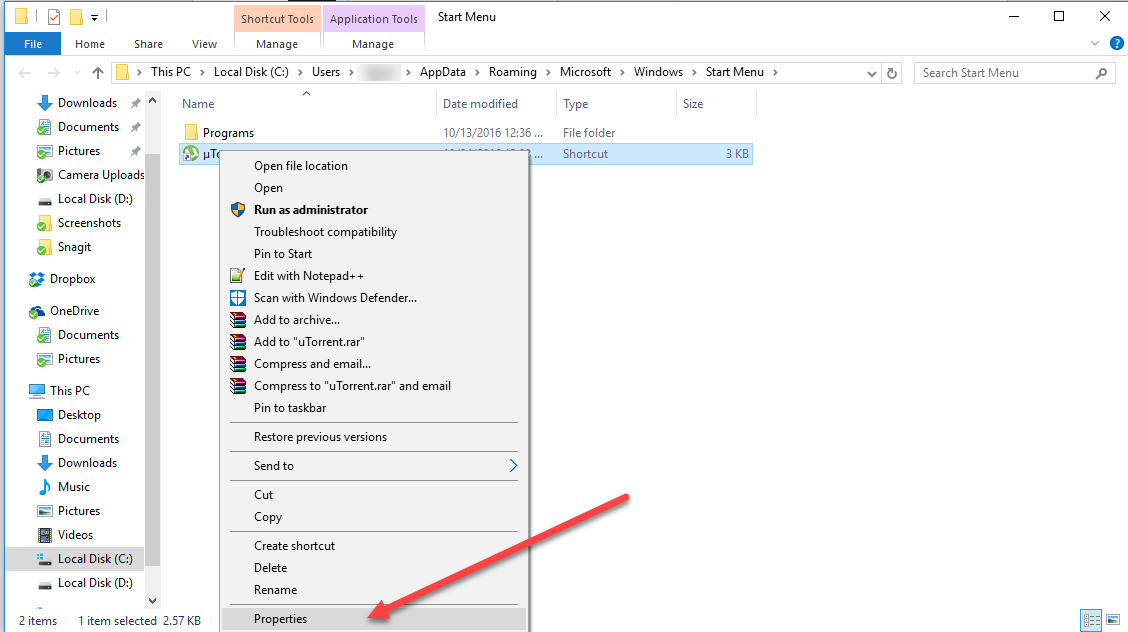
Access denied error utorrent windows 10 07 — Error access is denied (Write to disk) uTorrent in Windows 10

In properties, navigate to Compatibility tab, set “Run this program in compatibility mode for” and select “Windows XP Service Pack 3” in the dropdown menu.

Scroll lower and put the checkmark next to “Run this program as Administrator.”

In other words, make sure you have everything like on the screenshot below.
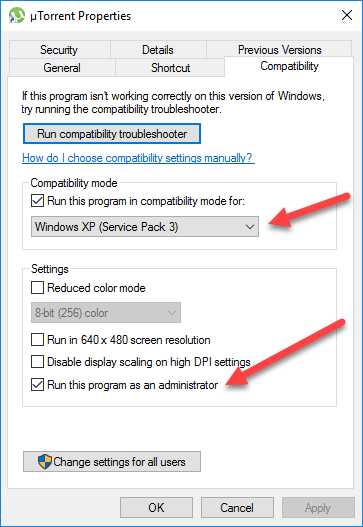
Access denied error utorrent windows 10 08 — Error access is denied (Write to disk) uTorrent in Windows 10

Now hit Apply and Ok button and go back to the uTorrent icon. Right click on it again and click on Open file location.
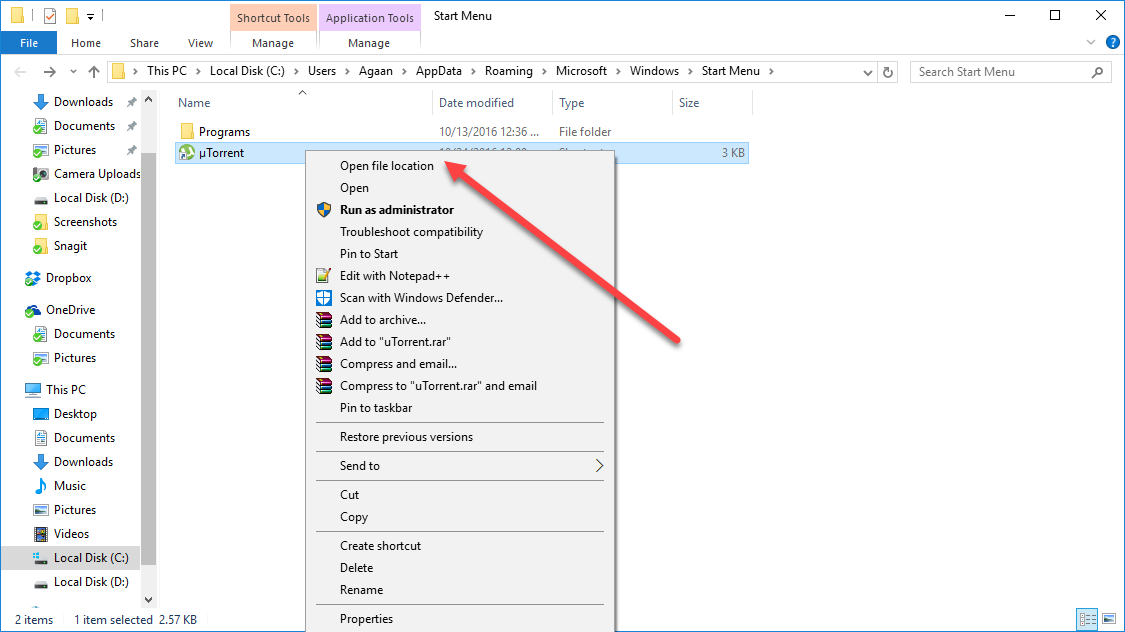
Access denied error utorrent windows 10 09 — Error access is denied (Write to disk) uTorrent in Windows 10

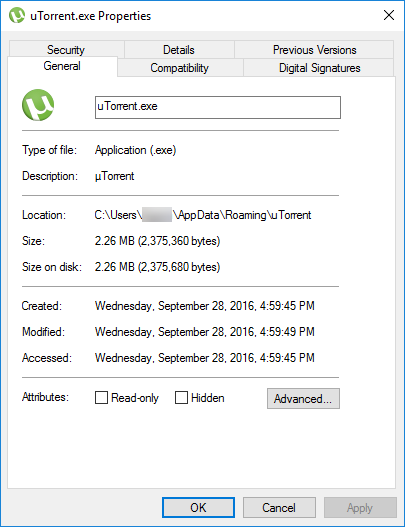
Find uTorrent.exe file, right click on it and choose Properties again.
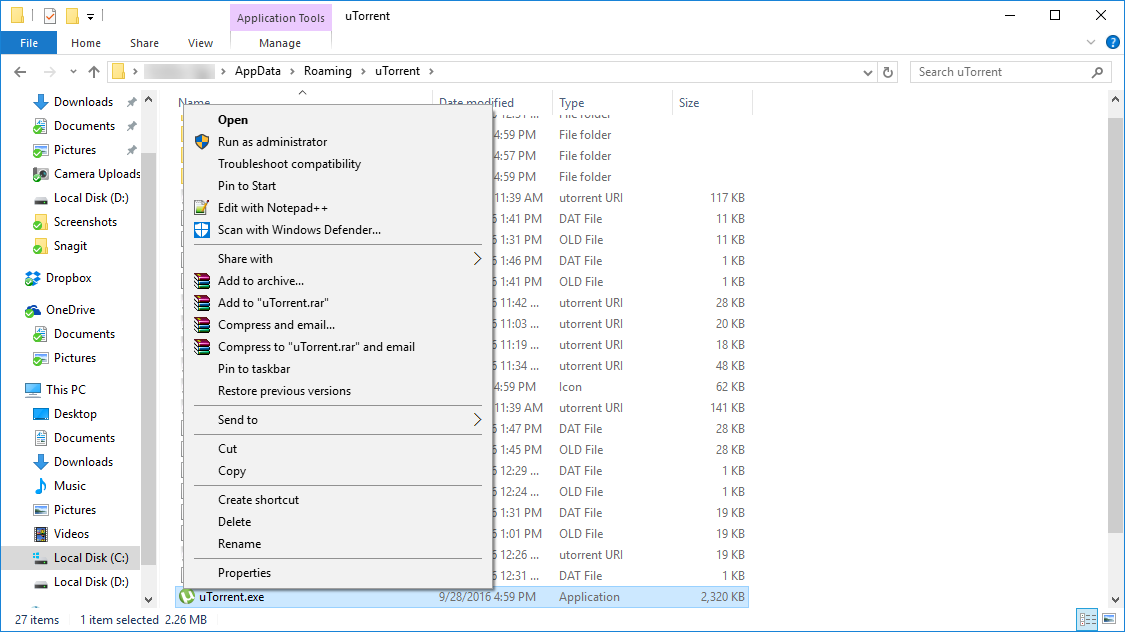


Access denied error utorrent windows 10 10 — Error access is denied (Write to disk) uTorrent in Windows 10

Navigate to Compatibility tab again.

Access denied error utorrent windows 10 11 — Error access is denied (Write to disk) uTorrent in Windows 10

Repeat the changes like we did with icon and save them.
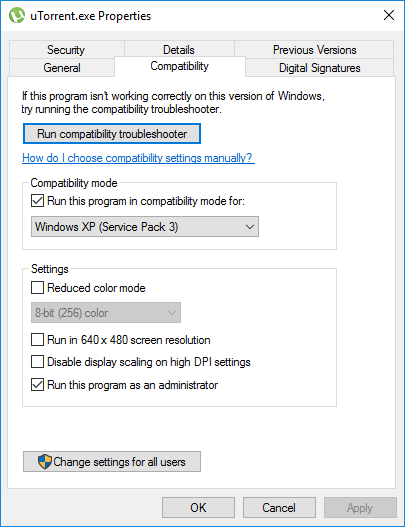
Access denied error utorrent windows 10 12 — Error access is denied (Write to disk) uTorrent in Windows 10

You might think that doing changes to exe file is enough and the step with changing the icon can be skipped, but it turned out that we need to change both – exe file and icon, since the application is launched by Windows 10 in different ways.

Now, double click on uTorrent icon and you will see that everything is working now.

We hope that these simple steps will help you, but if you need any additional assistance with this or any other computer related issue feel free to contact our User Support department to get immediate remote help.


  • On October 25, 2016
  • 0 Comment

Leave Reply Cancel reply

Your email address will not be published. Required fields are marked *

Recent Posts
  • Why Load Test Numbers Lie
  • When Config Became Executable: The Twenty-Year Pattern Behind Supply Chain Attacks
  • How Software Became a Medical Device
  • Compliant With What? A Working Map of GDPR, HIPAA, SOC 2 and ISO 27001
  • Local AI vs Cloud AI: The Break-Even Is About Utilization, Not Tokens
Categories
  • ai (7)
  • android (18)
  • apple (36)
  • chart (18)
  • cloud (1)
  • fix (42)
  • games (11)
  • google (31)
  • hardware (73)
  • healthcare (3)
  • how to (231)
  • internet (92)
  • ios (23)
  • macos (3)
  • microsoft (82)
  • mobile (36)
  • news (74)
  • optimization (17)
  • osx (4)
  • outsourcing (8)
  • qa (3)
  • regulation (7)
  • review (120)
  • security (37)
  • software (159)
  • windows (150)
Archives
  • August 2026
  • July 2026
  • June 2026
  • May 2026
  • August 2025
  • March 2025
  • February 2025
  • April 2023
  • March 2023
  • February 2023
  • January 2023
  • March 2022
  • January 2022
  • December 2021
  • November 2021
  • October 2021
  • September 2021
  • August 2021
  • July 2021
  • June 2021
  • May 2021
  • April 2021
  • March 2021
  • February 2021
  • January 2021
  • December 2020
  • November 2020
  • October 2020
  • September 2020
  • August 2020
  • July 2020
  • June 2020
  • May 2020
  • April 2020
  • March 2020
  • February 2020
  • January 2020
  • December 2019
  • November 2019
  • October 2019
  • September 2019
  • August 2019
  • April 2019
  • March 2019
  • February 2019
  • January 2019
  • December 2018
  • November 2018
  • October 2018
  • September 2018
  • June 2018
  • May 2018
  • April 2018
  • February 2018
  • January 2018
  • December 2017
  • November 2017
  • October 2017
  • June 2017
  • May 2017
  • April 2017
  • March 2017
  • February 2017
  • January 2017
  • December 2016
  • November 2016
  • October 2016
  • September 2016
  • August 2016
  • July 2016
  • June 2016
  • May 2016
  • April 2016
  • March 2016
  • February 2016
  • January 2016
  • December 2015
  • November 2015
  • October 2015
  • September 2015
  • July 2015
  • January 2015
Archives
  • August 2026
  • July 2026
  • June 2026
  • May 2026
  • August 2025
  • March 2025
  • February 2025
  • April 2023
  • March 2023
  • February 2023
  • January 2023
  • March 2022
  • January 2022
  • December 2021
  • November 2021
  • October 2021
  • September 2021
  • August 2021
  • July 2021
  • June 2021
  • May 2021
  • April 2021
  • March 2021
  • February 2021
  • January 2021
  • December 2020
  • November 2020
  • October 2020
  • September 2020
  • August 2020
  • July 2020
  • June 2020
  • May 2020
  • April 2020
  • March 2020
  • February 2020
  • January 2020
  • December 2019
  • November 2019
  • October 2019
  • September 2019
  • August 2019
  • April 2019
  • March 2019
  • February 2019
  • January 2019
  • December 2018
  • November 2018
  • October 2018
  • September 2018
  • June 2018
  • May 2018
  • April 2018
  • February 2018
  • January 2018
  • December 2017
  • November 2017
  • October 2017
  • June 2017
  • May 2017
  • April 2017
  • March 2017
  • February 2017
  • January 2017
  • December 2016
  • November 2016
  • October 2016
  • September 2016
  • August 2016
  • July 2016
  • June 2016
  • May 2016
  • April 2016
  • March 2016
  • February 2016
  • January 2016
  • December 2015
  • November 2015
  • October 2015
  • September 2015
  • July 2015
  • January 2015

Error in Chrome - To enjoy Spotify, please install Abode Flash.

Previous thumb

Why are batteries exploding?

Next thumb
Scroll

Services

  • Software Development
  • Quality Assurance
  • Customer Support
  • Managed Services
  • 24/7 Emergency IT Support
  • Competency Center
  • Local AI Agent Development
  • Software as a Medical Device

Compliance

  • Compliance Audit
  • GDPR Compliance
  • What is GDPR
  • ISO 9001:2015 Certification

Company

  • About Us
  • All Services
  • Projects
  • Case Studies
  • Articles
  • Contact
About HiTech Service

With 10 year experience of working together, we have reached tangible synergetic effect in performance and productivity, which results in highest quality services and satisfied clients.

Privacy Policy   Cookie Policy


  • Facebook
  • X
  • LinkedIn
CONTACT INFO
  • 900 Foulk Rd, Suite 201, Wilmington, DE, USA, 19803
  • Kudryavs’kyi descent 5b, Kyiv, Ukraine, 04053
  • +1 646.844.5712 (US)
ISO 9001:2015 certificate issued to HiTech Service LLC by Veritas
RIPE Atlas logo, the network measurement community HiTech Service takes part in
BrainBasket Foundation logo, IT education initiative HiTech Service supports
HiTech Service LLC membership badge of the Hi-Tech Office Ukraine association Dun & Bradstreet verified business badge for HiTech Service LLC
YouTeam partner badge for HiTech Service LLC
Hitech Service LLC

Copyright 2026