Have any questions? +1 646.844.5712 (US)

  • Facebook
  • LinkedIn
  • Twitter
HiTech ServiceHiTech Service
  • Home
  • About
  • Services
    • Software Development
    • Customer Support
    • Quality Assurance
    • Managed Services
    • Compliance Audit
    • GDPR Compliance
    • Competency Center
    • Emergency IT Support
    • Software as medical device
    • Local AI Agent Development
  • Projects
  • GDPR
  • Articles
  • Case Studies
  • Contact
Menu
  • Home
  • About
  • Services
    • Software Development
    • Customer Support
    • Quality Assurance
    • Managed Services
    • Compliance Audit
    • GDPR Compliance
    • Competency Center
    • Emergency IT Support
    • Software as medical device
    • Local AI Agent Development
  • Projects
  • GDPR
  • Articles
  • Case Studies
  • Contact
usbs

USB cables and connectors – types, differences, characteristics

There are several types of USB connectors (Universal Serial Bus – Universal Serial Bus), that can be divided into three generations – USB v1.1, USB v2.0 and USB v3.0.


Version v1.1 is rarely used nowadays because of its very low data transfer rate (12 Mbit/ s). It is mostly used for compatibility purposes.

The next generation – USB 2.0 is now, maybe, the most wide-spread in the market. Most modern devices support this version that has the data transfer rate maximums at 480 Mbit/sec, or 48 Mbytes/sec. However, due to some drawbacks in implementation and design, the actual speed rarely exceeds 30-33 MB/s. Many hard disk drives are capable of reading information at a rate being 3-4 times greater than that. USB v2.0 connector is a bottleneck that hinders the work of modern drives. At the same time, it does not really matter for mice, keyboards and other non-storage devices.

The third generation is USB v3.0. It is marked in blue, to indicate its last generation. The data transfer speed here is considerably higher – 5 Gbit/s, which is equivalent to 500 MB/sec.Taking into account that that state of the art SSD drives today have average speed limits at approximately the same level, it makes USB 3.0 a very good choice for portable storage units.

USB 1.1 and 2.0 connectors are absolutely similar in structure and are fully compatible with each other. If one of the connected parties supports version v1.1 only, the data exchange will take place at a reduced speed, and the operating system will display the message: “This device can perform faster”, which means that the computer is using a USB 2.0 port while connected device supports v1.1.

Compatibility between USB 2.0 and 3.0 is somewhat different. Any USB v2.0 device can be connected to the third version of the port, marked in blue. But the reverse connection (except for USB type A) is not possible. In modern cables and devices USB v3.0 provides additional contacts, that contribute to the speed of the interface.

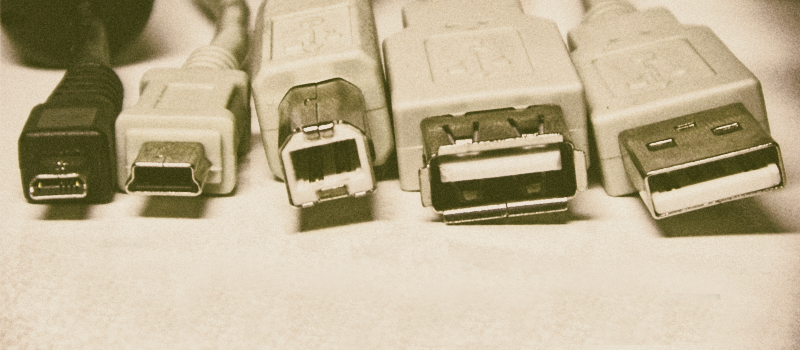
USB v2.0 and USB v3.0 connectors are also classified by type (type A and type B) and size (MiniUSB and MicroUSB).

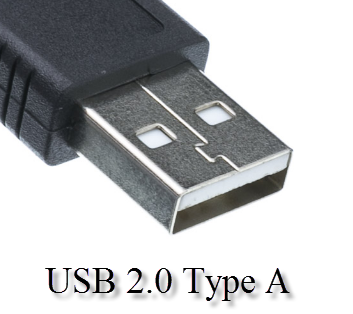
USB 2.0 Type A

USB Type A is most prevalent and is the most recognizable. Most devices (mouse, keyboard, flash drives, cameras, and many others) have a USB type A connector, that was developed back in the 90s. The main advantage of this port is the reliability to withstand large number of connections without losing its integrity. Although the connector has the rectangular shape, it has protection against incorrect connection it impossible to plug upside down. However, Type A has a sufficiently large size, therefore not suitable for portable devices. This resulted in smaller modifications of USB 2.0.
Usb cables and connectors types differences characteristics 02 — USB cables and connectors – types, differences, characteristics

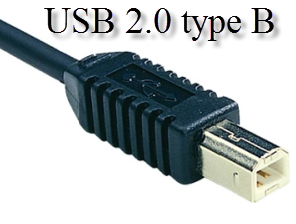
USB 2.0 type B

USB type B connectors are less popular. All modifications of type B, including Mini and Micro, have a square or trapezoidal shape. Traditional full-sized type B is the only type that has a square shape. Due to the large size it is used in various peripheral and stationary devices (scanners, printers, ADSL-modems). It is common that printer manufacturers rarely bundle their products with such a cable, so the customer should buy it as well..
Usb cables and connectors types differences characteristics 03 — USB cables and connectors – types, differences, characteristics

Mini USB 2.0 Type B

With multiple compact devices on the market, Mini USB type B connectors were getting more and more popularity. This kind of connectors is most used with portable hard drives. If compared to the large connector with 4 contacts, the Mini USB type B has five contacts, however, one of them is not involved. Unfortunately, miniaturization had negative impact on reliability. Mini USB connector starts to become loose with time. At this time, it is still widely used in portable hard drives, iPods, card readers and other compact devices. The second modification of Mini USB – Type A is almost not used. Also, Mini USB is getting less and less popular with Micro USB gaining its share.
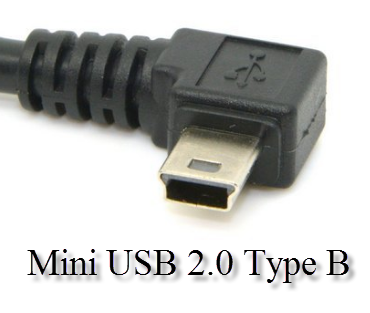
Usb cables and connectors types differences characteristics 04 — USB cables and connectors – types, differences, characteristics

Micro USB 2.0 type B

Micro USB type B connector is a modified version of the previous type Mini USB type B and is very tiny size, allowing manufacturers to use it in compact and slim devices. Due to an improved fastening plug is very tightly seated in the plug and does not fall out of it. In 2011, this type of connector has been approved as a single standard for charging smartphones, phones, tablets, music players and other portable devices. This solution allows to use a single cable to charge all the devices. Almost all smartphones are now equipped with this type of connector. Type A is rarely used.
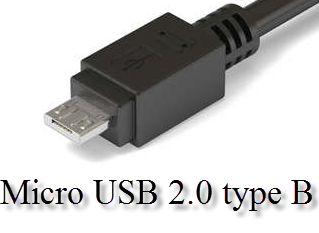
Usb cables and connectors types differences characteristics 05 — USB cables and connectors – types, differences, characteristics


USB 3.0 Type A

USB v3.0 standard provides significantly higher data transfer rate compared to the previous generations. Additional contacts in the new generation of USB connectors led to significant changes in the form of almost all the USB 3.0 connectors. However, type A remained seemingly unchanged, except for the blue core. This means that USB 3.0 Type A is still compatible with previous generations and can work with USB 2.0 plugs losing only in speed and vice versa. This is a major difference from other connectors of the third generation of USB. These connectors are commonly found in modern laptops and computers.
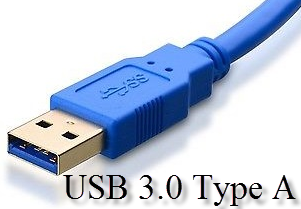
Usb cables and connectors types differences characteristics 06 — USB cables and connectors – types, differences, characteristics

USB 3.0 type B

USB 3.0 type B is used in medium to large high-performance peripheral devices – NAS, as well as in stationary hard disk drives. Connector has undergone significant changes, so it can not connect to a USB 2.0 port of the same type – USB 2.0 Type B.
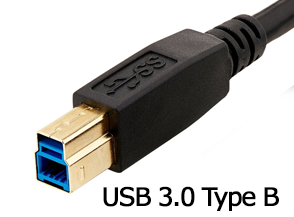
Usb cables and connectors types differences characteristics 10 — USB cables and connectors – types, differences, characteristics

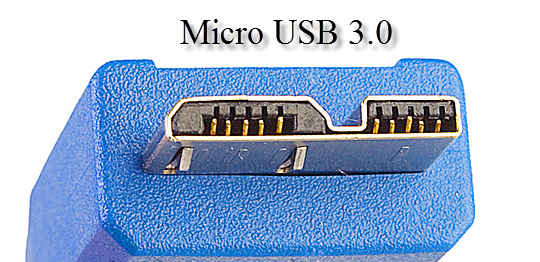
Micro USB 3.0

Micro USB 3.0 is the successor of the “classic” Micro USB connector and has the same features – compact, reliable, high-quality connection, but provides a higher data rate. Its is mainly used in modern high-speed external hard drives and SSDs. It is growing in popularity. The design is much similar to Micro USB 2.0 though a bit different. Thus old connectors of the same type will fit to the new type of plug, but not vice versa.
Usb cables and connectors types differences characteristics 08 — USB cables and connectors – types, differences, characteristics

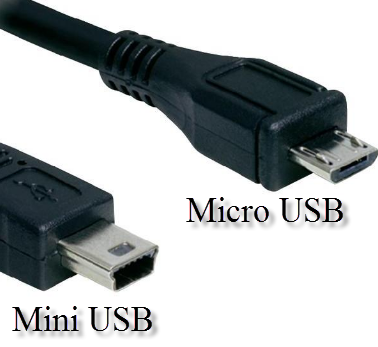
The difference between the Micro USB and Mini USB.

People sometimes confuse Mini USB and Micro USB connectors that look alike. The main difference is that the first is slightly larger in dimensions, and the second has special little locks on the rear side. Do not get confused=)
Usb cables and connectors types differences characteristics 09 — USB cables and connectors – types, differences, characteristics


  • On August 9, 2016
  • 0 Comment

Leave Reply Cancel reply

Your email address will not be published. Required fields are marked *

Recent Posts
  • How AI and Automation Are Changing IT Service Delivery
  • Managed IT Services vs. In-House IT: What Should You Choose?
  • When the Model Is the Vendor: What Happens to Compliance When You Don’t Own the Weights
  • The Edge Device Is the Perimeter: Why the Box You Bought to Keep Them Out Is How They Get In
  • The Password Memo Was Honest. The Checklist Wasn’t.
Categories
  • ai (10)
  • android (18)
  • apple (36)
  • chart (18)
  • cloud (1)
  • fix (42)
  • games (11)
  • google (31)
  • hardware (73)
  • healthcare (3)
  • how to (231)
  • internet (92)
  • ios (23)
  • macos (3)
  • microsoft (82)
  • mobile (36)
  • news (74)
  • optimization (17)
  • osx (4)
  • outsourcing (9)
  • qa (3)
  • regulation (8)
  • review (120)
  • security (41)
  • software (160)
  • windows (150)
Archives
  • September 2026
  • August 2026
  • July 2026
  • June 2026
  • May 2026
  • August 2025
  • March 2025
  • February 2025
  • April 2023
  • March 2023
  • February 2023
  • January 2023
  • March 2022
  • January 2022
  • December 2021
  • November 2021
  • October 2021
  • September 2021
  • August 2021
  • July 2021
  • June 2021
  • May 2021
  • April 2021
  • March 2021
  • February 2021
  • January 2021
  • December 2020
  • November 2020
  • October 2020
  • September 2020
  • August 2020
  • July 2020
  • June 2020
  • May 2020
  • April 2020
  • March 2020
  • February 2020
  • January 2020
  • December 2019
  • November 2019
  • October 2019
  • September 2019
  • August 2019
  • April 2019
  • March 2019
  • February 2019
  • January 2019
  • December 2018
  • November 2018
  • October 2018
  • September 2018
  • June 2018
  • May 2018
  • April 2018
  • February 2018
  • January 2018
  • December 2017
  • November 2017
  • October 2017
  • June 2017
  • May 2017
  • April 2017
  • March 2017
  • February 2017
  • January 2017
  • December 2016
  • November 2016
  • October 2016
  • September 2016
  • August 2016
  • July 2016
  • June 2016
  • May 2016
  • April 2016
  • March 2016
  • February 2016
  • January 2016
  • December 2015
  • November 2015
  • October 2015
  • September 2015
  • July 2015
  • January 2015
Archives
  • September 2026
  • August 2026
  • July 2026
  • June 2026
  • May 2026
  • August 2025
  • March 2025
  • February 2025
  • April 2023
  • March 2023
  • February 2023
  • January 2023
  • March 2022
  • January 2022
  • December 2021
  • November 2021
  • October 2021
  • September 2021
  • August 2021
  • July 2021
  • June 2021
  • May 2021
  • April 2021
  • March 2021
  • February 2021
  • January 2021
  • December 2020
  • November 2020
  • October 2020
  • September 2020
  • August 2020
  • July 2020
  • June 2020
  • May 2020
  • April 2020
  • March 2020
  • February 2020
  • January 2020
  • December 2019
  • November 2019
  • October 2019
  • September 2019
  • August 2019
  • April 2019
  • March 2019
  • February 2019
  • January 2019
  • December 2018
  • November 2018
  • October 2018
  • September 2018
  • June 2018
  • May 2018
  • April 2018
  • February 2018
  • January 2018
  • December 2017
  • November 2017
  • October 2017
  • June 2017
  • May 2017
  • April 2017
  • March 2017
  • February 2017
  • January 2017
  • December 2016
  • November 2016
  • October 2016
  • September 2016
  • August 2016
  • July 2016
  • June 2016
  • May 2016
  • April 2016
  • March 2016
  • February 2016
  • January 2016
  • December 2015
  • November 2015
  • October 2015
  • September 2015
  • July 2015
  • January 2015

Every note with Evernote? What alternatives do you have?

Previous thumb

Ad blockers will no longer work on Facebook

Next thumb
Scroll

Services

  • Software Development
  • Quality Assurance
  • Customer Support
  • Managed Services
  • 24/7 Emergency IT Support
  • Competency Center
  • Local AI Agent Development
  • Software as a Medical Device

Compliance

  • Compliance Audit
  • GDPR Compliance
  • What is GDPR
  • ISO 9001:2015 Certification

Company

  • About Us
  • All Services
  • Projects
  • Case Studies
  • Articles
  • Contact
About HiTech Service

With 10 year experience of working together, we have reached tangible synergetic effect in performance and productivity, which results in highest quality services and satisfied clients.

Privacy Policy   Cookie Policy


  • Facebook
  • X
  • LinkedIn
CONTACT INFO
  • 900 Foulk Rd, Suite 201, Wilmington, DE, USA, 19803
  • Kudryavs’kyi descent 5b, Kyiv, Ukraine, 04053
  • +1 646.844.5712 (US)
ISO 9001:2015 certificate issued to HiTech Service LLC by Veritas
RIPE Atlas logo, the network measurement community HiTech Service takes part in
BrainBasket Foundation logo, IT education initiative HiTech Service supports
HiTech Service LLC membership badge of the Hi-Tech Office Ukraine association Dun & Bradstreet verified business badge for HiTech Service LLC
YouTeam partner badge for HiTech Service LLC
Hitech Service LLC

Copyright 2026