
Everybody is probably aware about the task bar and its functions. In Windows 7 you can pin different icons there in order have possibility quickly find and run any application. Also it groups all windows of the same application in to stacks there.
When you are working with multiple applications at the same moment, switching between the windows all the time you will probably use ALT+TAB how keys.
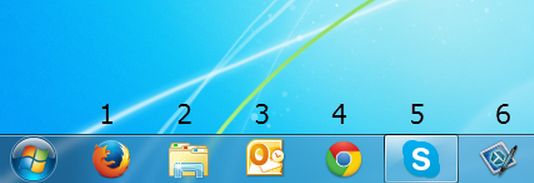
Another option allows no ring up required windows directly. Use Win+<#>, where <#> is the number key (1, 2, 3, 4 …). Every number is related to the icons in order they are placed on the taskbar (see screenshot).
So for example to run Firefox you press Win+1, and to switch to Skype you will press Win+5.
If you are running Windows emulation on Mac, user Command button instead of Windows button.