Google Chrome is 10 years old now! Much time has flown and numerous milestones in its history have occurred since the first release. To celebrate this event, the developers made a major upgrade of their child, which includes not only improvements in design but also some more substantial changes.
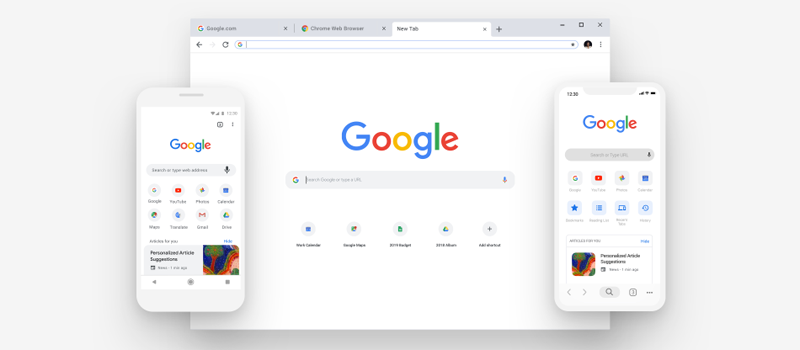
The following 69 version of Google Chrome looks more modern thanks to clean lines, rounded shapes, new icons, and an updated color palette. The developers paid a lot of attention to the user interface – the team that worked on the browser significantly improved the UI to increase the user interaction speed while working in the application. For example, in iOS, the toolbar is moved to the bottom of a screen with menus and the address bar which were simplified by hints.

Improved password management – the system will be even more careful in storing and organizing user’s information, including logins, passwords, phone numbers, and bank cards. All this data is stored in your Google Account and will now be available to the owner directly from the browser toolbar. In addition, Chrome is capable of filling in and saving passwords on its own, if needed, and provide access to both mobile and desktop versions.

Another major improvement was the upgraded Omnibox – now it’s even easier to use the tool. It shows the answers directly in the address bar without waiting for the search page displaying the results. With Omnibox, it’s easier to find a tab in one of several windows that the user has opened. The extension will notify you that the tab is opened and will help you make it active. In addition, it was announced that Omnibox will help to search files stored in Google Drive.

Also, a user can use Picture-in-Picture tool which allows users to watch their videos in a small but resizable window while working or surfing the net. To open this feature you need to right click twice in the option ‘’picture in picture’’ in the context menu of the video. However, a webpage with video file should remain open for the player to keep working. If everything is done properly, you will see a small icon on the tab.

The new version of Chrome has improved personalization features as well. Now you can create shortcuts and manage them directly in a new tab, customize the background for each one and add photos to it.
The popular browser update is wavelike and is already available to many Windows, iOS and Android users.