Have any questions? +1 646.844.5712 (US)

  • Facebook
  • LinkedIn
  • Twitter
HiTech ServiceHiTech Service
  • Home
  • About
  • Services
    • Software Development
    • Customer Support
    • Quality Assurance
    • Managed Services
    • Compliance Audit
    • GDPR Compliance
    • Competency Center
    • Emergency IT Support
    • Software as medical device
    • Local AI Agent Development
  • Projects
  • GDPR
  • Articles
  • Case Studies
  • Contact
Menu
  • Home
  • About
  • Services
    • Software Development
    • Customer Support
    • Quality Assurance
    • Managed Services
    • Compliance Audit
    • GDPR Compliance
    • Competency Center
    • Emergency IT Support
    • Software as medical device
    • Local AI Agent Development
  • Projects
  • GDPR
  • Articles
  • Case Studies
  • Contact
Android Lifehacks: adding touch gesture controls to Youtube!

Android Lifehacks: adding touch gesture controls to Youtube!

Using media players on a mobile device is simple and convenient to banality, especially with the ability to control basic playback elements with the help of gestures. Almost any third-party media app for Android supports swipe to adjust volume and brightness fast forward and rewind, etc. Even the stock apps on many branded shells support it. Youtube however is the only one left shying away from these features in it’s original application. Reaching the volume buttons or skillfully aiming to scroll the video at times becomes quite a challenge. But it wouldn’t be Android if thee was no solution invented to tend to this problem.


Solution #1

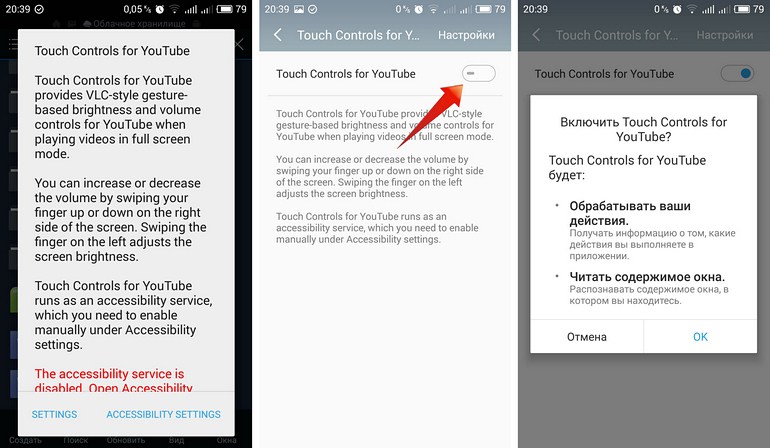
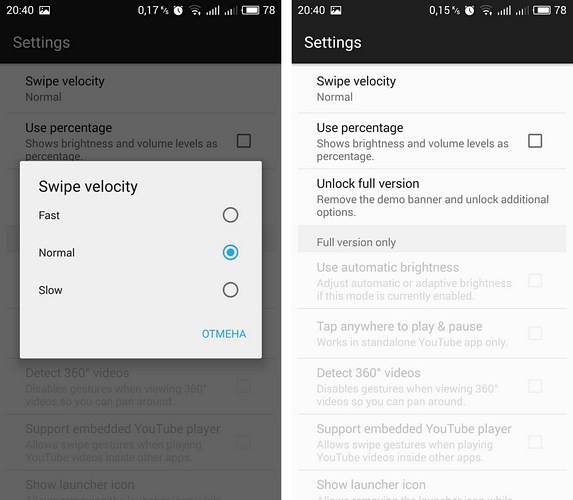
Touch Controls for Youtube app is probably the simplest way to add touch controls to your Youtube app. This method is suitable for all those who, due to any reason or belief does not have  ROOT access on their devices. All you need to do is to install the app from Google Play and to enable the service in device settings. Then you can check the operation of the utility in the YouTube app.
Android Lifehacks: adding touch gesture controls to Youtube! — illustration 1

How it works?

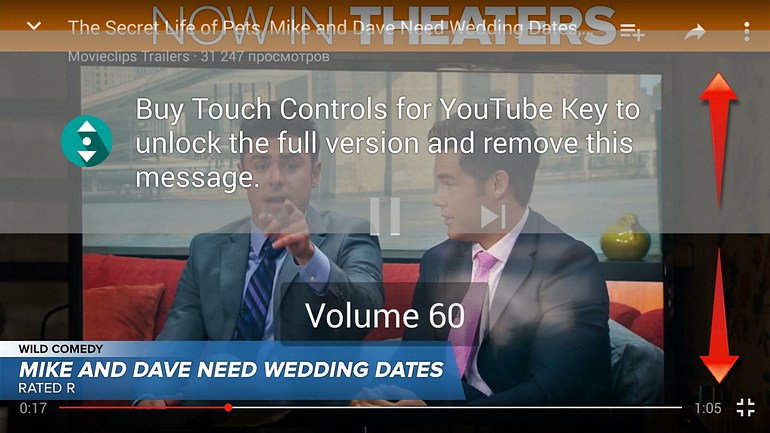
The utility allows you to change the volume swiping up or down on the right side of the screen and to change brightness using same method on the left side. The gestures work only in a full-screen mode. In the case of Touch Controls for YouTube one should immediately note that the utility has paid options: adjusting the brightness and volume are  free, but every action is accompanied by the appearance of messages with a proposal to buy the full version. And if you accidentally touch it (and you probably will, and more than once), you will be immediately transferred to the page with the application on Google Play.
Android Lifehacks: adding touch gesture controls to Youtube! — illustration 2

Android Lifehacks: adding touch gesture controls to Youtube! — illustration 3

Touch Controls for Youtube additional functionality

When you purchase a key to unlock the full version of the tool, one can turn on Auto-Brightness, automatically shut-off gestures while playing a panoramic 360 ° video, ability to activate touch controls on any third-party application for YouTube and more. In general, app works smooth. The first time YouTube is launched after the installation navigation with gestures may not work or does not work correctly, in this case, try to restart or reboot the device.


Android Lifehacks: adding touch gesture controls to Youtube! — illustration 4

Solution # 2 (ROOT access is required)

The second method involves the not only ROOT access, but also installed Xposed Framework, because it is one of the Xposed modules. Compared with Touch Controls for YouTube,  Youtube Swipe to Seek has one major advantage – the ability to scroll through video using touch gestures. Besides Xposed Framework, you are also required to have:

– Permission to install software from unknown sources;

– Android 5.0 and higher.

Installing the module

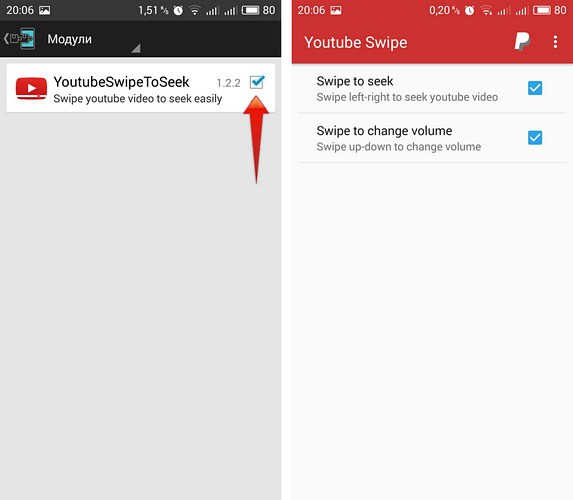
Open Xposed Installer app. In the “Download” section find Youtube Swipe to Seek module. Install the module, and do not forget to activate it in the “Modules”. Restart the device.

How it works?

It is not necessary to configure a module.  It contains only two options that are enabled by default: scrolling and volume control.
Android Lifehacks: adding touch gesture controls to Youtube! — illustration 5

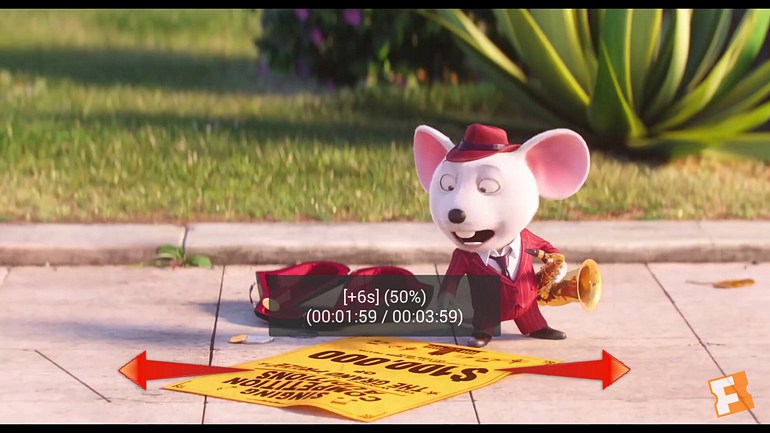
Fast forward / backward is adjusted by swiping left / right, works in both windowed and full-screen modes, you can change the volume swiping up / down anywhere on the screen, only works when watching videos on a full screen. Thus no distractions. It’s simple, functional and free of charge.
Android Lifehacks: adding touch gesture controls to Youtube! — illustration 6


  • On July 13, 2016
  • 0 Comment

Leave Reply Cancel reply

Your email address will not be published. Required fields are marked *

Recent Posts
  • Managed IT Services vs. In-House IT: What Should You Choose?
  • When the Model Is the Vendor: What Happens to Compliance When You Don’t Own the Weights
  • The Edge Device Is the Perimeter: Why the Box You Bought to Keep Them Out Is How They Get In
  • The Password Memo Was Honest. The Checklist Wasn’t.
  • As Is: How Software Became the Only Product You Could Legally Sell Broken
Categories
  • ai (9)
  • android (18)
  • apple (36)
  • chart (18)
  • cloud (1)
  • fix (42)
  • games (11)
  • google (31)
  • hardware (73)
  • healthcare (3)
  • how to (231)
  • internet (92)
  • ios (23)
  • macos (3)
  • microsoft (82)
  • mobile (36)
  • news (74)
  • optimization (17)
  • osx (4)
  • outsourcing (9)
  • qa (3)
  • regulation (8)
  • review (120)
  • security (41)
  • software (160)
  • windows (150)
Archives
  • September 2026
  • August 2026
  • July 2026
  • June 2026
  • May 2026
  • August 2025
  • March 2025
  • February 2025
  • April 2023
  • March 2023
  • February 2023
  • January 2023
  • March 2022
  • January 2022
  • December 2021
  • November 2021
  • October 2021
  • September 2021
  • August 2021
  • July 2021
  • June 2021
  • May 2021
  • April 2021
  • March 2021
  • February 2021
  • January 2021
  • December 2020
  • November 2020
  • October 2020
  • September 2020
  • August 2020
  • July 2020
  • June 2020
  • May 2020
  • April 2020
  • March 2020
  • February 2020
  • January 2020
  • December 2019
  • November 2019
  • October 2019
  • September 2019
  • August 2019
  • April 2019
  • March 2019
  • February 2019
  • January 2019
  • December 2018
  • November 2018
  • October 2018
  • September 2018
  • June 2018
  • May 2018
  • April 2018
  • February 2018
  • January 2018
  • December 2017
  • November 2017
  • October 2017
  • June 2017
  • May 2017
  • April 2017
  • March 2017
  • February 2017
  • January 2017
  • December 2016
  • November 2016
  • October 2016
  • September 2016
  • August 2016
  • July 2016
  • June 2016
  • May 2016
  • April 2016
  • March 2016
  • February 2016
  • January 2016
  • December 2015
  • November 2015
  • October 2015
  • September 2015
  • July 2015
  • January 2015
Archives
  • September 2026
  • August 2026
  • July 2026
  • June 2026
  • May 2026
  • August 2025
  • March 2025
  • February 2025
  • April 2023
  • March 2023
  • February 2023
  • January 2023
  • March 2022
  • January 2022
  • December 2021
  • November 2021
  • October 2021
  • September 2021
  • August 2021
  • July 2021
  • June 2021
  • May 2021
  • April 2021
  • March 2021
  • February 2021
  • January 2021
  • December 2020
  • November 2020
  • October 2020
  • September 2020
  • August 2020
  • July 2020
  • June 2020
  • May 2020
  • April 2020
  • March 2020
  • February 2020
  • January 2020
  • December 2019
  • November 2019
  • October 2019
  • September 2019
  • August 2019
  • April 2019
  • March 2019
  • February 2019
  • January 2019
  • December 2018
  • November 2018
  • October 2018
  • September 2018
  • June 2018
  • May 2018
  • April 2018
  • February 2018
  • January 2018
  • December 2017
  • November 2017
  • October 2017
  • June 2017
  • May 2017
  • April 2017
  • March 2017
  • February 2017
  • January 2017
  • December 2016
  • November 2016
  • October 2016
  • September 2016
  • August 2016
  • July 2016
  • June 2016
  • May 2016
  • April 2016
  • March 2016
  • February 2016
  • January 2016
  • December 2015
  • November 2015
  • October 2015
  • September 2015
  • July 2015
  • January 2015

Windows 10 - Lifehacks!

Previous thumb

Run apps from unidentified developers on MacOS!

Next thumb
Scroll

Services

  • Software Development
  • Quality Assurance
  • Customer Support
  • Managed Services
  • 24/7 Emergency IT Support
  • Competency Center
  • Local AI Agent Development
  • Software as a Medical Device

Compliance

  • Compliance Audit
  • GDPR Compliance
  • What is GDPR
  • ISO 9001:2015 Certification

Company

  • About Us
  • All Services
  • Projects
  • Case Studies
  • Articles
  • Contact
About HiTech Service

With 10 year experience of working together, we have reached tangible synergetic effect in performance and productivity, which results in highest quality services and satisfied clients.

Privacy Policy   Cookie Policy


  • Facebook
  • X
  • LinkedIn
CONTACT INFO
  • 900 Foulk Rd, Suite 201, Wilmington, DE, USA, 19803
  • Kudryavs’kyi descent 5b, Kyiv, Ukraine, 04053
  • +1 646.844.5712 (US)
ISO 9001:2015 certificate issued to HiTech Service LLC by Veritas
RIPE Atlas logo, the network measurement community HiTech Service takes part in
BrainBasket Foundation logo, IT education initiative HiTech Service supports
HiTech Service LLC membership badge of the Hi-Tech Office Ukraine association Dun & Bradstreet verified business badge for HiTech Service LLC
YouTeam partner badge for HiTech Service LLC
Hitech Service LLC

Copyright 2026