Cryptocurrency is a rising trend from 2017. It’s hard to find a person who hasn’t heard about Bitcoin. Even my grandma who has never used a computer or a smartphone with touchscreen has heard of Bitcoin.
People who are into computers know many more names of cryptos – Ethereum, Monero, Dash, Zcash, etc. And, of course, everyone heard about the miners – people who mine cryptocurrencies with their GPUs and cause graphic card shortage on the computer hardware market. These guys are not only the reason for low graphic cards in stocks, but also for high prices on GPUs and RAM sticks. But what is mining and is it hard to mine?
Today we will tell you about mining taking as an example the new cryptocurrency – Graft coin.
We will not give you details about what Graft coin is, you can find this information on their official site http://graft.network/ if you want to. The reason why we focused on them is that this is a new crypto and you can mine lots of coins until it becomes a mainstream and difficulty raises.
What do I need to mine Graft coins?
To mine GRFT (Graft coins) you will need 4 things:
– A modern GPU with 3+ Gb of VRAM
– Graft Wallet address – the address of the wallet where your GRFT will be stored
– A mining pool – a website that provides you with initial configuration and distributes the reward for mining.
– A miner – program that actually mines
Sounds hard? It is not.
Step 1. Graphic Card.
First things first, you need a graphic card with 3+ VRAM on it. The majority of modern graphic cards have 4 Gb to 8 Gb of VRAM. So if you have one of these – you can skip this part and proceed to Graft Wallet creation – that will take some 3 minutes of your time.
If you don’t have a modern graphic card, but you still want to mine some GRFT, I have a good news for you – you can mine even with your CPU. Although, your reward will be less than if you mined with GPU.
Usually, modern GPUs give 550+ – hashes per second, depending on a graphic card. For example, Radeon RX570 4Gb will give some 560 (H\sec) hashes per second, while GTX1070 will have 715 (H\sec) hashes per second.
(Hash per second, by the way is the way to measure your mining speed).
As for the CPU mining, the speed usually stays around 100 H\sec – at least five times slower that a GPU, so the reward will also be 5 times less.
Now you know what is hash, how to measure the mining speed and hopefully decided what your gonna mine with – GPU or CPU.
Step 2. Creating a Graft wallet.
Graft wallet creation is very simple, just install the Graft wallet on your smartphone, iOS or Android, and you are good to go.
As you see, these guys did amazing job to guide you through the Wallet creation process, so even a child can do it.
The only thing we want to emphasize is KEEP your MNEMONIC PHRASE SAFE, as this is the only key to your wallet and if you lose it, no one will be able to help you, even developers or our support team. NO ONE.
At this point you should have your wallet address.
Feel free to share it with anyone – the only thing one can do having the wallet address is to put money on your wallet ☺.
Step 3. Mining pool.
Mining pool is a web portal that gives you the settings for network access and distributes the reward.
We will use graftmine.com as the example.
Navigate to the pool page and switch to Getting Started section on the top.
There you will find the settings for your miner.
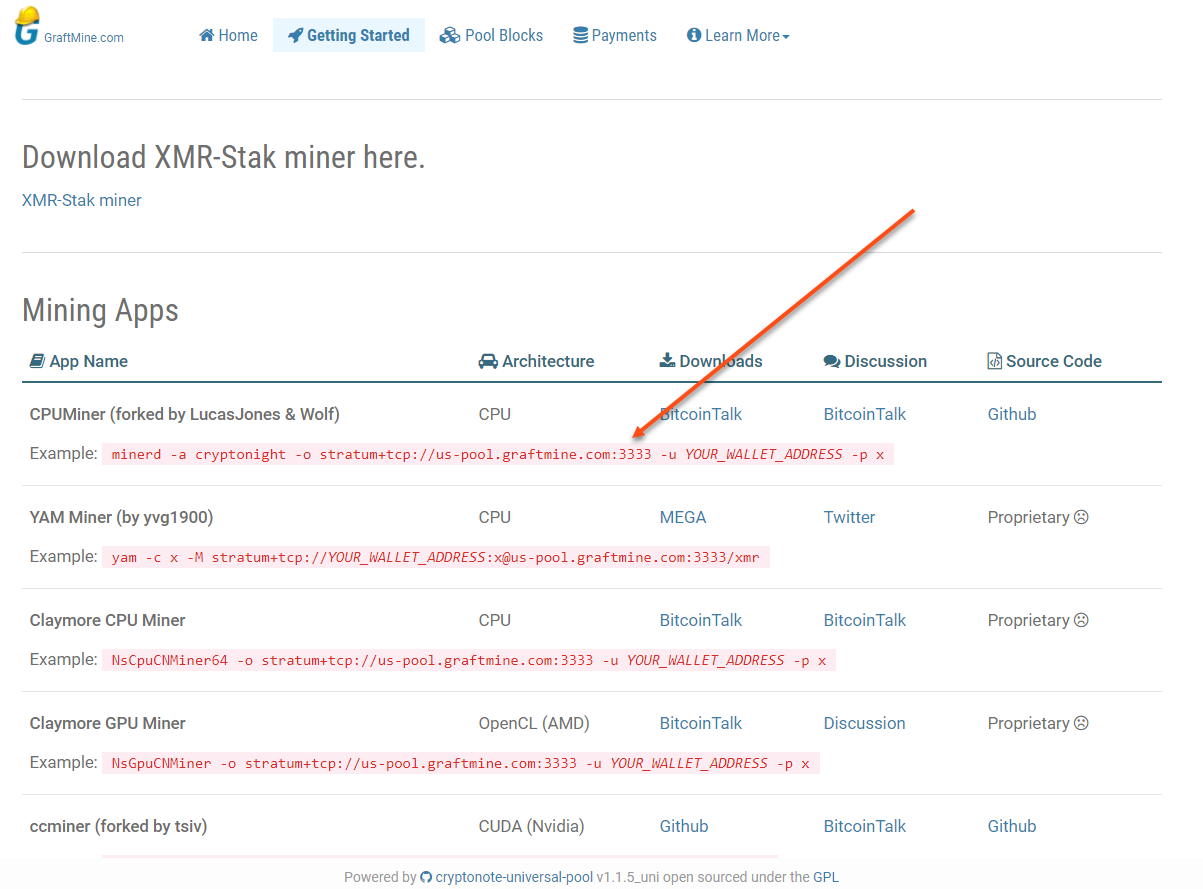
You need to copy these settings, as your will need them to set up your miner program in step 4.
The reason why we chose this portal is they seem to be new users friendly – have few instructions under learn more settings and have a support telegram channel, we believe that will be useful for every beginner in mining.
It’s time to set up the miner.
Step 4. Choosing a miner.
As we said, a miner – is a program that accesses the crypto network and mines. Basically it’s that thing that’s doing all the job. All you need is to download one and configure it.
Graft network has Cryptonight mining algorithm, so you can use any miner according to your likings that was created for Monero. All you need is the configuration. But since this article is for new people in to mining, we made this choice for you.
XMR-STAK – this miner will take all your computer resources to get as much as possible from mining. It is simple when it comes to set up, but makes it almost impossible to work with computer while mining.
Let’s go through the setup process together.
First thing you need to do is to turn off your Windows antivirus.
The problem is, that hackers tend to build in the miners into hacked games and software that caused system slowness and the running miners were reported as viruses. So nowadays, if you decided to run miner, Windows will not allow you to do that, killing the downloaded file and claiming there is a virus in it. No, there is no virus.
After your firewall is turned off, navigate to git-hub and download xmr-stak-win64.zip
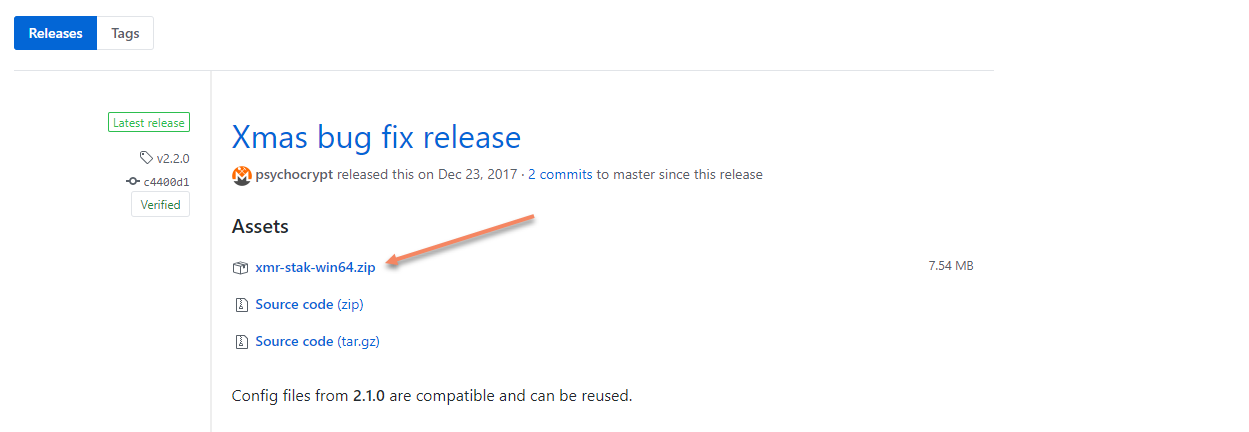
This is a universal miner so doesn’t matter whether you have Nvidia or AMD card, it will work for sure.
Unzip the downloaded file and find it, it will be a folder with this name in your download location.
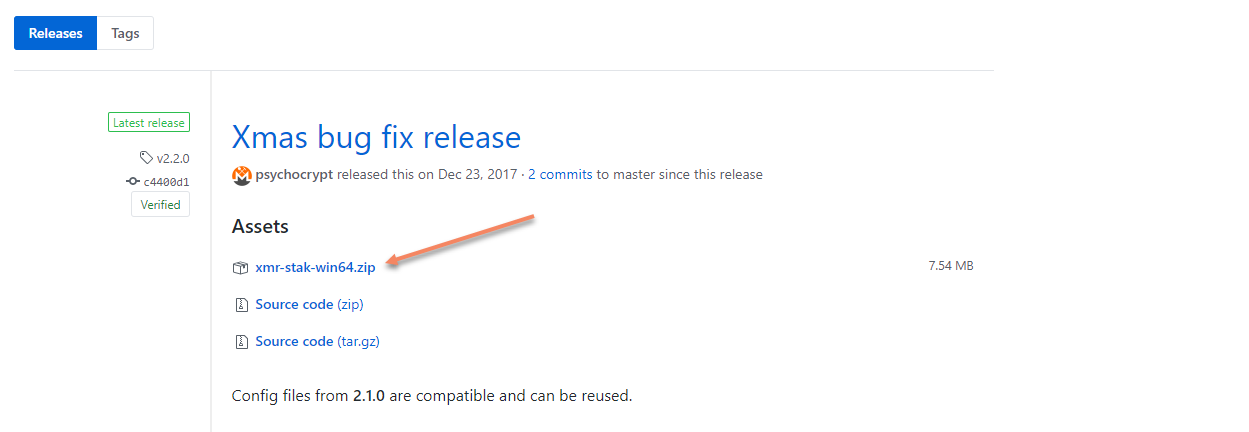
Your next step is to run xmr-stak.exe
Just double click on it and you will see the following screen.
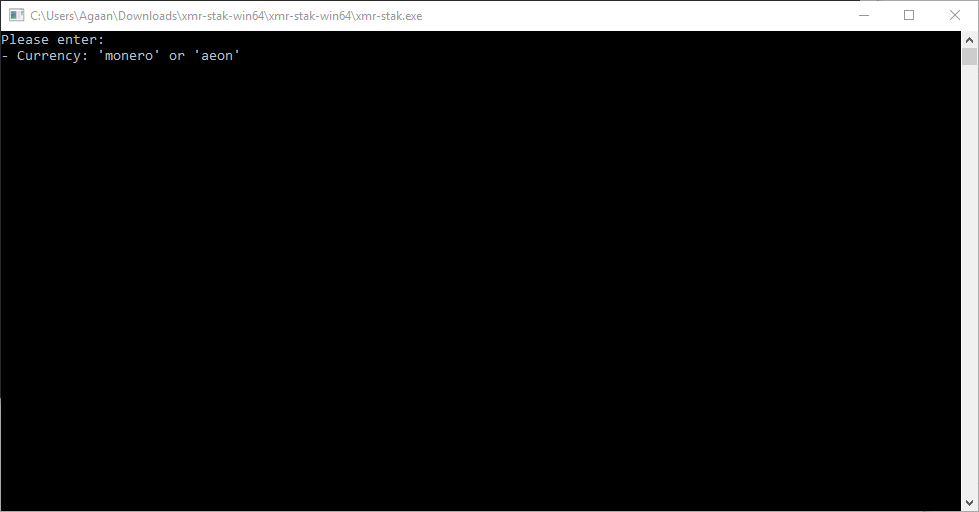
It’s time to enter the configurations.
Type in monero and hit enter.
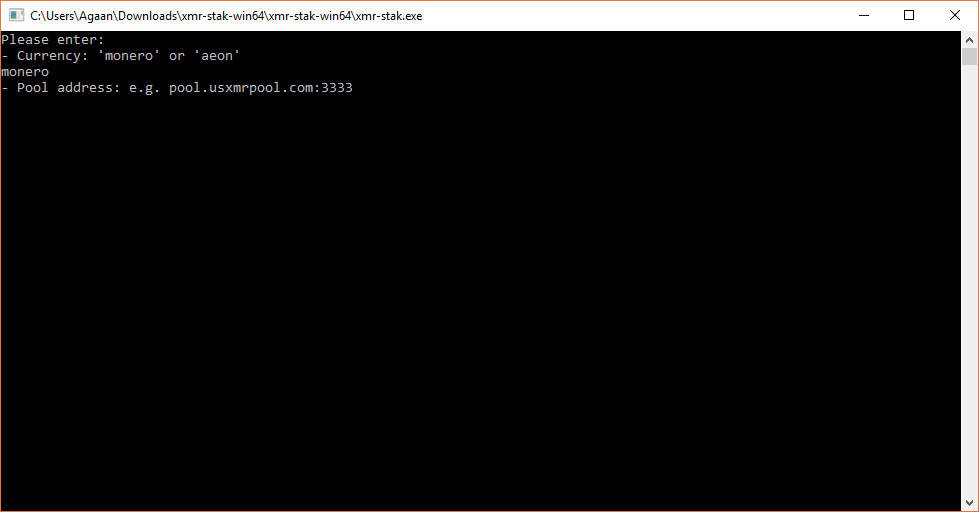
Now right click to paste the pool address.
One more time it is:
us-pool.graftmine.com:3333
or any other pool address that you want to use.
Hit Enter.
It’s time to enter your Graft Wallet address. The one from step 2.
It is similar to this one and always starts with G.
G4CAtLdueMK6s3MCEWFHa2Jgk5v3eMtN9BBUNUgik8XNApPTuErzwEfcmwqKotJKRF2fatttX5C7uESgdfFQqRit6eAfj1T
Hit Enter.
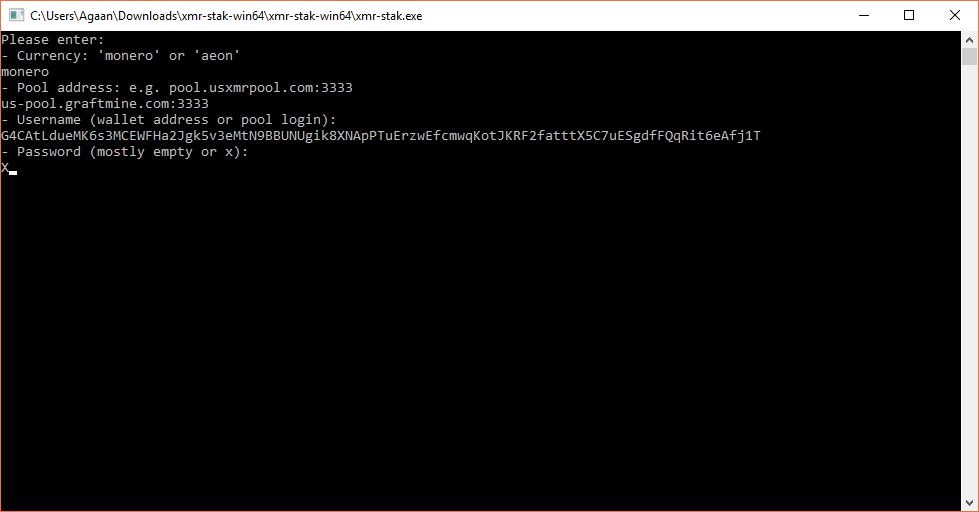
Final step is the pool password, usually it’s “X” if the pool is not private.
So enter X and hit enter.
We are almost finished with a set up.
The next 3 questions to answer will require simple “n” and Enter for the answer.
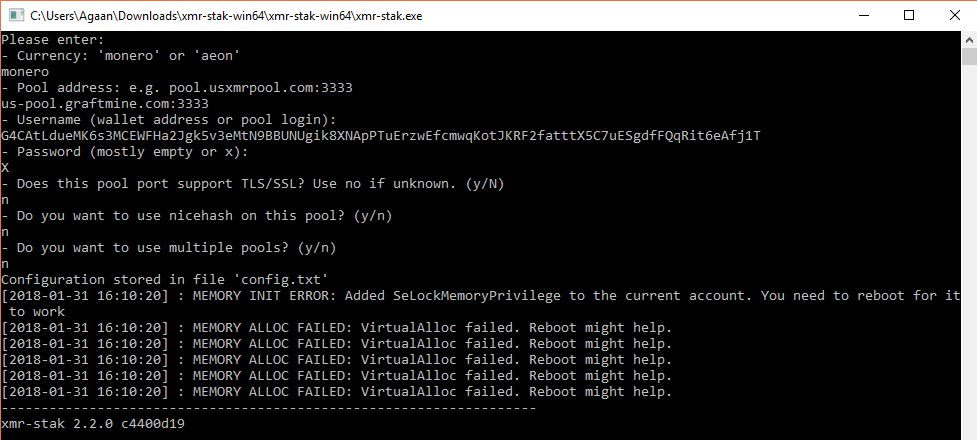
You will see something like this, so it’s time to close the miner. Configuration is done.
You are all set and to start mining, you just need to run it one more time.
This time you will see the following information:
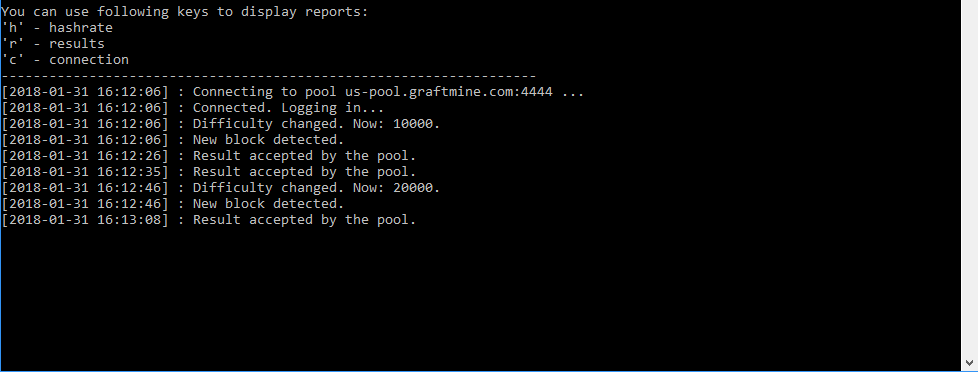
It means that mining has started and you are one of those mining guys.
“Result accepted by the pool” message means everything is ok and mining is in progress.
It’s time to wait till the block is found and verified and you will get your bonus.
When do I get my first Graft coins?
Mining is not very fast process, if it was fast, the coins wouldn’t cost a penny.
Depending on the Network and pool speed it may take from several hours to several days before you collect your first reward.
Let’s take a look at the main page of the pool we chose as an example.
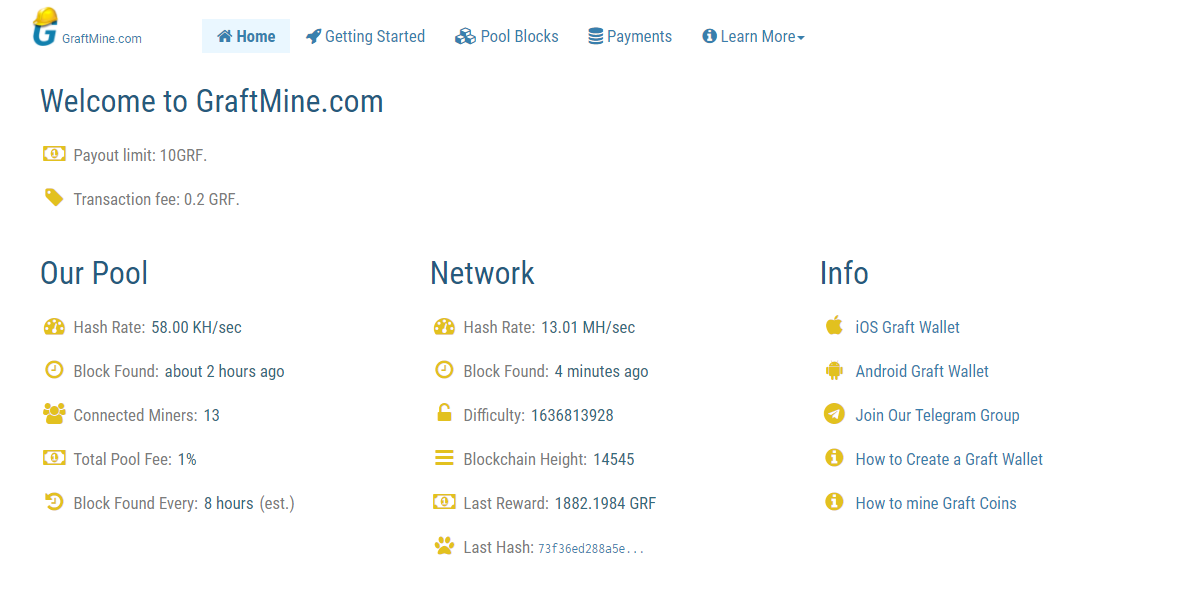
As you can see, the payout limit is set to 10 GRFT. It means that you need to mine 10 GRFT and only after than the funds will be sent to your wallet.
The second line says Transaction fee and that means that from every transaction you will have to pay 0.2 GRFT.
In other words, once you mine 10 GRFT, you receive 9.80 GRFT to your wallet.
Here is the payment to my account, for example.

Until you mine those 10 GRFT, you will be able to see your earnings in Pending Balance section.

But how long would it take to earn those 10 GRFT?
That depends on current network speed and current pool speed.
Network speed – is the combined speed of all the pools and miners in the Graft network. The higher network speed is, the faster the blocks are found over the network.
Pool network in turn shows you the total speed of all the miners in this pool – the higher pool speed is, the faster you get the block and get a reward.
Mining in this network is like a race, every pool competes for a block to mine. The higher the pool speed is, the faster you will find the block. And every block has a reward in it, current block reward, according to the pool information is 1884 GRFT.
Let’s see at the statistics again.
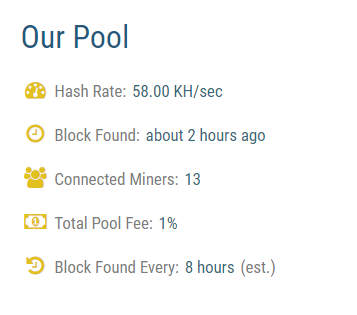
Block found every 20 hours, the previous block was found 4 hours ago, so you will need to mine for 16 hours to receive the reward for this block. If you are mining on GTX 1070 you should receive 50-60 GRFT from this block, if no changes in the speed are done.
However, if more people join this pool, the block will be found faster, but the reward will be divided between all miners.
From what we’ve noticed, the pool speed changes very often, so the block might be found faster, as it happened with me today. Here is my statistics while testing the pool.

Not bad, right?
But there is one more thing you need to know, the answer to one of the most frequently asked questions.
Why my balance is showing 0?
Let’s say you were mining for 16 hours and finally found the block. It’s time for the reward, but you still have 0 in your pending balance. Why?
It’s simple, the network needs to find 60 more blocks to confirm the one you found.

You can find this information in Pool Block section. Pay attention, it doesn’t matter if the next 60 blocks are found on your pool or anywhere else in the network, as soon as 60 blocks are found your block will be confirmed or “matured” and you will get your reward.
In other words, you will need to wait sometime before you see the balance updated.
Let’s sum up the mining part.
You start mining and wait for the block to be found by your pool. The block reward will be divided between all the miners who participated in this block on your pool based on their contribution – speed and time mined. Once the block is found, you need to wait for 60 more blocks to be found in the NETWORK, to receive you reward.
Everything is simple.
So, if you decided to start mining, you now have all the information you need.
Create your Graft Wallet, download a miner app and set it up, start mining and wait for your first block.
In case you have questions about mining, contact the admins of the pool in Telegram, they will be able to give you more details.