
Have any questions? +1 646.844.5712 (US)

  • Facebook
  • LinkedIn
  • Twitter
HiTech ServiceHiTech Service
  • Home
  • About
  • Services
    • Software Development
    • Customer Support
    • Quality Assurance
    • Managed Services
    • Compliance Audit
    • GDPR Compliance
    • Competency Center
    • Emergency IT Support
    • Software as medical device
    • Local AI Agent Development
  • Projects
  • GDPR
  • Articles
  • Case Studies
  • Contact
Menu
  • Home
  • About
  • Services
    • Software Development
    • Customer Support
    • Quality Assurance
    • Managed Services
    • Compliance Audit
    • GDPR Compliance
    • Competency Center
    • Emergency IT Support
    • Software as medical device
    • Local AI Agent Development
  • Projects
  • GDPR
  • Articles
  • Case Studies
  • Contact
How to activate multiprocess mode in Firefox?

How to activate multiprocess mode in Firefox?

Mozilla Firefox is one of the most used browsers on the market today. It is faster that Internet Explorer, eats out less memory than Chrome, has more extensions and plugins than Opera. Starting with Firefox 48, Mozilla has launched its attack on performance improvement to stand in line or be one step ahead Chrome and Edge, who claim to be the fastest among the browsers. The thing is that newer Firefox versions have so-called multi process mode built in. It is disabled by default, but still can be turned on if you would like to get a faster experience browsing with Firefox.


About Multiprocess Mode of Mozilla Firefox.

Multi-process mode, also called “Electrolysis” or “e10s”, is a multi-thread data processing technology, that splits all open browser tabs and add-ons and hands them over to be processed by multiple active processes. Most tangible effect this will yield on slow computers, though Mozilla expects overall performance and stability improvements on all platforms.
Firefox current multi process-mode differs from the one of Chrome. The latter has all tabs and extensions launched in separate OS processes, while Firefox launches only one additional OS process that in turn handles open tabs and add-ons. Mozilla plans to add more additional OS process in the future.

The cons here is that not all add-ons support multiprocess mode and that Firefox will use more RAM to handle this extra process.

How to enable multi-process mode in Mozilla Firefox.

To activate multi-process mode in Mozilla Firefox, we would need to access its hidden settings. But before we do that, it is recommended to make a backup of current browser configuration. This will allow to revert changes quickly if the new Firefox mode would not impress you or there are some conflicts with your vital add-ons.


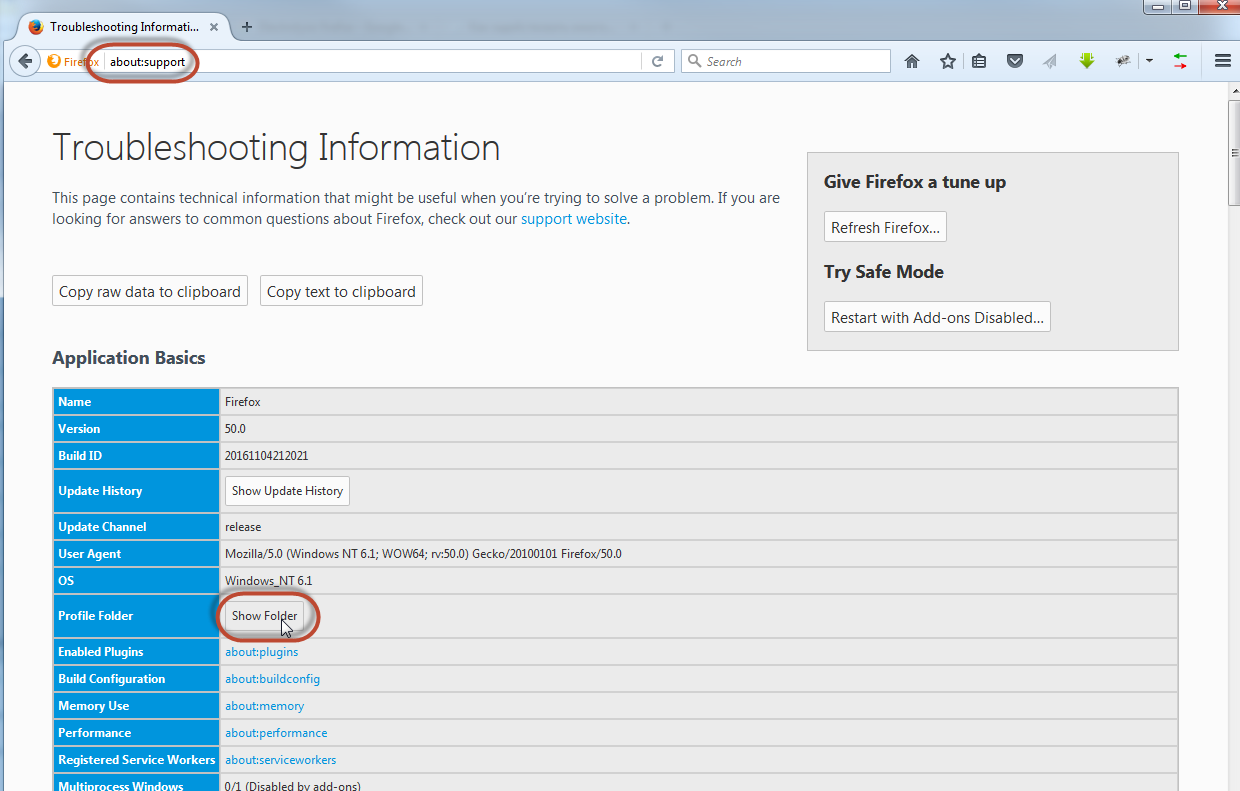
Open Firefox, paste about:support into the address bar and hit Enter. This will open Troubleshooting Information panel for you.
Firefox multiprocess mode 02 — How to activate multiprocess mode in Firefox?

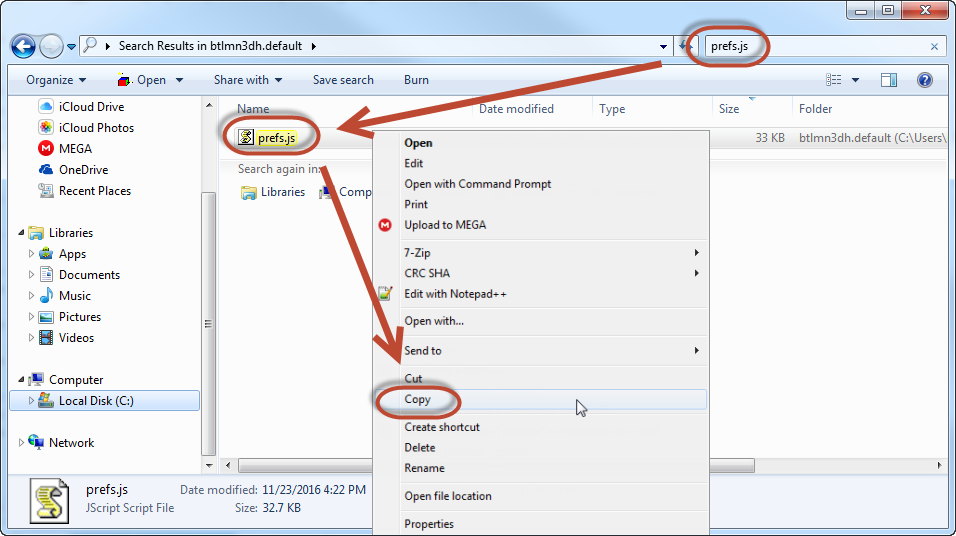
Here click on “Show folder” button next to Profile Folder row to open Windows Explorer and search for prefs.js file. This is the config file – copy this file to some other folder that you use for backups.
Firefox multiprocess mode 03 — How to activate multiprocess mode in Firefox?

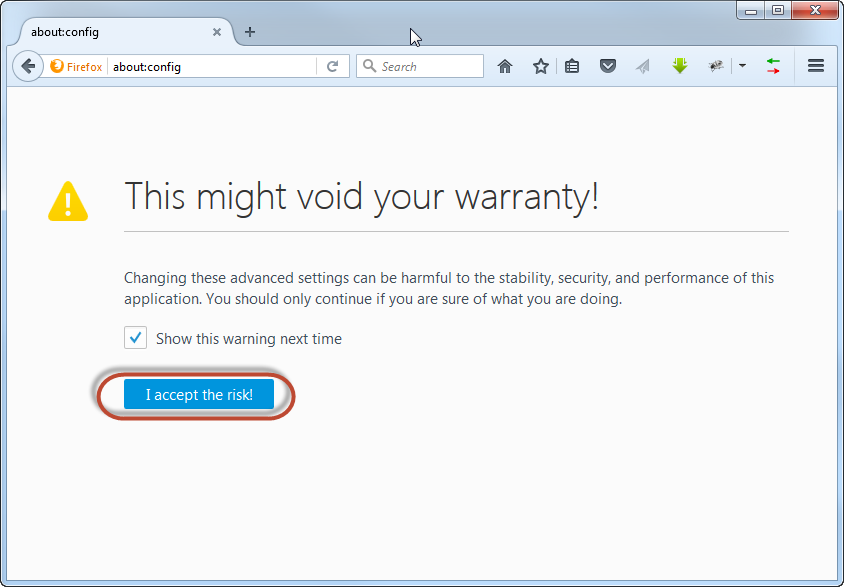
Now we are ready to turn on multi-process mode. Paste or type about:config to the address bar and hit enter. Click on “I accept the risk!” button to proceed to advanced browser settings.
Firefox multiprocess mode 04 — How to activate multiprocess mode in Firefox?

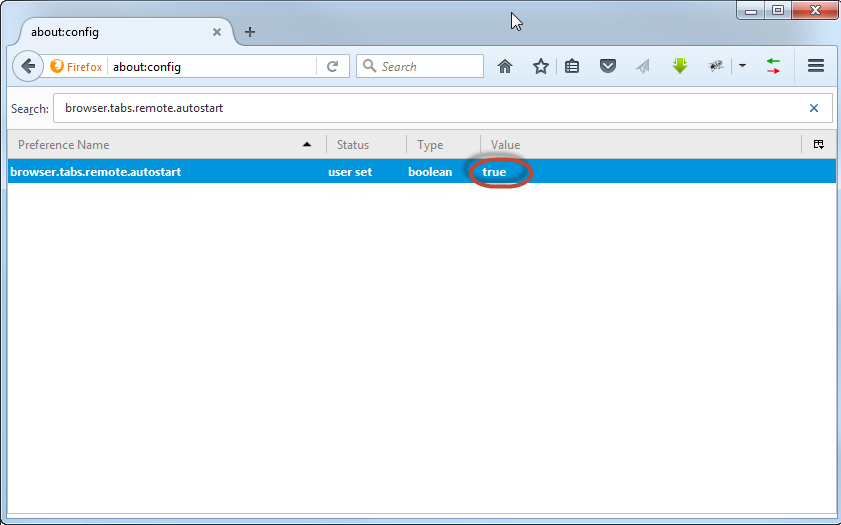
Here we will need to change 3 different parameters. First search for browser.tabs.remote.autostartparameter and change its value to “true” by double click.
Firefox multiprocess mode 05 — How to activate multiprocess mode in Firefox?

The next parameter to search for is extensions.e10sBlockedByAddons. Changing this parameter to “false” will not allow Firefox to be blocked by those add-ons that do not yet support multiprocessing.
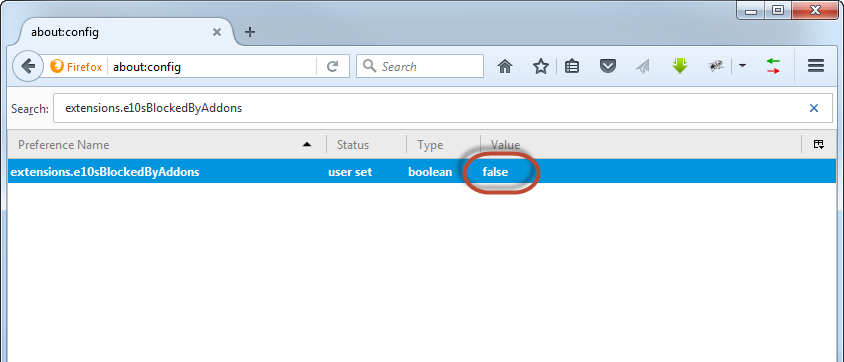
Firefox multiprocess mode 06 — How to activate multiprocess mode in Firefox?

And the last parameter to check is dom.ipc.processCount that allows to set the number of processor cores for Firefox to use while in multiprocess mode. Double click on the parameter, set the number of cores your CPU has available and restart Firefox after all the changes.Firefox multiprocess mode 07 — How to activate multiprocess mode in Firefox?
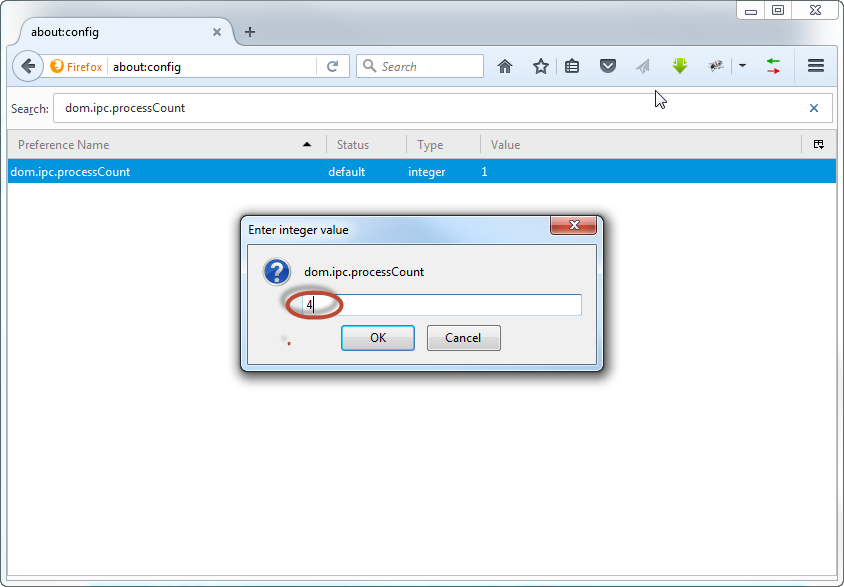
To revert the changes, just restore prefs.js file that we have in backuped earlier. That’s it!


  • On November 24, 2016
  • 0 Comment

Leave Reply Cancel reply

Your email address will not be published. Required fields are marked *

Recent Posts
  • The Production Incident Class Your Postmortem Template Doesn’t Have
  • Why Load Test Numbers Lie
  • When Config Became Executable: The Twenty-Year Pattern Behind Supply Chain Attacks
  • How Software Became a Medical Device
  • Compliant With What? A Working Map of GDPR, HIPAA, SOC 2 and ISO 27001
Categories
  • ai (8)
  • android (18)
  • apple (36)
  • chart (18)
  • cloud (1)
  • fix (42)
  • games (11)
  • google (31)
  • hardware (73)
  • healthcare (3)
  • how to (231)
  • internet (92)
  • ios (23)
  • macos (3)
  • microsoft (82)
  • mobile (36)
  • news (74)
  • optimization (17)
  • osx (4)
  • outsourcing (8)
  • qa (3)
  • regulation (7)
  • review (120)
  • security (38)
  • software (159)
  • windows (150)
Archives
  • August 2026
  • July 2026
  • June 2026
  • May 2026
  • August 2025
  • March 2025
  • February 2025
  • April 2023
  • March 2023
  • February 2023
  • January 2023
  • March 2022
  • January 2022
  • December 2021
  • November 2021
  • October 2021
  • September 2021
  • August 2021
  • July 2021
  • June 2021
  • May 2021
  • April 2021
  • March 2021
  • February 2021
  • January 2021
  • December 2020
  • November 2020
  • October 2020
  • September 2020
  • August 2020
  • July 2020
  • June 2020
  • May 2020
  • April 2020
  • March 2020
  • February 2020
  • January 2020
  • December 2019
  • November 2019
  • October 2019
  • September 2019
  • August 2019
  • April 2019
  • March 2019
  • February 2019
  • January 2019
  • December 2018
  • November 2018
  • October 2018
  • September 2018
  • June 2018
  • May 2018
  • April 2018
  • February 2018
  • January 2018
  • December 2017
  • November 2017
  • October 2017
  • June 2017
  • May 2017
  • April 2017
  • March 2017
  • February 2017
  • January 2017
  • December 2016
  • November 2016
  • October 2016
  • September 2016
  • August 2016
  • July 2016
  • June 2016
  • May 2016
  • April 2016
  • March 2016
  • February 2016
  • January 2016
  • December 2015
  • November 2015
  • October 2015
  • September 2015
  • July 2015
  • January 2015
Archives
  • August 2026
  • July 2026
  • June 2026
  • May 2026
  • August 2025
  • March 2025
  • February 2025
  • April 2023
  • March 2023
  • February 2023
  • January 2023
  • March 2022
  • January 2022
  • December 2021
  • November 2021
  • October 2021
  • September 2021
  • August 2021
  • July 2021
  • June 2021
  • May 2021
  • April 2021
  • March 2021
  • February 2021
  • January 2021
  • December 2020
  • November 2020
  • October 2020
  • September 2020
  • August 2020
  • July 2020
  • June 2020
  • May 2020
  • April 2020
  • March 2020
  • February 2020
  • January 2020
  • December 2019
  • November 2019
  • October 2019
  • September 2019
  • August 2019
  • April 2019
  • March 2019
  • February 2019
  • January 2019
  • December 2018
  • November 2018
  • October 2018
  • September 2018
  • June 2018
  • May 2018
  • April 2018
  • February 2018
  • January 2018
  • December 2017
  • November 2017
  • October 2017
  • June 2017
  • May 2017
  • April 2017
  • March 2017
  • February 2017
  • January 2017
  • December 2016
  • November 2016
  • October 2016
  • September 2016
  • August 2016
  • July 2016
  • June 2016
  • May 2016
  • April 2016
  • March 2016
  • February 2016
  • January 2016
  • December 2015
  • November 2015
  • October 2015
  • September 2015
  • July 2015
  • January 2015

What is DDOS attack?

Previous thumb

Choosing a PC processor Skylake vs Kaby Lake

Next thumb
Scroll

Services

  • Software Development
  • Quality Assurance
  • Customer Support
  • Managed Services
  • 24/7 Emergency IT Support
  • Competency Center
  • Local AI Agent Development
  • Software as a Medical Device

Compliance

  • Compliance Audit
  • GDPR Compliance
  • What is GDPR
  • ISO 9001:2015 Certification

Company

  • About Us
  • All Services
  • Projects
  • Case Studies
  • Articles
  • Contact
About HiTech Service

With 10 year experience of working together, we have reached tangible synergetic effect in performance and productivity, which results in highest quality services and satisfied clients.

Privacy Policy   Cookie Policy


  • Facebook
  • X
  • LinkedIn
CONTACT INFO
  • 900 Foulk Rd, Suite 201, Wilmington, DE, USA, 19803
  • Kudryavs’kyi descent 5b, Kyiv, Ukraine, 04053
  • +1 646.844.5712 (US)
ISO 9001:2015 certificate issued to HiTech Service LLC by Veritas
RIPE Atlas logo, the network measurement community HiTech Service takes part in
BrainBasket Foundation logo, IT education initiative HiTech Service supports
HiTech Service LLC membership badge of the Hi-Tech Office Ukraine association Dun & Bradstreet verified business badge for HiTech Service LLC
YouTeam partner badge for HiTech Service LLC
Hitech Service LLC

Copyright 2026