Have any questions? +1 646.844.5712 (US)

  • Facebook
  • LinkedIn
  • Twitter
HiTech ServiceHiTech Service
  • Home
  • About
  • Services
    • Software Development
    • Customer Support
    • Quality Assurance
    • Managed Services
    • Compliance Audit
    • GDPR Compliance
    • Competency Center
    • Emergency IT Support
    • Software as medical device
    • Local AI Agent Development
  • Projects
  • GDPR
  • Articles
  • Case Studies
  • Contact
Menu
  • Home
  • About
  • Services
    • Software Development
    • Customer Support
    • Quality Assurance
    • Managed Services
    • Compliance Audit
    • GDPR Compliance
    • Competency Center
    • Emergency IT Support
    • Software as medical device
    • Local AI Agent Development
  • Projects
  • GDPR
  • Articles
  • Case Studies
  • Contact
Gaming PC of 2018

Gaming PC of 2018

It’s been over a year since we updated our Optimal Gaming PC configuration for the last time. The reason for it was not that we stopped playing games, but we didn’t see any updates in the config. Even NVIDIA’s release of RTX graphics card did not urge us to change our config as the prices for the new cards were high and it was hard to estimate all the possible benefits of such purchase. However, today, we are ready to present our brand-new PC config – HiTech Service Gaming Config of 2018.


If you read our previous articles, you know that we are not only choosing the hardware but assemble computers with the config from the articles for our own gaming needs. So let’s compare our current build with the one, that we are going to assemble.

Last year we have chosen Intel Core i5-8600K for our build, and this CPU is awesome. If you own a PC with this CPU, you are all fine, and you can skip this part of the article. We spent $258 last year on the 6-core processor with K index – meaning it can be overclocked. If you are still using an old 4-core CPU, it’s probably time to switch to a modern 6-core one. This year we will take Intel Core i5-9600K.

This new generation processor is easily overclocked to 5GHz on all 6 cores with one click in motherboard automatic settings, and the price is quite appealing, starting with $249.99.

Of course, to get most out of this processor you will need a new Z390 motherboard, and even taking into consideration that Z390 chipset is quite new, the prices are totally ok in this segment.
Gaming pc 2018 build 03 — Gaming PC of 2018

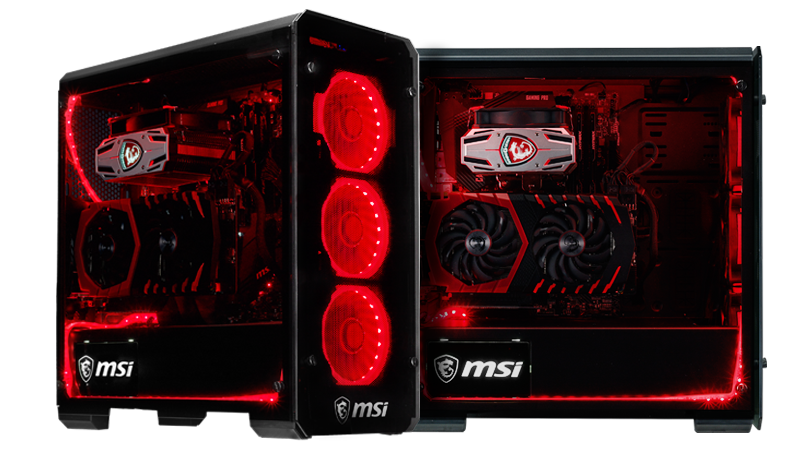
Traditionally, we would go with MSI brand, just because we like this company, although there are perfect competitors from ASUS or Gigabyte. In the last two years we went with MSI Tomahawk series of motherboards, and last year we had to spend $161 on it. Z390 Tomahawk prices start from $156.07. Although, what I personally don’t like about this motherboard is the absence of a built-in Wi-Fi module. I really can’t understand why in 2018 we still have the mobos with no Bluetooth or Wi-Fi on board, while these modules price is ridiculously low. For example, MSI Z390 Gaming Edge AC costs $169.99 and has Intel WiFI module in it, plus RGB MYSTIC LIGHT (if you like your PC glowing as a Christmas tree). In any case, this one would be my choice.

Now, that we have the CPU and motherboard, it’s time to choose a cooler for our processor. This year we want to try something new and spend some extra money on it, so we decided to take some water cooling system, that is simple to install and will cool our CPU pretty well.

EVGA CLC 240 Liquid costs only $79.98 but with this cooler our processor will not go higher than 80 degrees Celsius in top load even when overclocked. You can try other CPU water coolers under $100 – Amazon has plenty of those.


Another newbie in our config is M2 SSD drive – it’s small, it’s fast, it’s a must-have in the config of 2018. I’m using one with the last year’s config and I’m happy with it. Samsung 970 EVO 500GB – NVMe PCIe M.2 2280 SSD is a perfect choice here with the price of $119.99, while last year we spent $149.99 on a simple SSD, which is significantly slower than NVMe M.2 model.
Gaming pc 2018 build 02 — Gaming PC of 2018

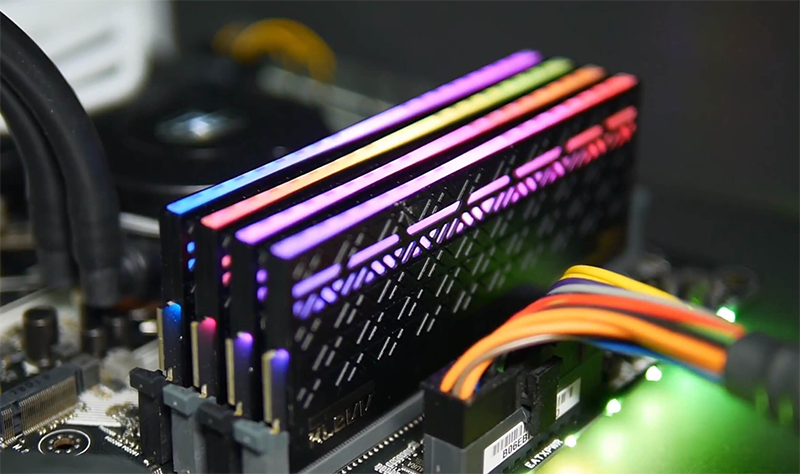
Another good news is about the prices on DDR4 modules. Last year we had to spend around $200 dollars on RAM for our computer, but this year the prices went down. Choose wisely and select something good for you with 3000+ Mhz, for example – G.SKILL 16GB (2 x 8GB) Ripjaws V Series DDR4 PC4-25600 3200MHz  for $139.99.

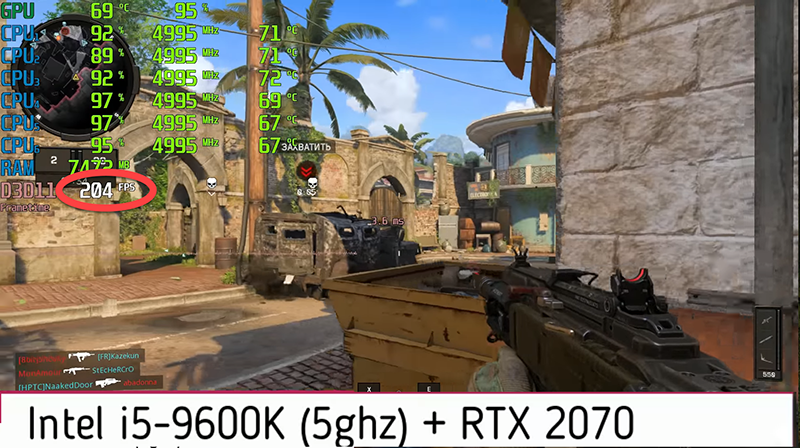
It’s GPU time! And of course, this time we will go with NVIDIA RTX 2070. Cryptocurrency boom is over, but the prices are still not very friendly. Still, RTX 2070 will bring us 150+ FPS in modern games in FullHD on Ultra settings, while 1070 can’t even keep stable 100Hz. Choosing from MSI models we can select Gaming Z series with the price of $573.99. Yes, it’s more expensive than GTX 1070 –  last year we spent $450 on it. Well, there are cheaper RTX models on the market, for example MSI Aero 8G model for $519.99. Prices on Gigabyte models start from $499.99.
Imgpsh fullsize — Gaming PC of 2018

To power all that up we can take a 550W power supply. The prices here start from $50, for example, Rosewill for $54 or EVGA for $82. Make sure that the power supply is 80 plus gold standard.

Now, that all the insides of the PC are in the cart, we can select a nice box for it. I mean a computer case. Nice NZXT or Corsair case would cost you around $100, but the list of options is very big, there are some good cases with the prices around $50 from less famous companies, but still of a good quality.

Now, let’s do some math.

CPU – $249.99

Motherboard – $169.99

Cooler – $79.99

DDR4 – $139.99

SSD M.2 -119.99

GPU – 519.99

Power Supply – $54

Case – $100


The total of this config is $1433.94 against $1352.11 in 2017 and $1300 in 2016.

However, our previous configs did not include the computer case. Now take those 100 dollars out and the brand new computer that will handle ANY game of this generation on Ultra settings in FullHD is even cheaper than it used to be one year ago.

Of course, we can lower the price of our configuration – take a cheaper cooling system, if you don’t plan to overclock the CPU, take a cheaper CPU, if you don’t plan to overclock it. RTX 2060 will soon be released and the total price will be even lower.


However, if you want to have up to 180Fps in the latest Call of Duty game on ultra settings – our config is what you need. In addition, don’t forget, that this build will work will serve you more than one year, and you will also have a place to grow giong forward if needed. In a year or two you can switch to i7 or i9 processor of the 9th generation not changing the motherboard, add 16 more Gb’s of RAM and switch to some RTX2080Ti when the price goes down with the release of some RTX 2180.


  • On November 27, 2018
  • 0 Comment

Leave Reply Cancel reply

Your email address will not be published. Required fields are marked *

Recent Posts
  • As Is: How Software Became the Only Product You Could Legally Sell Broken
  • The Production Incident Class Your Postmortem Template Doesn’t Have
  • Why Load Test Numbers Lie
  • When Config Became Executable: The Twenty-Year Pattern Behind Supply Chain Attacks
  • How Software Became a Medical Device
Categories
  • ai (8)
  • android (18)
  • apple (36)
  • chart (18)
  • cloud (1)
  • fix (42)
  • games (11)
  • google (31)
  • hardware (73)
  • healthcare (3)
  • how to (231)
  • internet (92)
  • ios (23)
  • macos (3)
  • microsoft (82)
  • mobile (36)
  • news (74)
  • optimization (17)
  • osx (4)
  • outsourcing (8)
  • qa (3)
  • regulation (7)
  • review (120)
  • security (39)
  • software (160)
  • windows (150)
Archives
  • August 2026
  • July 2026
  • June 2026
  • May 2026
  • August 2025
  • March 2025
  • February 2025
  • April 2023
  • March 2023
  • February 2023
  • January 2023
  • March 2022
  • January 2022
  • December 2021
  • November 2021
  • October 2021
  • September 2021
  • August 2021
  • July 2021
  • June 2021
  • May 2021
  • April 2021
  • March 2021
  • February 2021
  • January 2021
  • December 2020
  • November 2020
  • October 2020
  • September 2020
  • August 2020
  • July 2020
  • June 2020
  • May 2020
  • April 2020
  • March 2020
  • February 2020
  • January 2020
  • December 2019
  • November 2019
  • October 2019
  • September 2019
  • August 2019
  • April 2019
  • March 2019
  • February 2019
  • January 2019
  • December 2018
  • November 2018
  • October 2018
  • September 2018
  • June 2018
  • May 2018
  • April 2018
  • February 2018
  • January 2018
  • December 2017
  • November 2017
  • October 2017
  • June 2017
  • May 2017
  • April 2017
  • March 2017
  • February 2017
  • January 2017
  • December 2016
  • November 2016
  • October 2016
  • September 2016
  • August 2016
  • July 2016
  • June 2016
  • May 2016
  • April 2016
  • March 2016
  • February 2016
  • January 2016
  • December 2015
  • November 2015
  • October 2015
  • September 2015
  • July 2015
  • January 2015
Archives
  • August 2026
  • July 2026
  • June 2026
  • May 2026
  • August 2025
  • March 2025
  • February 2025
  • April 2023
  • March 2023
  • February 2023
  • January 2023
  • March 2022
  • January 2022
  • December 2021
  • November 2021
  • October 2021
  • September 2021
  • August 2021
  • July 2021
  • June 2021
  • May 2021
  • April 2021
  • March 2021
  • February 2021
  • January 2021
  • December 2020
  • November 2020
  • October 2020
  • September 2020
  • August 2020
  • July 2020
  • June 2020
  • May 2020
  • April 2020
  • March 2020
  • February 2020
  • January 2020
  • December 2019
  • November 2019
  • October 2019
  • September 2019
  • August 2019
  • April 2019
  • March 2019
  • February 2019
  • January 2019
  • December 2018
  • November 2018
  • October 2018
  • September 2018
  • June 2018
  • May 2018
  • April 2018
  • February 2018
  • January 2018
  • December 2017
  • November 2017
  • October 2017
  • June 2017
  • May 2017
  • April 2017
  • March 2017
  • February 2017
  • January 2017
  • December 2016
  • November 2016
  • October 2016
  • September 2016
  • August 2016
  • July 2016
  • June 2016
  • May 2016
  • April 2016
  • March 2016
  • February 2016
  • January 2016
  • December 2015
  • November 2015
  • October 2015
  • September 2015
  • July 2015
  • January 2015

PS5: what do we know so far (insides and rumors)

Previous thumb

Upcoming and most awaited games of 2019

Next thumb
Scroll

Services

  • Software Development
  • Quality Assurance
  • Customer Support
  • Managed Services
  • 24/7 Emergency IT Support
  • Competency Center
  • Local AI Agent Development
  • Software as a Medical Device

Compliance

  • Compliance Audit
  • GDPR Compliance
  • What is GDPR
  • ISO 9001:2015 Certification

Company

  • About Us
  • All Services
  • Projects
  • Case Studies
  • Articles
  • Contact
About HiTech Service

With 10 year experience of working together, we have reached tangible synergetic effect in performance and productivity, which results in highest quality services and satisfied clients.

Privacy Policy   Cookie Policy


  • Facebook
  • X
  • LinkedIn
CONTACT INFO
  • 900 Foulk Rd, Suite 201, Wilmington, DE, USA, 19803
  • Kudryavs’kyi descent 5b, Kyiv, Ukraine, 04053
  • +1 646.844.5712 (US)
ISO 9001:2015 certificate issued to HiTech Service LLC by Veritas
RIPE Atlas logo, the network measurement community HiTech Service takes part in
BrainBasket Foundation logo, IT education initiative HiTech Service supports
HiTech Service LLC membership badge of the Hi-Tech Office Ukraine association Dun & Bradstreet verified business badge for HiTech Service LLC
YouTeam partner badge for HiTech Service LLC
Hitech Service LLC

Copyright 2026