Case study · Quality assurance

Load testing tools: two approaches compared

We compared two approaches to load testing from our own experience: installed tools (HP LoadRunner, SmartBear LoadComplete) and a cloud web application (Dotcom-Monitor LoadView).

Type
Research
Area
Load testing
Tools
LoadRunner · LoadComplete · LoadView
Service
Quality assurance

Load Test Systems Overview

This review was written several years ago, and tools and prices have changed since. In it we compare two different approaches to load testing, judging from our own experience using the following two sets of tools (depending on the approach):
  1. HP LoadRunner and SmartBear LoadComplete
  2. Dotcom-monitor LoadView

HP LoadRunner

This is a standard Windows application. It consists of several components:
  • Virtual User Generator (VuGen) - the component used to create test scenarios of virtual users’ behavior (Vuser) for various application and protocol types
  • Controller - the main component for load imitation management
  • Agents Machines - virtual machines, where virtual users are allocated to.
  • LoadRunner Analysis and Monitoring - the component for all-round analysis of the executed test cases
  • LoadRunner Books Online - detailed documentation

The main stages of testing with LoadRunner

  1. Load test planning
  2. Creating a script for virtual user
  3. Scenario determination
  4. Launching the scenario
  5. Results analysis

Pros and Cons

  • Interactive emulation of user activity
  • Wide range of application supported tools
  • Efficient usage tracking tool
  • No way to launch several scenarios from command prompt
  • Technical support needs to monitor test case execution
  • Windows only
Hp loadrunner 110158 — Load Test Systems Overview

SmartBear LoadComplete

Standard Windows application. Key features:
  • Convenient and user friendly system interface
  • Ability to record and view scenarios speeds up and facilitates a test case creation
  • Visual programming allows to add up to test logic
  • Latest versions are able to work with cloud services and do preliminary price evaluations for using these services.
  • Ability to test various kinds of web applications (ASP.NET, Ajax, Flex and Silverlight)
  • Ability to use different sources as input parameters for tests (variables, files, databases)
  • Rich reporting system
  • Distributed tests
  • Close integration with other company products (TestComplete)
Its disadvantages are a rather high price (from $250/month per 250 virtual users) and high demands towards hardware, when many virtual users are involved.
Loadtests systems overview 1 — Load Test Systems Overview

Dotcom-monitor LoadView

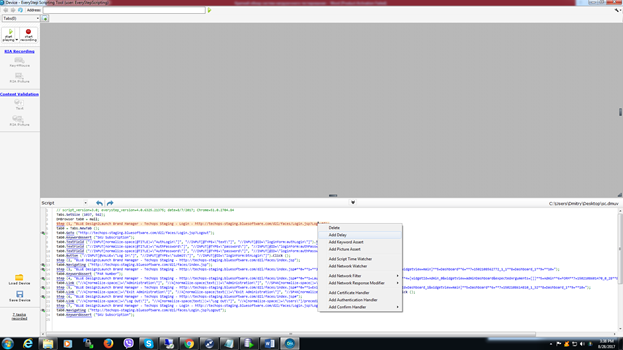
This one is a web application. Everything it requires is a browser and EveryStep Scripting Tool installed. The latter allows to create and execute test scenario and also has basic functionality for editing scenarios. The created test case has the list of designated scenarios, execution plans, geographic zones for virtual machines and their distribution. The tool also gives preliminary evaluation of test execution cost. Test case execution results can be analyzed in the reporting tool.

Loadtests systems overview 2 — Load Test Systems OverviewLoadtests systems overview 3 — Load Test Systems OverviewLoadtests systems overview 4 — Load Test Systems Overview

Summary

We can conclude that there is a clear tendency towards utilizing web-applications and cloud services for load testing. This allows a more precise emulation of geographically distributed load. At the same time Dotcom-monitor LoadView functionality is not as rich as in traditional systems. The load test expenses should be calculated for every case, since they vary a lot depending on the planned test execution frequency and test complexity.

Have a similar problem?

Tell us about it. We’ll reply within one business day with next steps.